
Solana is a "new" blockchain that is growing very fast because of the high ethereum fees. I have been using Solana for some time now, and the recent $COPE airdrop brought many users into the Solana ecosystem. In this post i will teach you how to easily create a Solana wallet and how to add custom tokens on it, by doing this you will be able to easily receive and trade future coin airdrops on this ecosystem.
Sollet.io
In my opinion, sollet is the best and easier private wallet that you can use on the solana network. Lets see how to create a wallet.
First, simply go to sollet.io . You will be presented with the option to import an old wallet or to create a new one. Obviously we will go with the second choice.
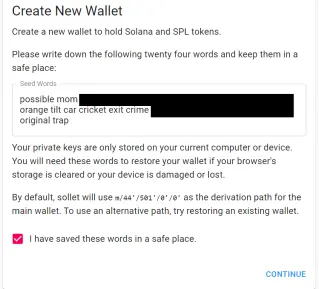
Make sure to write the seed words in a safe place, click on the checkbox and press "continue". After that, you will be asked to choose your wallet password.
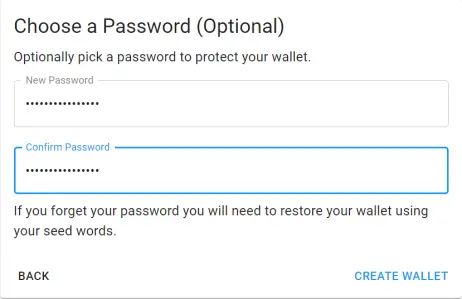
Choose a strong password, make sure you can remember it and click on "create wallet".
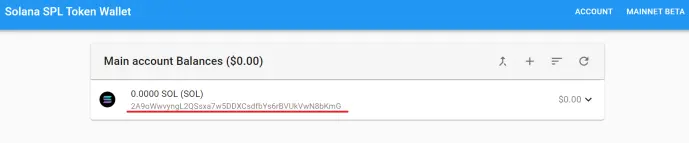
Congratulations, now you have created a solana wallet and are ready to trade on the solana ecosystem. The strange string of letters and numbers than i underlined in red is your public wallet address, it is what you will use to receive deposits.
Lets now see one of the most important and necessary features that you need to learn how to use:
Add Custom Tokens
This is also a very simple and intuitive procedure. To start the process you need to click the + button on the top right corner of the wallet.

Some tokens are already under the popular tokens tab, you can also add erc20 tokens by simply inputting the contract address of said token, but what we want to learn is how to add custom tokens.
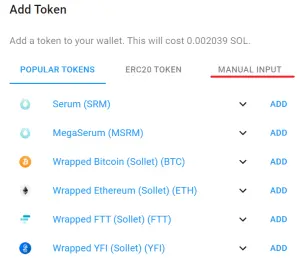
Click on manual input, and you will need to fill the following information.
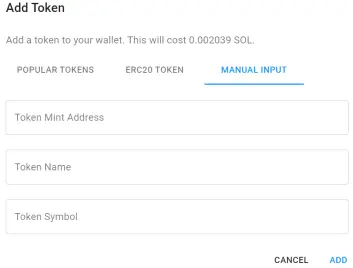
Token mint address, Token name and Token symbol. You can find this on the official channels of the tokens than you are trying to add. Lets check $ROPE, a new token created on the Solana network, we go to their official discord and search for said information.

Now go back to sollet wallet, copy and past the address, the token and the symbol, and click "ADD". This operation will cost you around 0.002 SOL, yes, it is very cheap. Wait a few seconds.......and it is done.
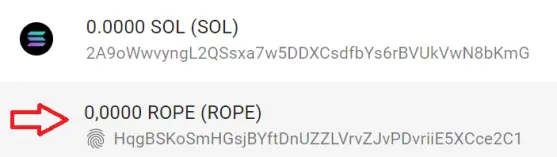
You now know all the basics needed to start trading and collecting airdrops on the solana network, congratulations!






