
You've probably heard of crypto exchanges and digital wallets, but most of them are either combination wallets associated with an exchange or they are coin/network specific wallets. No surprise, while most folks have an ERC-20 compatible wallet for Ethereum type coins, they also probably have some kind of an exchange wallet or cold wallet for bitcoin. There are other choices as well. DASH has an app wallet, and the same goes for Monero, Digibytes, Litecoin and dozens of others. However, if you want to engage in the Worldwide Asset eXchange or WAX network NFT markets, then you're going to need a WAXP compatible wallet to store your funds. A couple of big options exist, with a lot of smaller, lesser-known choices as well. We'll start the most common and then get to the more esoteric choices.
REAL DIGITAL WALLETS

Provided by the WAX Network, the WAX Cloud Wallet is a web-based hot wallet, similar to Metamask. You create the account online, deposit and spend from it online, and you can use it to engage both with WAX Network NFT markets as well as cross-over to HIVE and also engage with De-Fi projects on the WAX Network as well. While the WAX Cloud Wallet is definitely one of the most flexible choices, often chosen by just about everyone as a beginner when they first get into WAXP in general, it is by far the least secure. The basic defense is a simple password. One can amp it up a bit with an MFA feature, that either uses a Authy app, or you get the temporary secondary code email to you to input for entry. However, once cleared, your wallet is essentially open with the Cloud version on anything WAXP related you click on until you log out. And that can be a bit of a nightmare if, for example, you click on a bad link in Discord. Doing so while logged in essentially opens the barn door to your account, and a hack can drain it of WAX coins and all your valuable NFTs in the space of a minute or so. Sometimes even less. This story has repeated itself by the hundreds across Discord forums in particular, but that's not the only place someone get hacked. At a minimum, many argue to have two accounts, one for daily interaction, and one as a safehouse for valuable stuff. That said, if both are the WAX Cloud Wallet, they are only as safe as a login and click.
Ongoing use of WAX for anything serious does have a cost. Selling NFTs on the WAX Network takes RAM, which means the user has to invest some small amount of WAXP to function. For a handful of NFT sales it's not much, but significant selling requires more investment in RAM. Additionally, trying to run transactions when desired can run into high network activity periods. If one invests in CPU, then this is not a problem. However, with only a little or none, one is at the mercy of the network traffic. Typically, it takes about 1,000 WAXP staked to get a somewhat reliable level of functionality in CPU, and even that still has downtimes during high traffic. Fortunately, with WAXP so low right now in value, it's very affordable. Doing so stakes WAXP in the WAX Network and you get a mini-level of earning everyday as well, adding your WAXP balance over time.

The next big player is Anchor. This wallet comes in two forms, a mobile App as well as a web-based wallet portal. To do anything major, you need to be on the web-based side, however, the mobile app is nice because it forces an MFA type secondary confirmation with a QR code scan on every transaction. While it can be an annoyance, the consistent MFA use blocks easy hacks right away and makes things a lot more secure. Anchor works for both the WAXP Network as well as the EOS Network, a similar blockchain. NFTs can be stored on Anchor as well as coin balances. Many folks in the know use a WAX Cloud Wallet for testing the waters and daily engagement, but they use Anchor to protect their good stuff. The security on Anchor is far better and hard to pull off a full wipeout of a victim. The downside of Anchor is that it takes some getting used to. For the first-time user, Anchor can be a bit of a frustrating math problem trying to get everything to work right. If, however, you get past that hurdle, then Anchor has proven itself to be a formidable vault. The second downside of Anchor is cost.
I did add a How-To guide put together by Vyryn of CryptoMonkeys fame here and at the bottom of the article. The video is available on YouTube that goes into step-by-step details how to get started with Anchor.
Anchor is available on iOS Apple, but not as a fully functional wallet. The iOS app is really a mobile authorization app for the wallet instead. However, Anchor does provide a desktop version in addition to it's online portal functionality. Anchor also costs in CPU to run a lot of transactions. So, again, while it's free to get started, heavy use requires CPU costs.
Who in the world names a digital wallet, Wombat? Regardless, it provides a third option for a WAXP wallet, also as an online hot wallet. Wombat is probably one the more versatile WAX-related wallets. It has availability on Chrome as an add-in, can be used as an iOS Apple app, and Android users can get it on Google Play. The wallet also works on multiple blockchains, but I've only tried it for WAXP myself:

Wombat Wallet doesn't have any fees to start up with, unlike the WAX Cloud Wallet, for example. However, if one wants premium features, then you have to pay in to upgrade. Also, Ethereum-based transactions have their own gas fees regardless of using Wombat.
When you use Wombat it's going to feel like its trying to be everything. That's because the tool is taking the approach of being more like an exchange than just a wallet. It works as a gateway to gaming, to NFT exchanges, to multi-coin accounts and deposits, and as a position in the Wombat network. Additionally, there's a strong push to invest in Wombat through its $Wombat coin, a governance staking token. In short, Wombat is a bit like going to Vegas - you wanted to play a slot machine and instead got overwhelmed by everything from glitzy drinks to lion & tiger shows.
I use Trust as a mobile app and it works wonderfully as a Swiss Army Knife decentralized wallet for a lot of tokens and coins. However, it's limited to the BSC and ERC networks when it comes to what it can take. That said, I can confirm Trust does allow for storage of WAX, just not the way you're thinking.
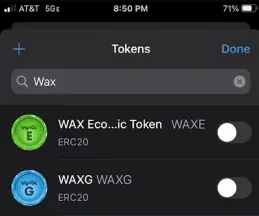
Instead, the normal WAXP you might have has to be converted to WAX E or WAX G. Both of those are "wrapped" version of WAX that functions on the ERC20 network. Once you do that, then the coins can be deposited in a Trust Wallet and stored or used in that capacity. I have no idea how to convert them back, but now that I know this is possible, I'm going to explore it to find out for sure.

This one is one of the more obscure WAXP wallets available. While not solely dedicated to the WAX Network, it does allow storing and transactions in WAXP. It works as a Chrome add-in, and handles about a 100+ other blockchain coins as well. It comes across more like a mobile app exchange or web portal swap than a full tool or wallet, but I haven't used it personally, so I can't speak to the details.
Metamask is out of luck. What? Seriously?!?
I'm really surprised by this one as Metamask has been a long-standing option for a web-based decentralized wallet with solid staying power and functionality. It operates as a Chrome add-in as well as a web-based platform. Metamask also provides a mobile app on both iOS as well Android platforms. It handles ERC-20, BSC/Binance, and even Polygon/Matic. However, when it comes to WAXP, Metamask is non-functional. It simply doesn't have the network connection to take the token or do anything with it. When they do, however, Metamask could be one of the biggest multi-network wallet to use for lots of folks.
EXCHANGE "WALLETS"
Binance (U.S. & International)
Binance was handling WAXP for a while on its international platform, and it just began handling WAXP on its U.S. version as well a few months ago. This one I use on a regular basis when I want to move my WAXP from grinding earnings and then convert it to another coin. Binance is particularly useful as an exchange because it handles all the big coins, runs trades with both swap and limits, and you can take advantage of WAXP's current stability to jump on bigger name coins suffering volatility. I usually use Binance as a holding tank for WAXP I build up from grinding, wait for LTC or ETH to dip, and then grab the lower price point to WAXP for gains. It's a two-step process, changing WAXP to USDT and then to the coin of choice. Binance provide a direct connection to the WAX network, so its easy to deposit small amounts, build up over time, and then withdraw back into a WAX Cloud Wallet for action. The one thing to remember though is that the Binance exchange account is centralized. Like Coinbase, it can flop at any time and, like Celsius, one's funds can then become compromised without any chance of removing them. So, i don't carry a big balance. Once I get up to $100 on Binance, I then transfer the destination coin out to a decentralized wallet I control to avoid the Celsius thing all over again.
Binance is also good for swapping other coins into WAXP and then shifting them to your Cloud Wallet for activity or paying other parties. Binance works on both mobile apps as well as a web portal, and the platform is fairly robust.
Kucoin
Probably one of the most extensive exchanges available, this exchange handles WAXP along with hundreds of other tokens and coins. While it's quite easy to deposit into Kucoin, the WAXP fees are darn expensive to withdraw back out. The one time I did cost me 30 WAX to do a simple one-time withdrawal. I've never used Kucoin since as a result. However, Kucoin does not require KYC except for really big whale accounts.
CoinEx
Another exchange, this one has been a big one for WAX users who move other coins in, swap them for WAX, and then move them to a Cloud wallet for use. CoinEx's big advantage is that it also doesn't require KYC. It's primarily useful as an exchange app, but CoinEx is also functional as a web platform as well. Like all exchanges, transactions have fees, but CoinEx is probably the lowest cost in fees compared to all the other exchange I've used. It's also centralized, so whatever you leave in the exchange account could be locked up without warning at any time. I lost $5 of LUNA that way with CoinEx when that coin collapsed. Never got it back after the replacement LUNC.
Crypto.com
Another of the robust exchanges that handle WAXP is Crypto.com. I've never used it myself, already full enough with four other exchanges I work with. Supposedly, it does handle WAXP though. Just remember, Crypto.com is also a centralized exchange. Don't leave anything big there you don't want to lose.
And, finally, a big thanks to Floorboat from Cryptomonkeys for this article idea. I was stuck in a writing rut when he suggested this topic last night, and that's all it took for me to be off to the races. Cheers!






