
In the previous article we saw how to use the BPow Client on Raspberry Pi4, but we can also use https://bananominer.com/ to earn extra $BAN.
What is Banano Miner?
With Banano Miner, instead of running arbitrary calculations to "mine" a cryptocurrency, your computer runs protein fold simulations through Folding@Home to help scientists around the world fight diseases such as Alzheimers, Cancer, Parkinson's. As a result of your contribution, you get rewarded in Banano.
What is Banano?
BANANO is an instant, feeless, rich in potassium cryptocurrency. It has had an ongoing free and fair distribution since April 1st, 2018.
Running Folding@Home client on RaspberryPi4
Requirements
- Raspberry Pi4
- Ubuntu 20.4
- Banano Address (Most common are https://kalium.banano.cc/ or https://vault.banano.cc/)
Download & Install F@H
You can find the latest versions for Ubuntu https://download.foldingathome.org/releases/public/release/fahclient/debian-stable-arm64/
We'll use the latest.deb
Create a folder in your home: ~/FoldingBananos/mkdir ~/FoldingBananos/
cd ~/FoldingBananos/
Download latest.deb
Install F@H
sudo dpkg -i --force-depends latest.deb
Configure
UserID: get from https://bananominer.com/ (f.e. o2gtmta8gvw4)
TeamID: get from https://bananominer.com/ (f.e. 234980)
Passkey: (you can request it here)
The configurations will be saved here: /etc/fahclient/config.xml
<config> <!-- Folding Slot Configuration --> <cause v='CANCER'/> <gpu v='false'/>
<!-- Slot Control --> <power v='FULL'/>
<!-- User Information --> <team v='234980'/> <user v='o2gtmta8gvw4'/>
<!-- Folding Slots --> <slot id='0' type='CPU'/>
</config>
Service - Start/Stop/Status
sudo /etc/init.d/FAHClient stopsudo /etc/init.d/FAHClient statussudo /etc/init.d/FAHClient start
Send Commands to FAHClient
FAHClient --configure
FAHClient --send-command "simulation-info 0"
FAHClient --send-command ppd
FAHClient --send-command pause
FAHClient --send-command unpause
Access WebView from other computers
Add to the configuration the IP addresses you want to reach the server from:
<!-- HTTP Server -->
    <allow v='192.168.0.1/24'/>
    <web-allow v='192.168.0.1/24'/>
After that you should be allowed to reach the WebView
That's it!
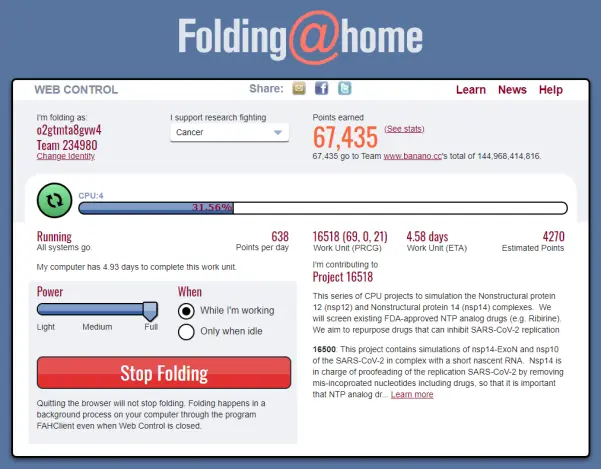
Your webview should look something like this:
You can see how your results via API calls:
https://bananominer.com/user_name/o2gtmta8gvw4
https://stats.foldingathome.org/api/donor/o2gtmta8gvw4
https://stats.foldingathome.org/donor/o2gtmta8gvw4
The current formula to get $BAN from folding:
2.2 * ( PPD / 2) ^ 0.44
My Banano Address: ban_3b3bqj9m89a5qoxkmjbmom3rhp171irr39tcbd1opwn7rm5g5jk3e5n9sd44 , feel free to add me to your contact list :)






