As part of my project to turn my Old computer into a miner, I have had to explore a number of options for the mining software to run my DIY miner.
I had originally hoped to use Claymore on Linux to run the miner as the old girl already had a Linux operating system installed and working fine. However, as is oft the case with Linux software, I ran into issues trying to get Claymore up and running. Various drivers that were not automatically identified, missing dependencies, and on and on and on.
This caused me to investigate Linux distributions that were designed to be used for mining. I found and tested a number of options, including NiceHash OS which I will review in a separate post, but ended up settling in on MinerStat OS.
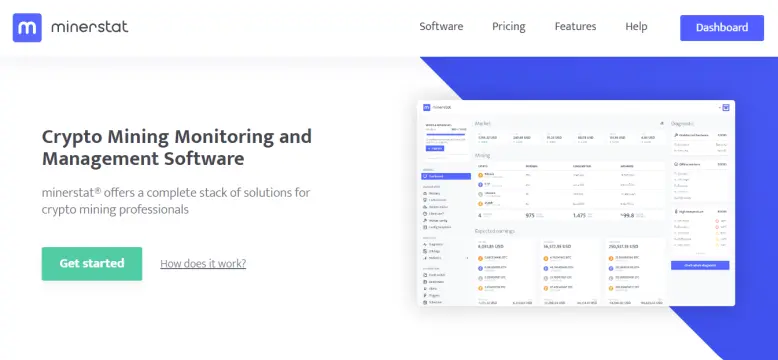
Pricing
Certainly one factored I appreciated is that MinerStat OS is free for a single rig (with up to 16 GPU). If you want to use MinerStat for your whole network of miners it costs a very reasonable $2/rig/month (again, each rig can have as many as 16 GPU). Discounts are available for longer term contracts. I only have the 1 rig, if you want to call her that, so the free version is all I needed.
Installation
First you will need to sign up for an account. This is very easy, just follow the steps.
Next you need to install the software. One of the things I like about Minerstat OS is that it can be installed as a bootable USB drive. First you download the OS as an IMG file to your hard drive. Then using a USB Flash tool (I used a free tool called Rufus) you create a bootable USB thumbdrive installation of the entire operating system(it needs to be an 8+ GB drive, I used a freebie I got at a trade show, bonus!)
After you have flashed the IMG file to your thumbdrive you need to edit the configuration file. This can be done with a simple text editor such as Notepad. Instructions for this are on their website and I recommend you follow those. It was very easy.
Once the USB drive is ready you put the USB into your computer, and boot it up. If your computer is configured to boot from the USB drive before the hard drive (instructions for your computer can be found on the web) in about 2 minutes your miner will be up and running. MinerStatOS comes with all the available miners and GPU drivers preinstalled. It is plug and play at this point. It spends about 2 minutes "auto-tuning" your rig for optimum performance and after that you are off and mining.
MinerOS Web Interface
You can now monitor and adjust your monitoring rig (or network of rigs) on any computer via the MinerOS website (they even have a good app so you can monitor with your cell phone!) The main reason I ended up sticking with MinerStat is how well designed the web interface is. It is very easy to use and yet has an amazing degree of flexibility built into it.
You can easily check on the status of your network of rigs with the mining dashboard.
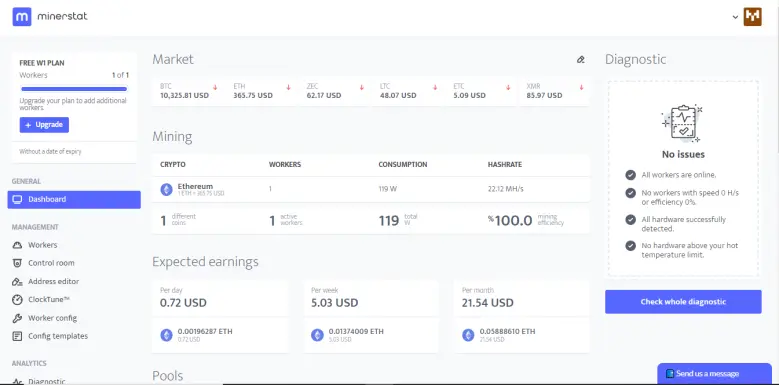
You can quickly see the status of your entire mining operation in a glance. Which rigs are up, which are down, are any having temperature problems, and oh yeah, an estimate of how much you are earning.
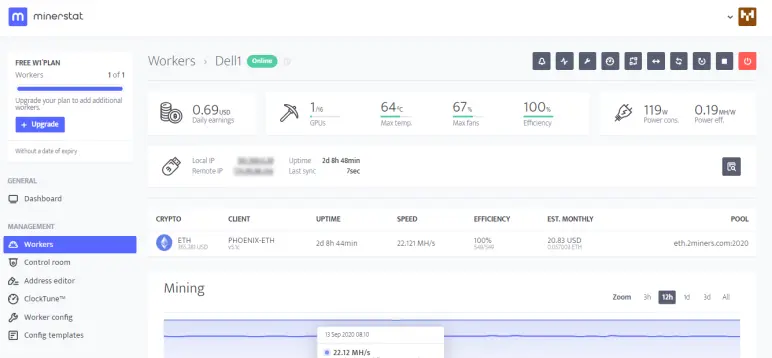
From there you can drill down and check on each rig. Here is the screen for my old Dell. You can quickly see the current temperature, GPU power consumption, hashrate, and estimated earnings.
Going into their statistics page you can check on a how your hash rate had been over various time periods, as well as the variability of the estimated earnings.
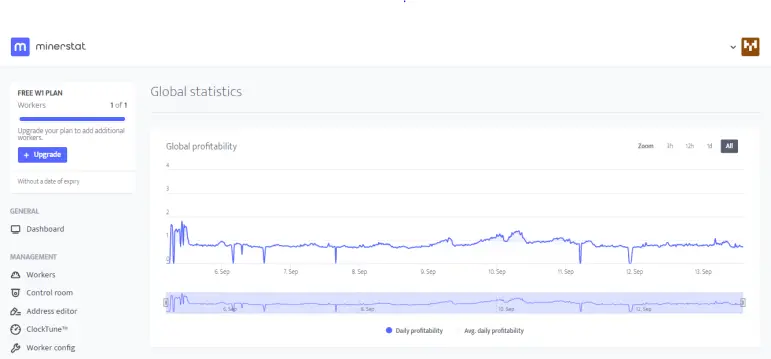
This is the chart of the estimated profitability of my old dell since I fired her up a week or so ago. Most of those dips to 0 were from when I was messing with Overclocking. That is a fine tuning I still need to work on.
Note Worthy Features
Minerstat OS really is a power packed mining system which could be used for a single rig like mine or a full scale mining operation. Features I should point out include -
- Built in mining software for nearly all the major miners (including NiceHash surprisingly)
- Support for pooled or solo mining
- AMD and NVIDIA compatibility (you can't mix on a single rig, but you can in your network)
- Automated switching to the most profitable mining coins and pools for your setup
- Automated-overclocking (I bit conservative in application)
- Manual overclocking (if you want to be more aggressive than the auto-tune)
Conclusion
Minerstat OS is a great option for either amateur miners or professional miners. The software is easy enough to use for the beginner and yet powerful enough for even the most either a single rig or a whole network of rigs.
A wise sage wandering in the crazy crypto world handing out free advice that may or may not be worth the price.
Want free crypto? Check out my top free crypto sources -
PipeFlair - Earn three different crypto coins every day with this great faucet.
Brave Browser - A web browser that lets you earn free crypto when you surf the web
Presearch - Earn free crypto every time you search the web
DualMine - Get your own free Bitcoin cloud miner
EarnCrypto - Earn free crypto just for playing games on your phone





