
TABLE OF CONTENT
- Abstract
- Introduction
- Implication of the integration of Dogechain on Icecreamswap DEX
- A brief information about Dogechain
- How to Swap tokens on Dogechain using the IcecreamSwap DEX
- How to bridge from Bitgertchain or Binance smart chain to Dogechain
- How to Bridge from Dogechain to either Bitgert (Brc-20) or Binance smart chain (Bep-20).
ABSTRACT
Icecreamswap the first DEX on Bitgertchain (Brc-20) has been living up to its expectations just like the parent chain (Bitgertchain), hitting each stage of its roadmap so well. The Icecreamswap team are trilled to announce the latest development on Icecreamswap Dex.
Guess what…. A new Chain integration!!. WoW more icecream for all…
INTRODUCTION
In Accordance with the Icecreamswap Roadmap for September 2022, a new chain has been integrated on the Icecreamswap Dex.
Icecreamswap has integrated into their DEX a chain that is unique, renowned, fast, secured and reliable just like their parent chain Bitgertchain. With this latest development, Users of Icecreamswap Dex can now Swap or Bridge tokens between Bitgertchain, Binance smart chain and the newly added
chain, can you guess the new chain??.
Which chain is Integrated on icecreamswap Dex??
DOGECHAIN, hell yes!!!. The great Dogechain has been integrated into the Icecreamswap Dex.
The Bitgertchain ecosystem has just taken a great leap into the future, all thanks to IcecreamSwap, the best Dex on Bitgertchain (Brc-20).
IMPLICATION OF THE INTEGRATION OF DOGECHAIN ON ICECREAMSWAP DEX.

This great portal opened by Icecreamswap, will lead to more partnerships between the projects on the Bitgertchain ecosystem and that of the Dogechain ecosystem.
This means that the $ICE token will be taking a new bull-trend, therefore welcome onboard for the ride to the moon.
A BRIEF INFORMATION ABOUT DOGECHAIN.
Dogechain is a blockchain that’s built on Polygon Edge, it uses the Proof-of-Stake model (PoS). The Dogechain framework and SDK allow developers to build and host decentralized applications (Dapps), create tokens and mint NFTs while using Dogecoin as gas fee.
These unique features of the Dogechain enables its users to interact with the Doge network and also to port over Dogecoin which it uses for its activities.
In essence, Dogechain wants to add more use-case to the $DOGE community thereby unlocking new untapped potentials.
NB: it’s VERY important to state that Dogechain is not Dogecoin chain nor is Dogechain an expansion of the Dogecoin project.
Rather, Dogechain is a project that is creating more utility/usecase for the $Doge community, moving it beyond just simple transactions memecoin to a smart contract based token.
The Dogechain team believes that giving Dogecoin holders access to advanced functionality while using their $Doge will help expose many casual holders of the $Doge to the greater world of Web3 (Introducing them to the great potentials of smart contracts and all the different dimensions made possible by programmable tokens).
HOW TO SWAP TOKENS ON DOGECHAIN USING THE ICECREAMSWAP DEX:
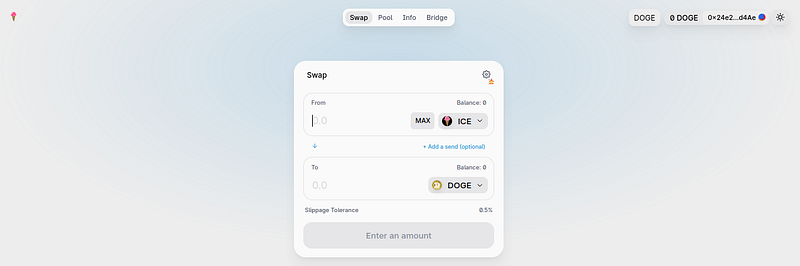
Icecreamswap Dex UI/UX has made swapping as easy as ABC, the following steps explain in detail how to swap tokens on Dogechain while using Icecreamswap Dex:
i. First of you need to add the Dogechain network to your wallet (Preferably Metamask), use the configuration below to set it up:
Configuration:
Network Name: DogeChain
Network URL: https://rpc01-sg.dogechain.dog
Chain ID: 2000
Currency Symbol: wDOGE
Block Explorer URL: https://explorer.dogechain.dog
ii. Go to Icecreamswap website: https://icecreamswap.com/, then navigate to Swap.
iii. Change your Metamask network to Dogechain network (Described above).
iv. Click on “Connect wallet” button and connect your Metamask wallet.
v. Select the tokens you want to swap and click on the Swap button, follow the metamask pop-ups to approve your transaction.
vi. Go to your wallet and check the newly swapped token, if not visible then you have to import the token to your wallet using the token address.
NB: you can also confirm your transaction by scanning your wallet on the Dogechain explorer.
Currently, the swap supports few tokens like $ICE, $USDT, $USDC, $BNB, $DOGE, $ETH, $SHIB, $ATL, $DAI, $YODE, $LUNG….more tokens will be added with subsequent partnerships.
HOW TO BRIDGE TOKENS FROM BITGERTCHAIN OR BINANCE SMART CHAIN TO DOGECHAIN:
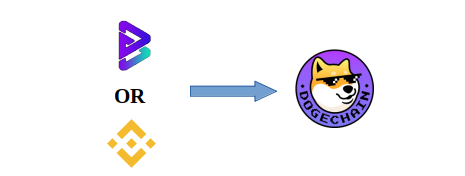
i. Go to Icecreamswap website bridge page: https://icecreamswap.com/.
ii. Change your Metamask network to either Bitgertchain network or Binance network (Described in our previous article)
iii. Click on “Connect wallet” button and connect your Metamask wallet
Depending on network your metamask is on ( Bitgertchain network or Binance chain network), the Home network will be locked as Bitgert or Binance smart chain, while you will have to select destination network to be Dogechain.
NB: once metamask is connected to the bridge the Destination Address will be filled with the your metamask wallet address, this can be changed to another address of your choice by toggling the “I want to send funds to my address” Box below.
iv. Select the Token you want to bridge (From the list of the Tokens, more tokens will be added soon..) and then input the amount of tokens you want to Bridge.
v. Click the “Transfer” Button below and follow the metamask pop-up instructions to approve your transaction
NB: Depending on the network you are bridging from, make sure to have some $Brise or BNB for gas fee
vi. Once the bridging is complete, you can either go to Dogechainscan or Brisescan (if you bridged from Bitgertchain) or Bscscan (if you bridged from Binance smart chain) to scan your wallet address, this will show the bridged token.
HOW TO BRIDGE TOKENS FROM DOGECHAIN TO EITHER BITGERTCHAIN OR BINANCE SMART CHAIN:
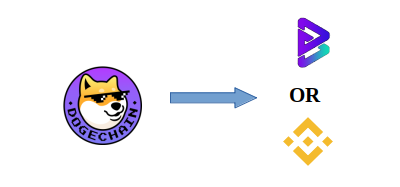
i. Go to Icecreamswap website bridge page: https://icecreamswap.com/
ii. Change your Metamask network to Dogechain (Described above).
iii. Click on “Connect wallet” button and connect your Metamask wallet.
Since your metamask is on Dogechain network, the Home network will be locked as Dogechain, while the destination network will be Any network (currently Bitgertchain or Binance Smart chain, more chains will be added soon…)
NB: once metamask is connected to the bridge the Destination Address will be filled with the your metamask wallet address, this can be changed to another address of your choice by toggling the “I want to send funds to my address” Box below.
iv. Select the Token you want to bridge (From the list of the tokens, more will be added soon..) and then input the amount of token you want to Bridge.
v. Click the “Transfer” Button below and follow the metamask pop-up instructions to approve your transaction.
NB: Make sure to have some $Doge for gas fee
vi. Once the the bridging is complete you can go to either Dogechainscan or Brisescan (if you bridged to Bitgertchain) or Bscscan (if you bridged to Binance smart chain) to scan your wallet address, this will show the bridged token.
CONCLUSION:
With the integration of Dogechain into Icecreamswap Dex, users as well as projects on both Bitgertchain and Dogechain can now partner with each other, this will create more opportunities for both communities.
Icecreamswap Dex remains the best Dex on the Bitgertchain (BRC-20) and the integration of a new chain was part of the icecreamSwap road map, more chains will be added soon according to the road map.
Stay tuned….
Useful links
Website: https://icecreamswap.com/
Telegram: https://t.me/Icecreamswap_com
Twitter: https://twitter.com/icecream_swap
Discord: https://discord.com/invite/dVZm67rt4S
Bitgert website: https://bitgert.com/
official medium: https://icecream-swap.medium.com/
Brisescan: $Ice
Nomics: $Ice
Dogechain website: https://dogechain.dog/
Dogechain scan: https://explorer.dogechain.dog/
Icecreamswap Team publications @ 2022
“HAPPY BRIDGING AND SWAPPING PEOPLE”






