
An atom is arguably the smallest constituent of matter which combines to form molecules - a compound, and then these molecules combine to birth a pure substance.
Little wonder then, why the Atomic wallet is the smallest in the planet - in size. It is, like an atom, the simplest yet unbreakable form of what a wallet should be.
This "compound" review addresses all its "elements" and how they combine to yield one of the purest wallets in the cryptospace.
Curious to know if this wallet holds true to its name, I decided to run a quick check on the amount of storage each of the wallets in my mobile device requires to run. Here are the results;
- Argent: 72.55MB
- Atomic Wallet: 15.68MB ✓✓✓
- Bool Wallet: 77.02MB
- Bundle: 67.71MB
- Electroneum: 35.92MB
- Lynx Wallet: 114MB
- Tron Wallet: 108MB
- Trust Wallet: 90.18MB
- Vite Wallet: 62.63MB
- Wombat: 112MB
To include exchange wallets,
- Binance: 148MB
- Huobi Pro: 101MB
The above data is a summation of App size, User Data and Cache. It can be seen that the Atomic wallet maintained the smallest size amongst all other wallets. This wallet is truly an Atom!😅
So what is the Atomic Wallet?
Before diving specifically into what the atomic wallet is, it is important to have a general idea what a cryptocurrency wallet is.
Traditional wallets hold your notes or coins, whatever nature your fiat currency takes. Cryptocurrency wallets do not hold your cryptocurrency tokens or coins. Those are stored on the blockchain and never leaves there.
Unlike traditional wallets, Basically, A cryptocurrency wallet is a software wallet that acts as a doorway to the tokens or funds on the blockchain by storing addresses and keys (public and private) instead. These prove your ownership to the tokens you have on the blockchain.
The Atomic Wallet is a non-custodial decentralized multi-coin wallet that supports over 40 blockchains and 300+ tokens.
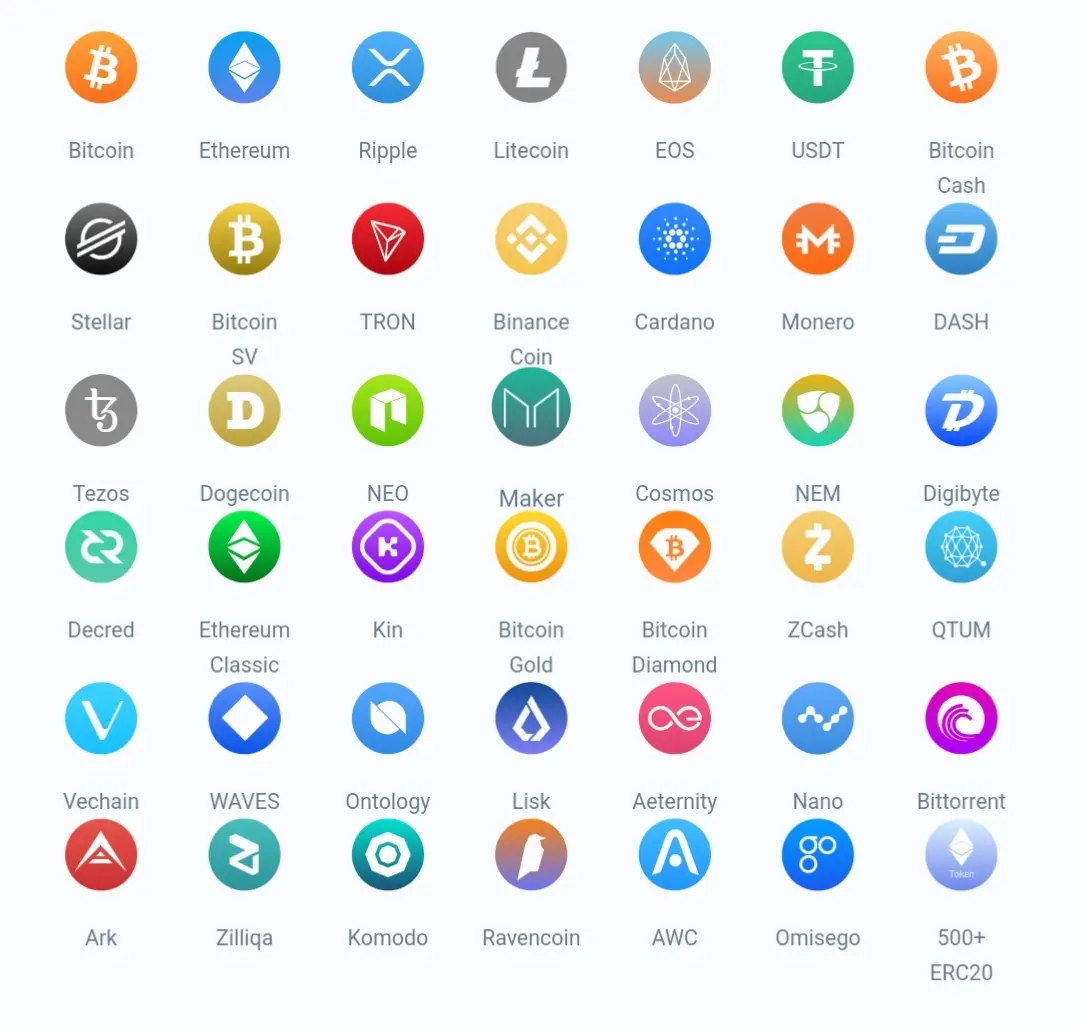
Supported Cryptocurrencies & Tokens
Big words huh?😏
Not really, It simply means that the wallet has no control over your funds (they have no custody of it) and it has no single point of attack.
Remember how I said, keys prove your ownership of funds on the blockchain? Well, there are some wallets who hold back these keys and let you access funds via the combination of usernames or emails with passwords. This is usually done to protect the user from misplacing keys or eliminate the stress of handling those lengthy key texts.
However, this blessing is a curse in disguise. A curse which arises from violating the central theme of the blockchain - decentralisation. Custodial wallets, as they are called, have reportedly been hacked a number of times and other times, they disappear with customer funds. Although not usually reported, such humongous losses sometimes lead to depression or even loss of life of some of the victims.😓
For this reason and also to uphold the theme of decentralization, the Atomic Wallet gives the user full custody of all keys to the Multi-Coin wallet. All keys are encrypted and stored locally within the user's device.
The wallet is not heartless to leave handling all the keys of each coin wallet to the user. Rather, it condenses access to all the wallets into using a password, pin or fingerprint - Your choice. Moreover, it also allows for the 12-Phrase back up, which also do not leave your device and is encrypted within it. This is primarily to restore wallet in cases of a lost device, uninstalled app etcetera.
It is ADVISED that you store your backup phrase in a trusted password manager.
In summary, the Atomic Wallet puts you in charge of ownership of your funds and allows you to directly interact and transact on the blockchain without any third-party having knowledge of your sensitive wallet information.
The Atomic Wallet Mobile App Review
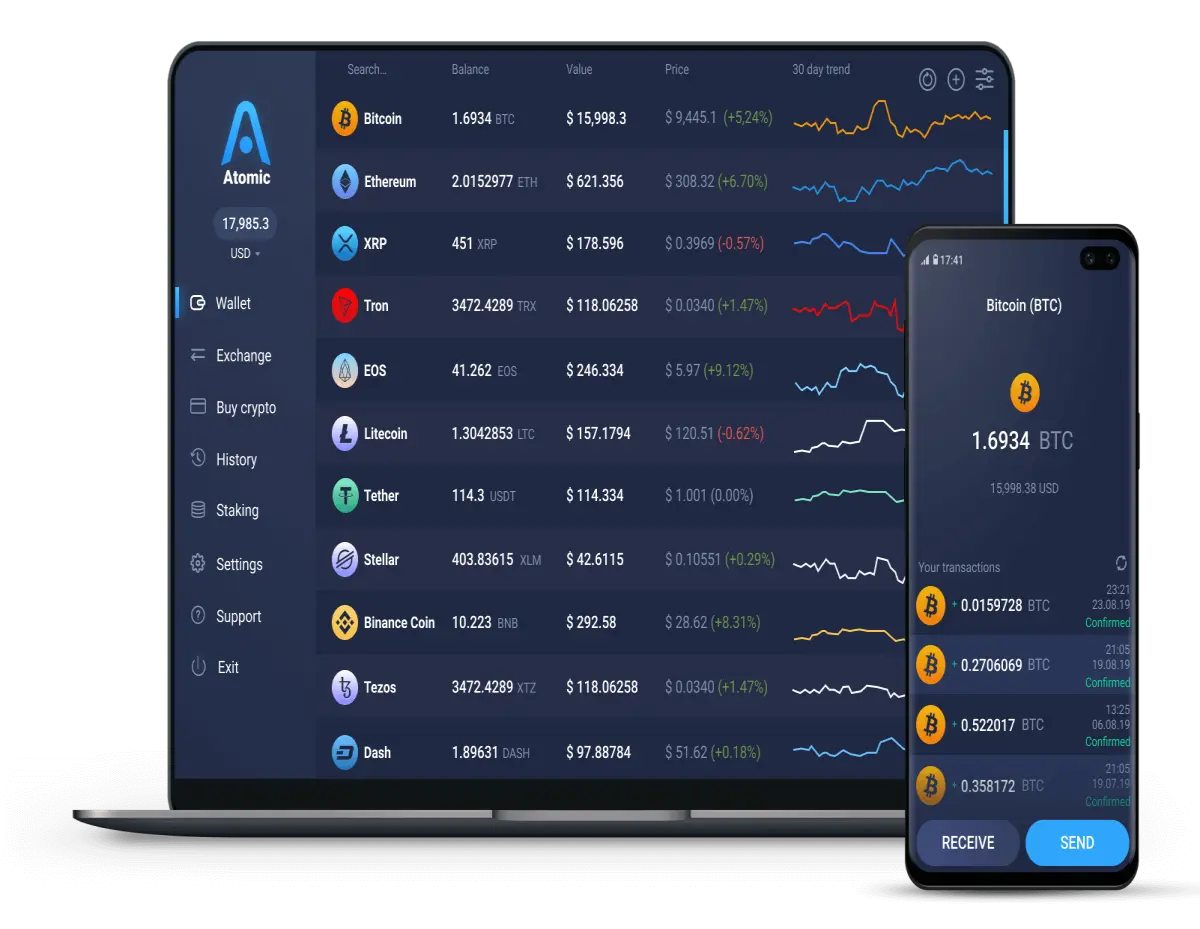
Atomic Wallet on PC & Mobile Device.
If you judge the Atomic Wallet mobile app by its size, you'd be dead wrong. Its atomic size doesn't tell you an inch of all the features compacted into it. In my opinion, I think it contains the minimum number functions a non-custodial decentralized wallet should have.
Wallet Tab
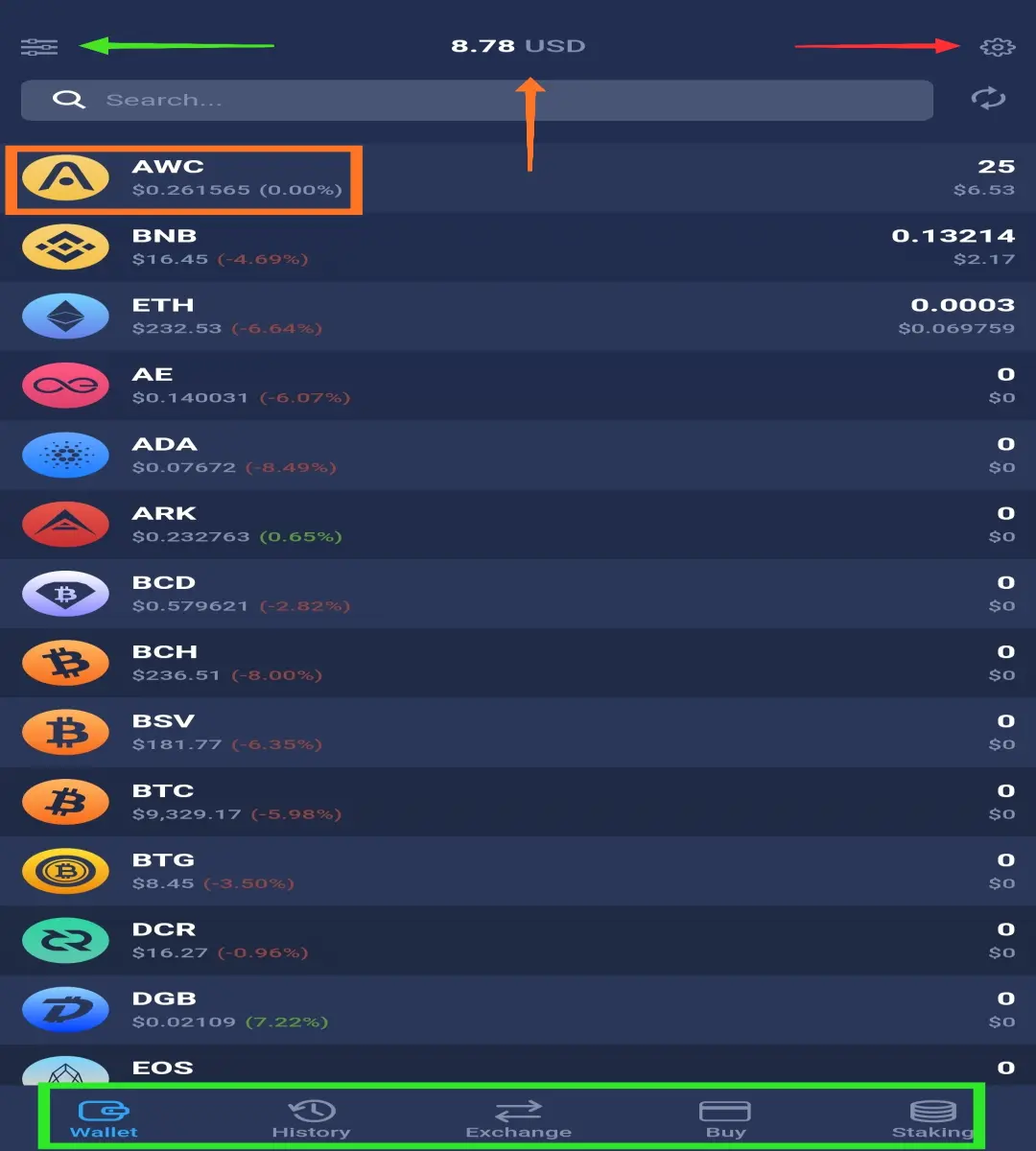
Launching the App, after passing through security, lands the user in the wallets tab - the current tab is signified by the blue coloured Icon stationed at the screen bottom alongside the others. The area is differentiated with a green box in the screenshot above.
The tab holds the balance of every coin in the wallet which is summed up to give the total funds in the wallet as shown by the screenshot above (pointed at by the Orange arrow).
Each coin or token is displayed by its logo and ticker symbol with some information about its current price, 24H change in price, the total number of coins and its value.
Beneath the gear icon which stands for "settings", is the reload icon. If buttons could go bad, the reload or refresh button would surely have been the first to. I can't count how many times I hit that button while waiting for exchanged funds to appear!😂
Filters
On the Atomic wallet App, the user has the choice to modify what is displayed in the wallet tab by "filtering it." The filter section is accessed by tapping on the icon at the green arrowhead end.
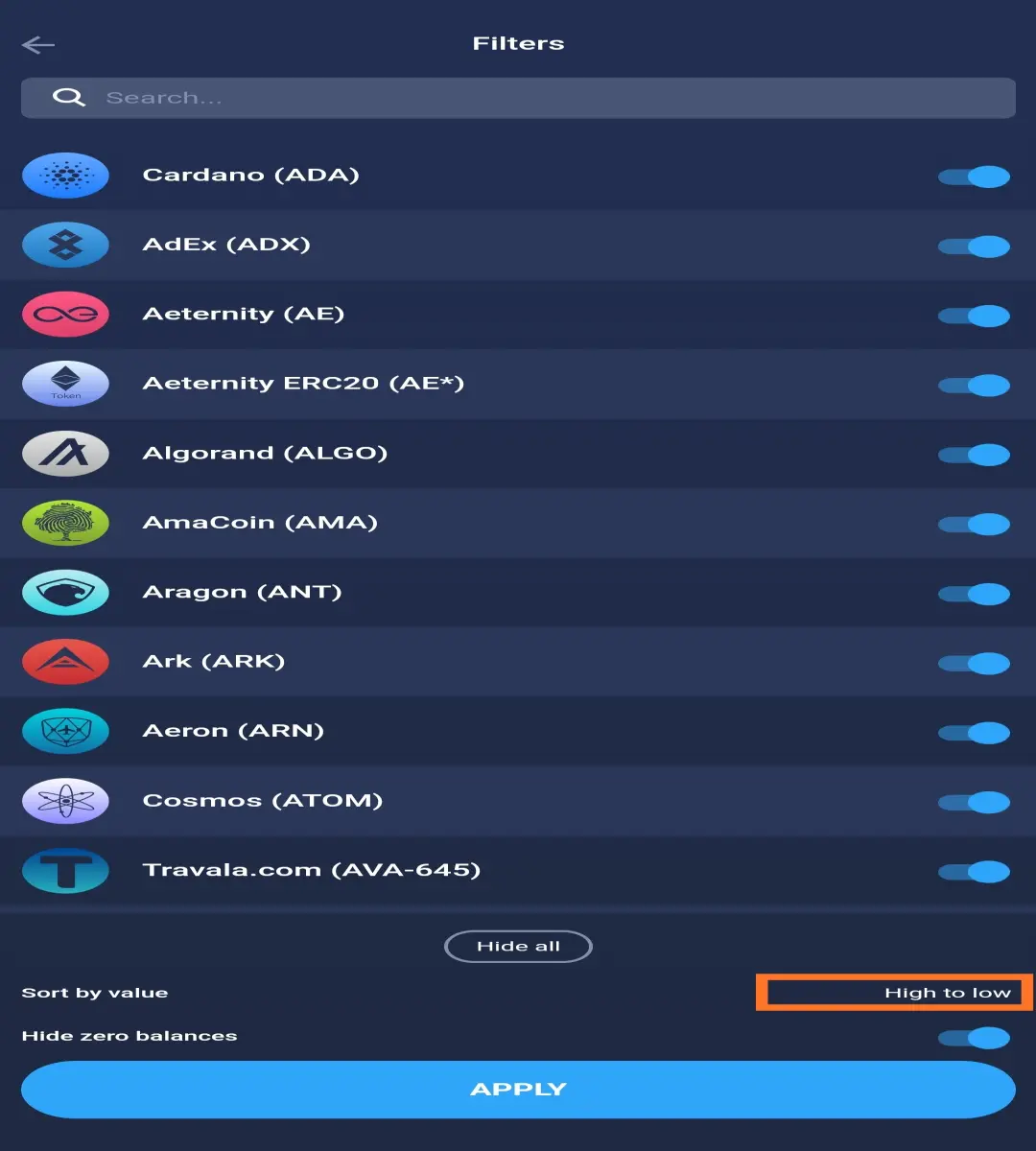
The user can add different filters as he/she deems convenient. The user can choose to hide a single coin (via the toggles on the right) or hide all of them. The user can also sort coins in the wallet tab based on value - High to low or otherwise. Finally, the user can hide zero balances to have a neater view in the wallet tab.
The user should REMEMBER TO HIT THE APPLY BUTTON. Without this, the changes are not implemented.
Settings.
Tapping on the gear icon opens the settings panel. The icon can be found at the top-right of the wallet tab shown by the red arrow in the wallet tab screenshot above.
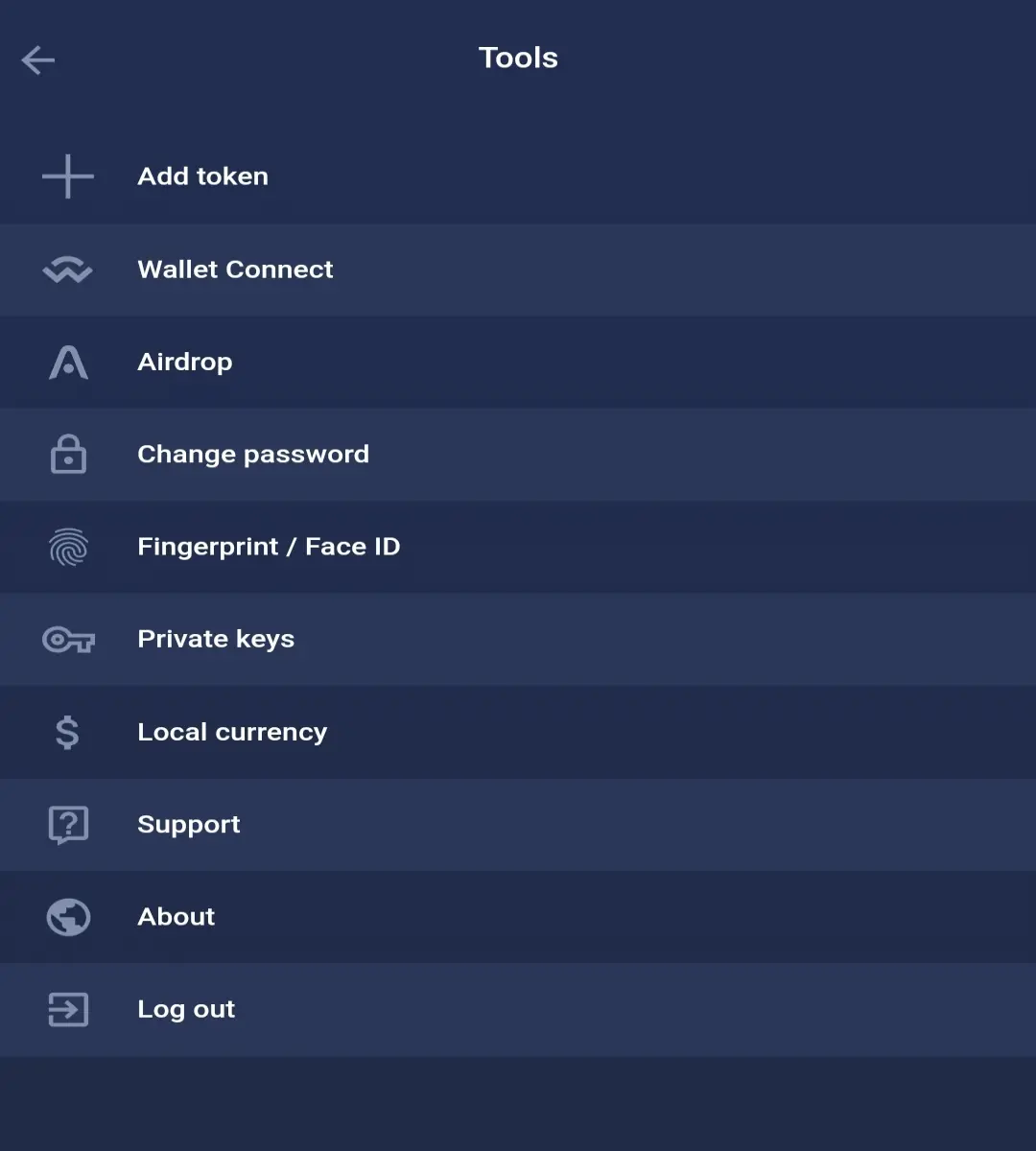
It holds "tools" for improving security - passwords and biometrics, connecting to a Decentralised exchange (DEX) using wallet connect, selecting a local currency as the in-app display currency (sadly, no NGN yet), easily reaching out to support which has been reported to offer almost instant help. Finally, this feature is my favourite, export keys. The user can copy out keys to any of the wallet created within the app. Even trustwallet doesn't give her users this liberty.
This means that EOS account created here can be imported into any other EOS wallet App like lynx or wombat. This is true "non-custodiality". A user having full control over funds and where to access them.
I noticed that an EOS account can not be imported though; I tried and failed.
History Tab
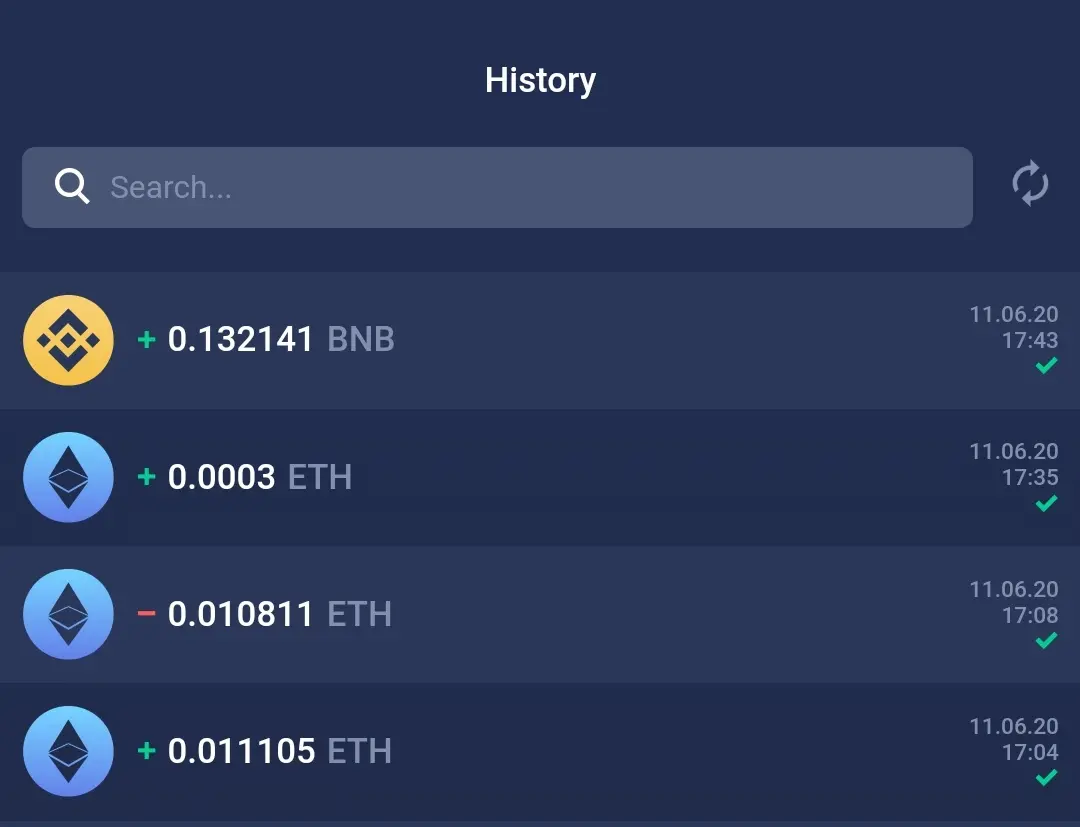
The history tab whose icon is just after the wallet icon in version 0.60.0, holds a record of all incoming and outgoing transactions of the user. A received transaction is indicated by a green "+" icon beside the transaction and a sent transaction is indicated by a red "-" icon. All fulfilled transactions are indicated by a green checkmark as seen below.
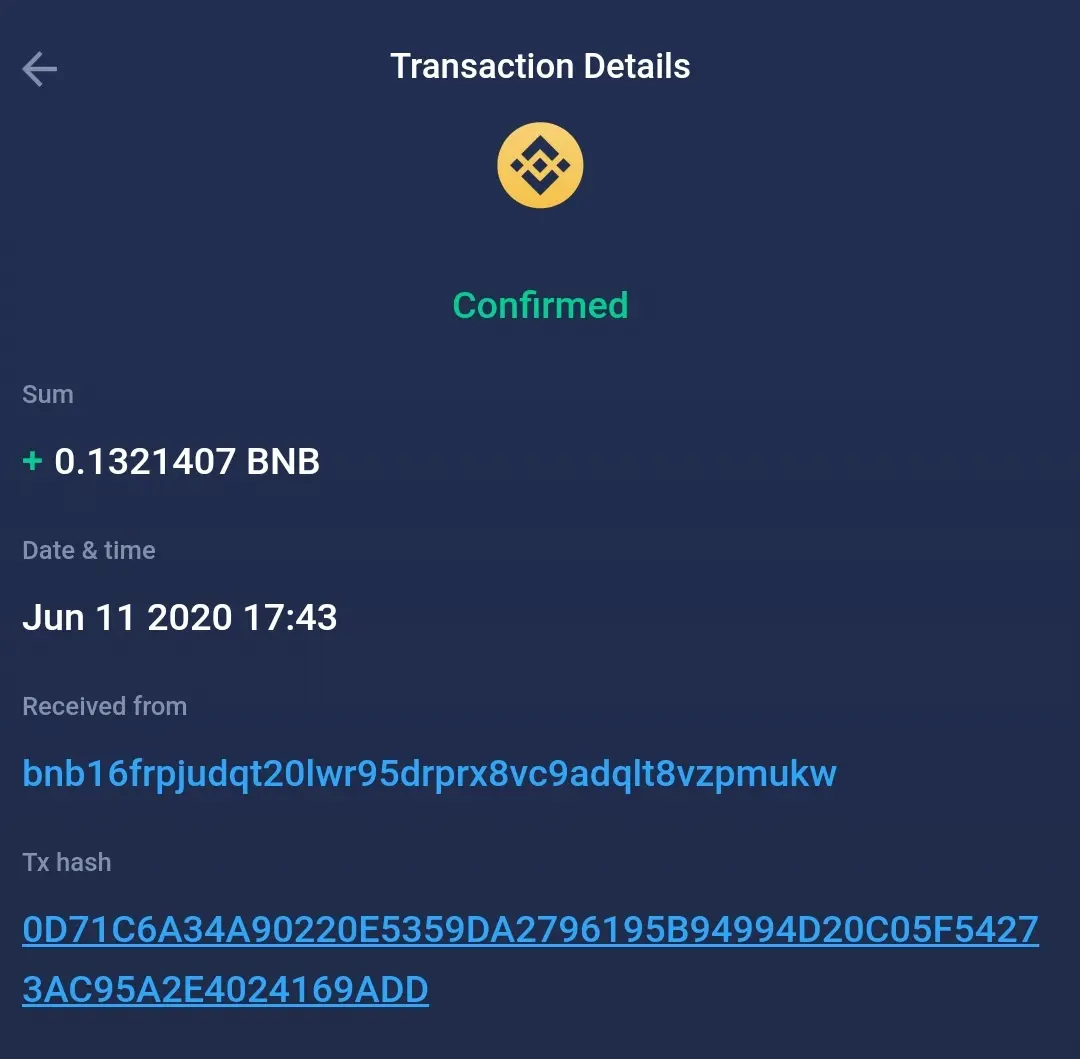
Tapping on each transaction opens the user to more details about the transaction, including the transaction hash, date and time and involved address.
The Exchange Tab.
This tab is held by the transaction arrows icon which holds the middle position amongst the other icons stationed below in the version of the Wallet app mentioned above.
It allows the user swap assets within the wallet without having to go through the stress and cost of withdrawing to an exchange. The interface as shown below is simple and intuitive.
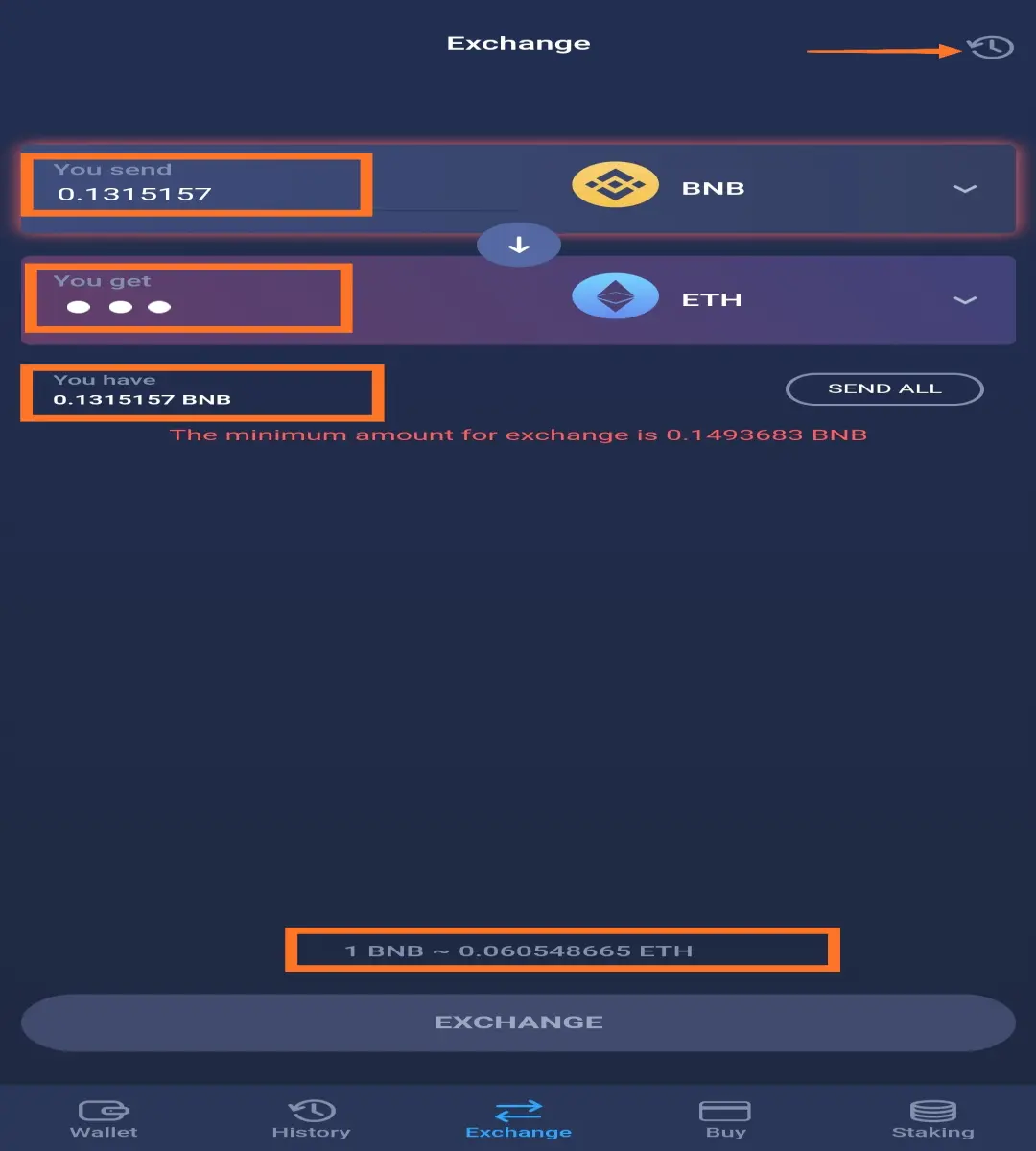
The Cryptocurrency being converted FROM takes the "You Send" input area, while the Cryptocurrency being converted TO takes the "You Get" input area. Actually, the wallet app automatically calculates the number of funds received after the amount to be SENT IN has been inputted.
Your balance and the exchange rate are also shown in the exchange screen. If the number of tokens or coins to be exchanged falls below the minimum, a red shadow appears under the "You Send" box and "the minimum amount for exchange" message is displayed to the user.
Atomic Wallet charges no fees for sending and receiving coins, only the required network fees are deducted from the transaction. The exchange process takes about 5-20 minutes to complete.
It has its own history panel, having a similar icon as the history tab, found at the top right of the exchange screen. Fulfilled and pending transactions can be found there. With this, the user can easily track the stage of the transaction.
It partners with Changelly and ChangeNOW to achieve this operation.
PS: Some pairs are yet to be available.
Atomic Wallet Partners. Source
Buy Crypto
Atomic Wallet lets the user buy crypto with fiat directly within the app. A feature currently being adopted by wallet apps - trustwallet has this feature as well. Both wallets are partners with simplex, a company which makes a crypto purchase with fiat via credit cards feasible.
5% fees (minimum 10USD) is included in the fees using this service.
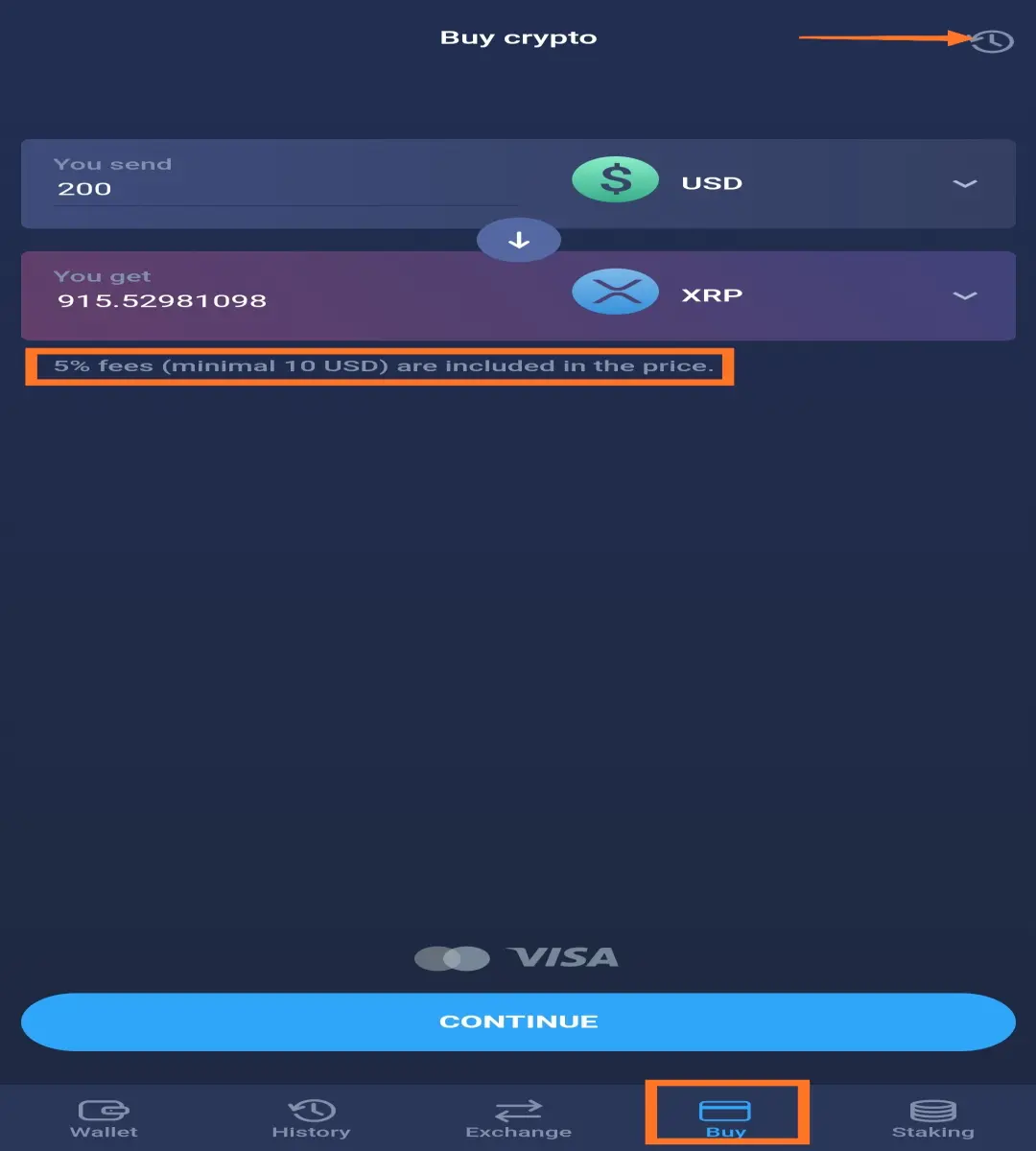
The Buy tab has its history too where transactions can be tracked in real-time. The section is pointed out in the screenshot above.
PS: Some pairs are yet to be available & some, temporarily unavailable at press time.😅 Sounds official to say!
Staking
This is a new trend for wallets. Allowing users to stake directly from within the wallet app.
Wondering what the term staking is? It is simply locking down cryptocurrencies with such consensus protocol to receive rewards while the staked funds help the network operate and stay secure. For a full gist on staking see this article on staking from Binance Academy.
The Atomic Wallet holds several coins with this structure, including her own which has a whopping 20% annual percentage yield (APY). Other coins which can be staked include;
- Cosmos (ATOM) - 10% APY
- Tezos (XTZ) - 7% APY
- Tron (TRX) - 5%
- Ontology(ONT-ONG) - 5.6%
- NEO (NEO-GAS) - 1.4%
- Komodo (KMD) - 5.1%
- Algorand (ALGO) - 5.6%
- Vechain (VET-VTHO) - 1.63%
It is interesting to note the difference in percentage yields across wallets. For trust wallet, Cosmos, Tezos and Tron have 7.16%, 6.09%, and 0.74% APY respectively. Clearly, Atomic Wallet trounces Trustwallet in staking yields hands down.
Atomic wallet via this staking tab, lets users know as well what coins can be held and by what amount to qualify for airdrops.
The Atomic Wallet Coin (AWC)
The coin claims to be the first of its kind - a token issued by a decentralized cryptocurrency wallet. It is not the only one on this ship though. Trust wallet, Lynx are two other wallets with their own issued tokens.
The AWC is designed to have high utility within the platform including the staking already mentioned, services discount, bounty rewards, etcetera.
It had an initial total supply of a 100M on Ethereum blockchain where they were created as ERC20 tokens. 50% of this total supply has been burnt and reissued on the Binance chain as BEP2 tokens. Hence there's a 50M total supply on the Binance Chain and 50M total supply on the Ethereum blockchain.
The token can be traded on Binance DEX and IDEX currently and it is priced at $0.29 at press time.🤭
Read more about the token here.
UseCase || Into the CryptoVerse
The buzz around bitcoin halving caused a lot of search of "bitcoin" as google analytics indicates. It is safe to say that many of those who searched for the new seemingly asset class were deterred from entering the space because of the many hurdles involved buying the asset. From the barriers of KYC to having to buy and store funds at different places.
This high-level entry barrier was what Chris was faced with until he met the Atomic Wallet. The wallet literally atomizes the gap between traditional wallets and crypto-wallets. Making transactions so smooth that the purchasing and holding crypto could be referred to a wallet-to-wallet transaction -W2W.
How? Quite Simple.
From your traditional wallet, the one holding your fiat notes. Pull out your Credit Card, Open the Atomic Wallet, Buy your favourite crypto and hodl in the wallet. Smooth! W2W.
Not to mention the Earning opportunity it presents as well to Chris. Therefore it reduces the barrier and motivates entry into the cryptoverse.
To Conclude, although this wallet is considered "atomic", it is in no way limited in its functions. In fact, one could say that like an atom has several subatomic particles including neutrons, protons, electrons, quarks etcetera that makes it whole, the atomic wallet consists of features that make handling cryptocurrencies delightful. Creating a whole experience, right from lowering the barrier of entry to ensuring "unbreakable" security.
Small as an atom, Strong as an atom, yet a "compound" of convenient cryptocurrency handling features. Truly small but Mighty!💪🏽
Download the Atomic Wallet NOW
For More Information & Resources;
- Atomic Wallet Website
- Atomic Wallet Knowledge Base
- Atomic Wallet Facebook
- Atomic Wallet Twitter
- Atomic Wallet Telegram
Also, Check out these Videos on Atomic Wallet...
Thanks,






