
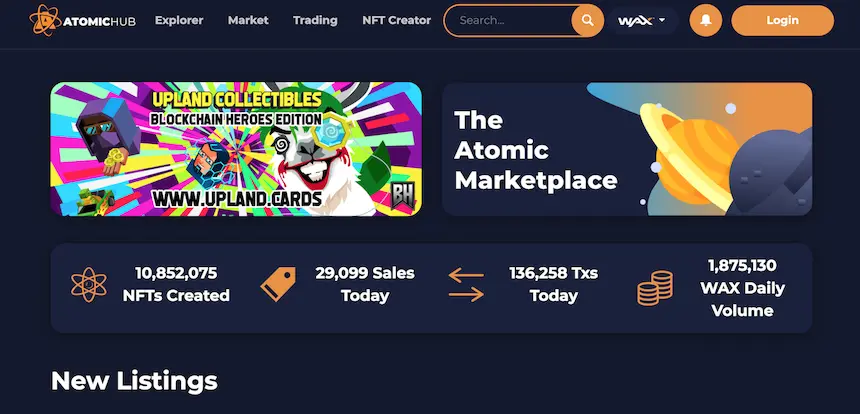
If you have heard or seen NFTs (Non-Fungible Tokens ≠ Fungible Tokens) being sold by famous musicians, athletes or artists, you probably have wondered at some point, if it is possible to create your own.
The short answer is: YES! You can create your own NFTs and sell them.
Do you need to have detailed knowledge of Cryptocurrencies, Blockchains, NFTs and so on? NO, you don't!
It is fairly simple and I will try to guide you through the process, that might be confusing if you are new. But stay with me, you will not want to miss out on this opportunity!
PLEASE NOTE: Do Your Own Research (DYOR) before creating a wallet. Sometimes, certain platforms and coins / tokens are not available due to strict regulations and rules. This might apply to your country as well!
Here is a short list of what you should do first:
1. Create a Wallet. I suggest to sign up with WAX Cloud Wallet (WCW). You can sign up on their official website: https://on.wax.io/wax-io/
2. Once you have created your WCW, you should make sure to buy some WAX. Just follow the instructions shown within your WCW once you click "Buy WAXP". You will need WAX to buy RAM on AtomicHub, which will be explained below in detail. Here you can find out, what else you can do with your WAX (https://medium.com/wax-io/earn-more-wax-introducing-wax-staking-rewards-staking-and-voting-guilds-and-more-c61c4988ed1d).
3. Make sure to have an idea before creating your NFTs. That is - probably - the most crucial part of the process. Your idea should be original. DO NOT - I repeat - DO NOT take existing material from Google Image or someplace else and make it an NFT. Otherwise, you might be infringing copyright, trade mark and many other rules and regulations and eventually violate the Terms of Service of AtomicHub (https://wax.atomichub.io/terms).
4. If you have an idea for your NFT collection, here is a great explanation, how you can create your own NFT on AtomicHub made by CryptoStache (https://www.youtube.com/watch?v=0NmmF9lJBlU). Just follow the instructions in the video.
5. Once you have created your NFT, you are ready to sell them on the AtomicHub Market. However, your NFT might not be recognized by other NFT enthusiasts, as your collection might not be shown to them. This is because you have not been whitelisted by AtomicHub. Click here to find out the requirements: https://wax.atomichub.io/faq.
6. Originality, as mentioned in #3, is also important for the whitelisting procedure. Therefore, make sure to spend some time with brainstorming or any other technique that will help you find some great, original and high quality ideas. If you want to create NFT based on Cryptocurrencies (BTC, BCH, ETH, DOGE, etc.) you might be late to the game, as the market is flooded with those NFT already.
If you followed the steps mentioned above, you are ready to drop your NFTs on AtomicHub!
Step by Step Walkthrough:
1. Write down your WCW address and have it ready! Double check you wrote it 1:1. Otherwise, you might not receive the WAX.
2. Write down your collection's name. Double check here as well!
3. Write down your templates ID. Double check!
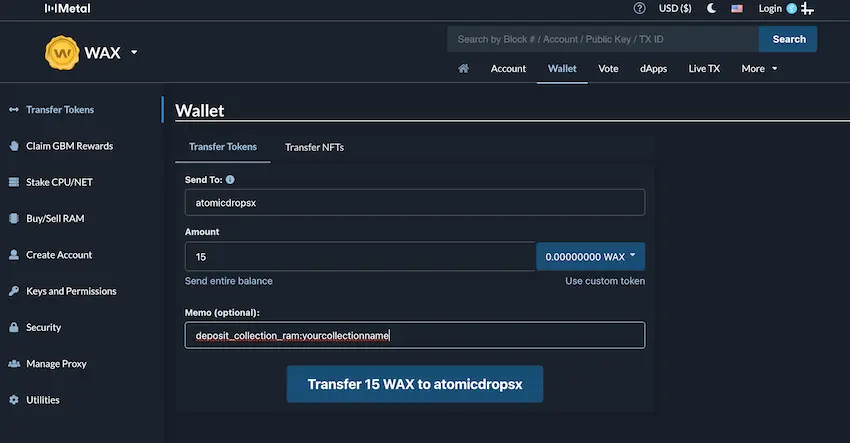
4. As mentioned earlier you will have to buy RAM on AtomicHub, so it can mint and drop your NFTs. Here is how you do it. Go to https://wax.bloks.io/wallet/transfer and login with your WCW. Fill in the mask as shown below.
Sent to: atomicdropsx (Make sure you write it correct!)
Amount: 15 (PLEASE NOTE: This is the amount I suggest to send for starters. There will be no refund. So if you are just playing around and want to experiment a little with your drops, 15 WAX is enough. If you sent more than that and find out that you don't want to stick to NFTs you will not get your money back. However, if you want to stick with dropping NFTs, you will have to buy more RAM in the future by following the same steps again.)
Memo: deposit_collection_ram:yourcollectionname (PLEASE NOTE: This memo is NOT optional. You have to fill that in. REPLACE "yourcollectionname" with the name of your collection.
Click on "Transfer 15 WAX to atomicdropsx".
CONGRATULATIONS! You just bought RAM on AtomicHub!
5. Starting from here, you will be filling out the mask for your drop. In order to do that, you have to click here: https://wax.bloks.io/account/atomicdropsx?loadContract=true&tab=Actions&account=atomicdropsx&scope=atomicdropsx&limit=100&action=createdrop. Make sure that you are logged in.
Also make sure that "createdrop" is selected as action! This is important!
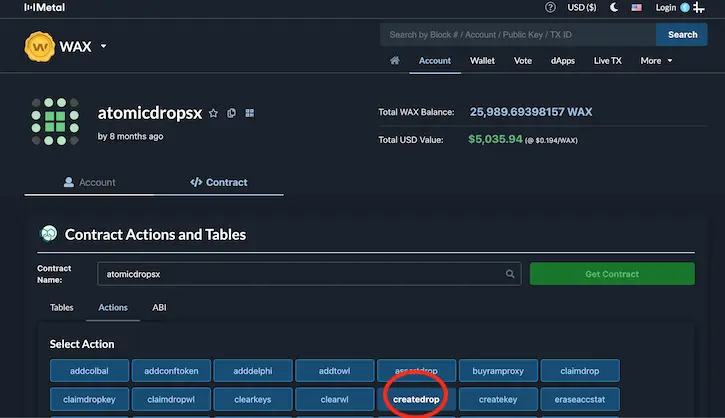
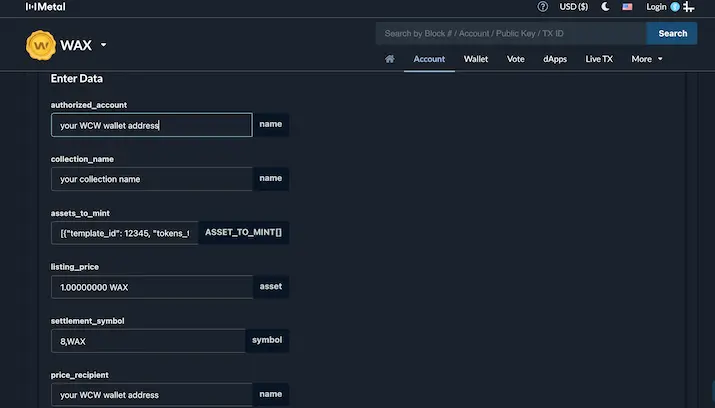
6. Once again, we have to fill out a mask (Part 1):
authorized_account: your own WCW wallet address
collection_name: your own collection name (NOTE: Make sure it is the same collection name, that you bought RAM for in #4!)
assets_to_mint: [{"template_id": 12345, "tokens_to_back": []}] (NOTE: You can copy paste this line. Make sure to replace "12345" with the actual templates ID of your NFT that you want to be dropped on AtomicHub!)
listing_price: If you want to sell your NFT, you have to choose a number followed by 8 decimals and the word WAX. If you want your NFT to be FREE, you have to write 0 NULL.
settlement_symbol: 8,WAX
price_recipient: your own WCW wallet address because you want to receive WAX paid for your NFT by the buyer.
7. Continue filling out the mask (Part 2):
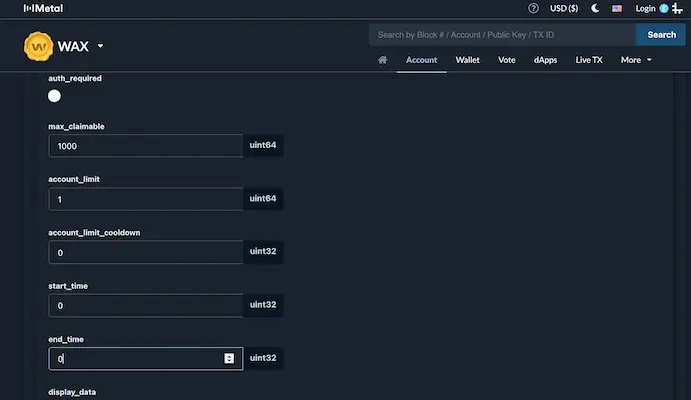
auth_required: don't check it - it's not required and complicates your drop, especially if you are new to NFTs. Later on, if you want certain people only to be able to claim your drops, you can "whitelist" them this way.
max_claimable: you can enter a specific number, however, it cannot be higher as the mint number you chose during the creation of your NFT. If you put a 0, it will be infinite. However, only if your NFT has been created that way.
account_limit: you can enter a specific number you prefer.
account_limit_cooldown: if you choose the account_limit to be higher than 1, then you can decide whether the claiming person has to wait before they can claim again. If you want them to be able to claim the specified amount with one go, put a 0. This is used by the verified accounts that expect many claimers and therefore want as many as possible to have a shot buying their NFTs.
start_time: 0
end_time: 0
--> NOTE: Start and End are calculated in "epoch time" (https://www.epochconverter.com/). If you are new to NFT and are just experimenting with your first drop, I suggest to ignore Start and End by putting a 0.
display_data: to be perfectly honest, I have absolutely no idea what this field does. I have never filled it out. So I suggest, that you leave this one empty.
Click on "Submit Transaction"
CONGRATULATIONS! YOU DID IT!
You will see a small green box popping up, saying: Success - Your action has been successfully pushed, check transaction: Here will be your transaction number displayed. Click on it!
Once you click on it, you will be redirected to a new window where you will see under actions:
- Actions
- Traces
- RAM Deltas
- RAW
- Comments
Now click on "Traces", scroll a bit down and you will find the line: drop_id: 16463
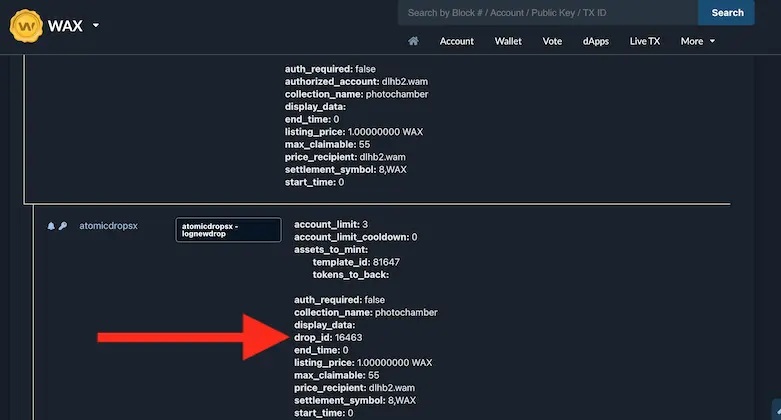
All you gotta do now is, take that drop ID and put it behind the AtomicHub link:
wax.atomichub.io/drops/16463
Now that you have dropped your first NFT on AtomicHub, I want to congratulate you!
If you found this article helpful, please like, comment and spread it!
Have fun creating your NFTs!
Feel free to follow me on TORUM: https://www.torum.com/u/photochamber
Feel free to check out my first NFT drop: http://wax.atomichub.io/drops/16436







