
This article outlines ractices for good user experiences using Truffle, React, Redux, Web3, and MetaMask. Prerequisites: Understanding of React, Redux, and basic blockchain/DApp concepts.
Introduction
Truffle enables developers to create a full-stack application with a blockchain back end. In this example, I’m using Truffle to implement a React and Redux front end, with a blockchain back end.
There are no widely accepted standards pinned down for interacting with Web3 in the browser due to the infancy of the space and the small user base in comparison to overall web users. Here’s an easy way to make sure users have a good experience when using your Ethereum DApp.
Loading the Blockchain
The React Truffle box, by default, attempts to connect to Web3 as soon as the page loads. This stifles user experience if the user isn’t logged onto MetaMask or is configured to a blockchain on which the DApp isn’t deployed.
Proposal: Blockchain ➼ account ➼ interaction
Instead of loading everything at once, I propose the following pattern for loading your DApp: Blockchain ➼ account ➼ interaction. Each step is distinct from the other, with explicit visual feedback for the user.
- Step 1: Load the blockchain
- Step 2: Load the account
- Step 3: Enable interaction
In this example, there’s a single contract and a DApp front end for that contract. Before the user can interact with the contract, they need to connect to the blockchain (I’m using a localhost blockchain here, provided by Ganache).
Several things happened here:
- When the page loads, Web3 is not loaded
- Blockchain — The user clicks “Connect Blockchain” to connect the webpage to their chosen blockchain in MetaMask
- Account — Once loaded, the application provides a second button to connect their wallet
- Interaction — The user is now able to interact with the DApp
Connecting the blockchain

Using Bootstrap, we can give visual feedback to the user as to whether their chosen blockchain is connected. In Figure 1, the className includes btn-danger when it’s yet to be loaded and btn-success and disabled classes when it is. Web3 represents a Redux state selector.
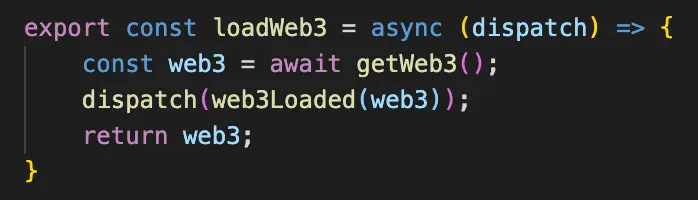
In Figure 1, the connectBlockchain onSubmit action grabs the Web3 instance with an interaction, which is displayed in Figure 2. It dispatches the web3Loaded(web3) reducer, which saves the Web3 instance to the state.
Connecting the account

Figure 3 shows a similar rendering, where we apply similar rules to the “Connect Wallet” button depending on if an account has been loaded already. This time, however, if Web3 is loaded, we apply an extra condition on whether or not an account is loaded:
(account !== null) ? “btn-success” : “btn-warning”
The connectWallet onSubmit action is a function that calls an interaction called loadBlockchainData(), as seen in Figure 4.
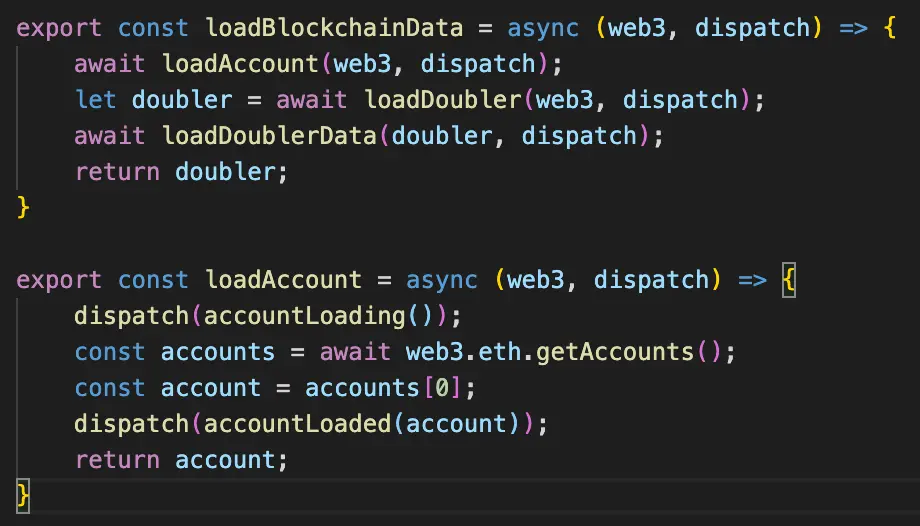
Figure 4 shows loadBlockchainData(), which in turn calls loadAccount() on its first line. This function gets the account provided by MetaMask and dispatches an action called accountLoaded(), which stores the account in our state via a reducer.
Once these steps are complete, the rest of the interface is enabled, and the user is free to interact with the DApp.
Conclusion
Using MetaMask with DApps can be a jittery experience that could deter users from interacting with your DApp. Use simple flows like Blockchain ➼ account ➼ interaction to build your DApps.
Thanks for reading!
Learn More
If you’re interested in Blockchain Development, I write tutorials, walkthroughs, hints, and tips on how to get started and build a portfolio. Check out this evolving list of Blockchain Development Resources.
If you enjoyed this post and want to learn more about Smart Contract Security, Blockchain Development or the Blockchain Space in general, I highly recommend signing up to the Blockgeeks platform. They have courses on a wide range of topics in the industry, from Coding to Marketing to Trading. It has proven to be an invaluable tool for my development in the Blockchain space.






