The Pirl network operates on almost the same principle as the etherium. Users can create smart contracts here.
However, there are some peculiarities. Pearl also works with masterminds with a protection mechanism, which is a hybrid of Proof of Work and Proof of Stake.
In addition, Pirl is committed to creating a decentralized marketplace using smart contracts. For extraction, the Ethash algorithm is used.
Now that the readers already know some details about the cryptocurrency, we can move on to describing the process of extraction of coins directly.
1. Some basic tips
Before you start extracting cryptocurrency, it is checked that the video card has the latest driver updates installed.
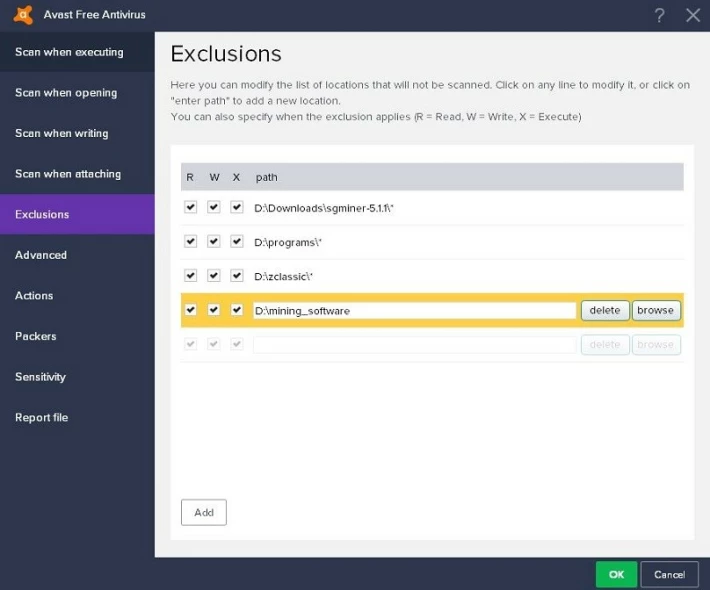
Also, most mining applications usually conflict with antivirus applications.
Accordingly, if the client wants to do mining as usual, the mining application is added to the exceptions.
Here you can recommend creating a folder and marking all mining software within the subdirectories.
Then, the folder is added to the antivirus exceptions and thus all mining applications can be added.
2. Cryptocurrency mining pools
The first thing you need to do to start mining is to find the right pool. You can also mine Pirl yourself, but the payments in such a month will be much rarer.
Everything depends on the equipment used by the user.
However, the pools usually have a small commission.
Using such a network allows you to receive constant payments, and several times a day.
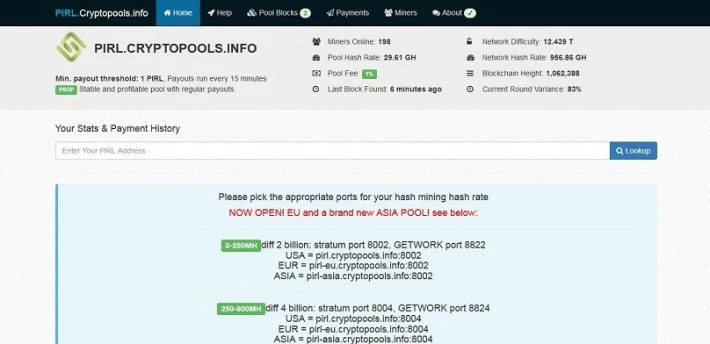
The pool http://pirl.cryptopools.info will be used for this instruction.
It is chosen because there are low commissions and many functions.
The peculiarities of this network are its large size and wide possibilities. On average, there are 183 units a day. The servers are located in the U.S., the European Union and Asia.
Once you've selected the pool, you can get started directly with the prey.
3. Mining on the CPU
The article will not describe mining on CPUs because it is not advantageous in comparison with Pirl cryptocurrency mining on video cards.
4. Mining on Nvidia
There are many mining applications available on this manufacturer's graphics cards. One of the best is Claymore Dual Ethereum.
It is unique in that it can be used to extract coins from ethash, as well as some alternative coins at the same time.
Together with the miner comes a document readme where all kinds of alto-koin, which can be mined in dual mode, are registered.
The application is compatible with both Nvidia and AMD. Works with Windows and Linux operating systems.
Mining software is offered with a commission if the miner plans to work with ethash or one and a half percent in dual mode.
In this manual, more attention will be paid to the mining of only one coin.
A new bat-file (or script file when working with Linux) is created inside the folder where the miner is installed and copy the lines below there:
EthDcrMiner64.exe -epool stratum+tcp://mining_pool:port -ewal wallet_public_key -eworker worker -epsw password -esm 0 -asm asm_option -mode mining_option -gser 2 -allpools 1 -allcoins 1


Next, it is necessary to replace "mining_pool" with the servers the user will work with.


The "port" is replaced by any of the following:

1.You can use 8002 if the maximum speed is between 0 and 250MH/s.
2.Port 8004 is suitable for those who have an overall speed range of 250 to 800MH/s.
3.Finally, port 8008 is suitable for those with a maximum speed of 800MH/S-200GH/s and nicehash operation.


Next, you need to replace "wallet_public_key" with the user's wallet address. The "Worker" function is optional.

It can be used when working with several mining computers.

You can, for example, install the neworker officecomputer for one computer and the second eworker gamingcomputer.

In that case, they'll be able to track the pool's office.

Next, you need to replace "password" with x. If you work with nicehash, you can change it to #.

The "asm_option" option must be set to 0 when Nvidia is installed.

For ADM it is necessary to set 0 for the beginning, but it is possible to set 1 for comparison of capacities.

It may also be necessary to set 1 when the AMD graphics card generates an error when using 0.

It is necessary to replace "mining_option" with 0 if the user wants to apply the dual mode. Otherwise, set 1 here.


Here's one example of the settings:
EthDcrMiner64.exe -epool stratum+tcp://pirl.cryptopools.info:8002 -ewal 0x0f60e4c17dc47705a96da96fce605769c872166b -eworker officecomputer -epsw x -esm 0 -asm 0 -mode 1 -gser 2 -allpools 1 -allcoins 1
Then, double-click on the file with the extension bat and you will see this window: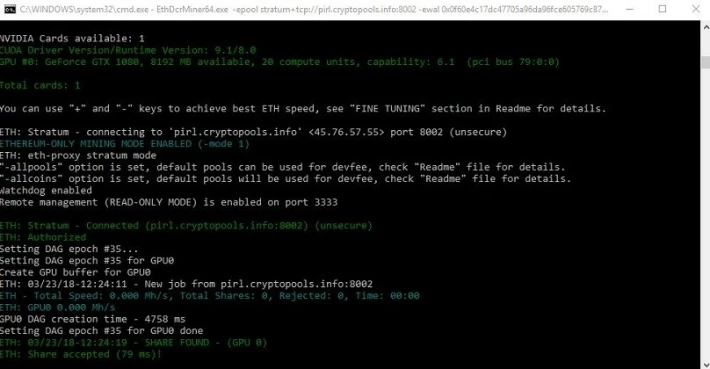
The first picture shows that the miner will apply all graphics cards in the system.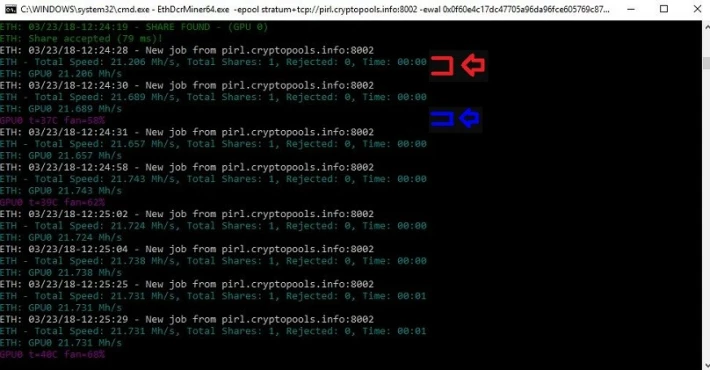
The red arrow indicates the speed of the graphics card and the total speed. The blue arrow indicates the temperature.
5. Mining with AMD graphics card
Actually, there are a lot of programs for this vendor's graphics cards, but one of the best is Dual Ethereum.
It can be used to mine coins on ethhash, as well as several alternative coins at the same time.
You can find the available coins for dual mode, as mentioned above, in a special readme file that comes with the miner.
As mentioned above, the software is compatible with Nvidia and AMD graphics cards.
The application works on Windows and Linux operating systems. Using the software is quite easy.
It is necessary to create a bat-file, just as in the situation with Nvidia, and insert the following lines into it:
setx GPU_FORCE_64BIT_PTR 1
setx GPU_MAX_HEAP_SIZE 100
setx GPU_USE_SYNC_OBJECTS 1
setx GPU_MAX_ALLOC_PERCENT 100
setx GPU_SINGLE_ALLOC_PERCENT 100
EthDcrMiner64.exe -epool stratum+tcp://mining_pool:port -ewal wallet_public_key -eworker worker -epsw password -esm 0 -asm asm_option -mode mining_option -gser 2 -allpools 1 -allcoins 1
Replace "mining_pool" with the server the user will work with.


Next, you need to replace "port" with one of the following options:


1.You can work with port 8002 when the total speed is between 0 and 250MH/s.

2.Port 8004 is suitable for situations where the total speed ranges from 250 to 800 MH/s.

3.Finally, you can use port 8008 if the total speed is in the range of 800 MH/s-200GH/s or if you are working with nicehash.


Next, it is important to replace "wallet_public_key" with the purse address.
As for the Warkeeper, his choice is optional.
It should be used if several computers are to be used for mining.

For example, you can configure -eworker oficecomputer for one PC and -eworker gamingcomputer for another. In this way, you can monitor the operation of your computers in the pool room. Basically, all settings are almost the same as for Nvidia so far.


Replace "password" with "f". For those who work with nicehash, insert #.

Instead of "asm_option" 0 is entered for those who use Nvidia. Customers with AMD cards here also specify 0 or 1 to compare their computing power.

If an error occurs when inserting 0, you will need to use 1.

The line "mining_option" changes to 0 if dual mode operation is planned.

Otherwise, you can insert 1.
EthDcrMiner64.exe -epool stratum+tcp://pirl.cryptopools.info:8002 -ewal 0x0f60e4c17dc47705a96da96fce605769c872166b -eworker officecomputer -epsw x -esm 0 -asm 1 -mode 1 -gser 2 -allpools 1 -allcoins 1
When all the settings have been made, you need to double-click on the bat file and the window will appear: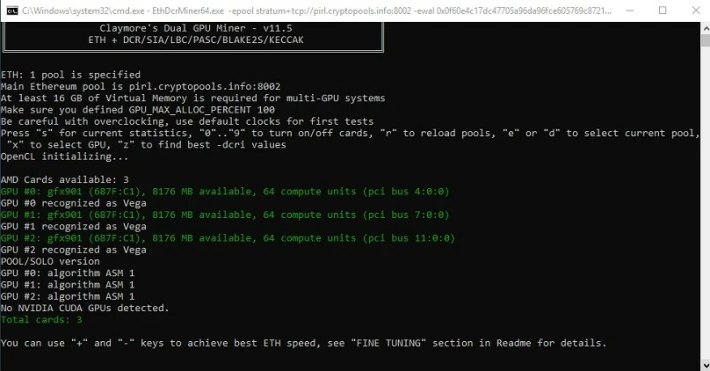
In the first picture you can see that the miner uses all the power of the graphics card in the system.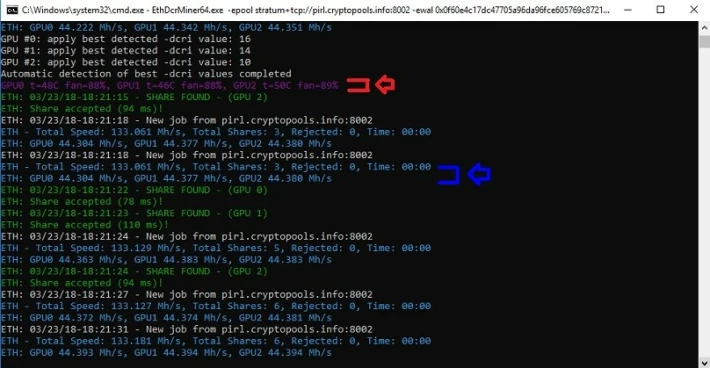
The red arrow indicates the temperature of the graphics card. Speeds are indicated in blue.
6. How much PIRL you can earn per day
In order to calculate the number of coins received per day, you can turn to the Whattomine service and use their calculator.
It allows you to get a rough estimate. In fact, you can earn more or less.
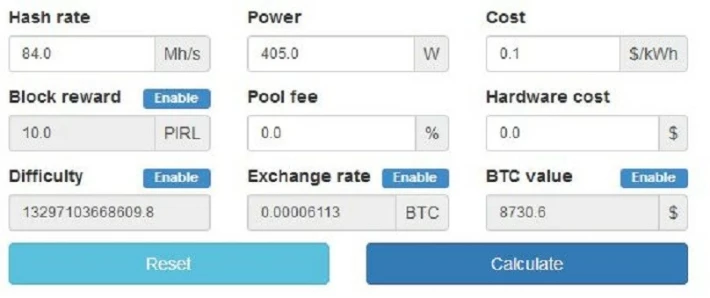
Most of the values have already been entered, so the client only designates a few points.
Hash Rate: Enter the total speed (in mega hashes per second) for all computers that will be used in mining. This will be the total speed for all mining equipment. It is important to make sure that the data is entered for all computers.
Power: The total power in watts used by the farm is entered here.
In some mining programs, this figure is calculated automatically.
It is also possible to calculate the total power consumption using a special application.
Some people prefer a kilowatt meter because they think it is the most accurate method. It is also important to make sure that all the devices to be used for PIRL mining are accounted for.
Costs: The cost of electricity is entered. This information can be found in the invoices.
Pool Commission: This is where the pool commission is paid, as well as the cost of software fees for the developers of the mining application.
Equipment costs: The total cost of all mining equipment is entered.
LEAVE A COMMENT






