How to add money to your CoinDCX directly through UPI?

By Amit Kumar1 | Aparecium | 24 Aug 2021


If you have the CoinDCX app and whenever you want to add the money to your wallet you have to pay through MobiKwik wallet.

Here I'm going to show you can add the money directly through UPI.

Step1:
You need to download CoinDCX go app on your mobile.
The link is here.

Step2:
Log in with your CoinDCX account.

Step3:
Go to Account and click on the amount shown.
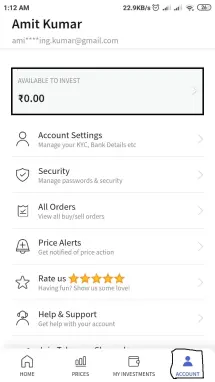
coindcx1


Step4:
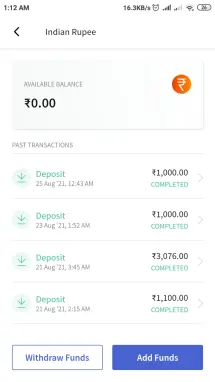
Click on Add Funds.
coindcx2

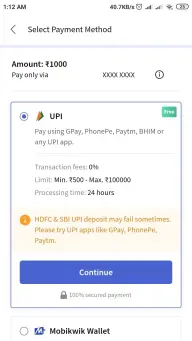
Step5:
Select and add UPI Id. and pay.
coindcx3


Once you have added the money, go back to the CoinDXC app and check your balance.
The added amount would reflect in your CoinDCX account.

Great!!!!

Now, you can trade easily without installing MobiKwik wallet.

How do you rate this article?

3


Amit Kumar1
Amit Kumar1

Hi All, My name is Amit, I'm a software engineering, who loves to solve programming scenarios and automate stuff using Python/Shell Scripting or any other language :P (pun of being a polyglot). Join Publish0x. https://www.publish0x.com?a=w9aAP28Pev


Aparecium
Aparecium

Let's scribble thoughts! Donate ETH here: 0x21DfffFB92B42721FC87c9b70773306023dA843B

Send a $0.01 microtip in crypto to the author, and earn yourself as you read!

20% to author / 80% to me.
We pay the tips from our rewards pool.