
We know hardware wallets are the first choice in regard to the safest ways to hold crypto coins.
But I still continue to like what years ago was considered a good choice, even if now many users discourage people from using it: the paper wallet.
I think it depends on what you need to do and in my case I feel pretty comfortable holding a part of my cryptos in the way I'm going to describe.
First of all I use to distinguish what I want to use from what I want to hold: if in the first case a good mobile wallet is fine, for the second one I started to use years ago a little Raspberry Pi Zero no wireless, enough for generating the private keys I need.
This guide focuses on the case of bitcoin but it can be obviously an universal method.
Setting up and forever disconnection from the outside world.
After installing the OS on a micro SD card the Raspberry Pi is ready to receive the only files are needed: from a clean PC we go to download some trusted software for generating paper wallets (in the case of bitcoin I downloaded an offline version of bitaddress.org from github) and, using a clean USB flash drive, we install it on the Raspberry PI.
It has been its last time with the outside world.
Generating Private Keys.
Now we can generate all the couple of Public & Private Keys we want and need.
Like this:
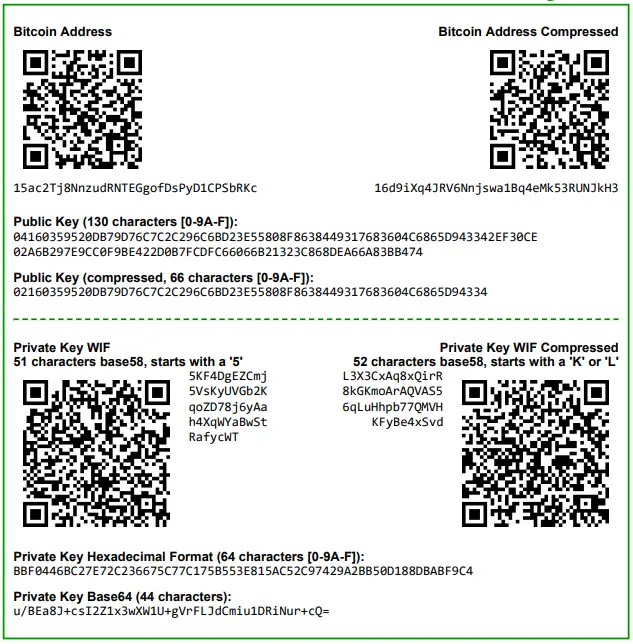
After having printed a pdf for each of them, we can manage the files in 3 directories.
- Never used Paper wallets
- Paper wallets in use
- Used Paper wallets
Every time a paper wallet goes to "in use" it's important:
- to register the private key in a physical place, for example writing it with a pen on a paper sheet or taking a picture of the screen with an old digital camera, paying attention to avoid everything can be online, such as a WiFi printer.
- to bring the public key on the app we are going to talk about.
Watching your bitcoins with an online app.
Now that our private keys are safe, for tracking balances and transactions we can use a mobile app that only uses public keys.
For bitcoin I use Sentinel, a fully open source app for android by Samourai.

• SegWit fully supported.
• Track any type of bitcoin address or extended public key, such as those created by Mycelium Wallet, Coinomi, Ledger, Trezor, and BRD.
• Remote deposit allows you to receive bitcoin payments into any tracked wallet or address without needing access to your private keys.
• Broadcast signed transactions from your offline wallet to the bitcoin network when you need to send bitcoin.
• Currency conversions for USD, GBP, EUR, CNY, RUB.
• Add an optional PIN code with PIN Scramble technology to help thwart keylogger attacks.
Conclusion
With the combination of Raspberry Pi Zero and Sentinel we can generate and hold our private keys totally offline and manage balances, transactions and public keys online. In the case someone needs to hold, increase or sweep bitcoins is a comfortable, cheap and pretty safe solution. However, let's be clear, slow.






