1.1 Overview
The aelf Block Explorer is used to monitor the main chain and side chain, allowing users to search for specific information, and participate in the aelf ecosystem.
1. Search: basic data such as the number of transactions per minute, block height, total transaction volume, the total number of token holders, node applications, side chains;
2. Query: specific information regarding block height, transaction ID, and wallet addresses;
3. Network Participation: Grow the aelf ecosystem through actions such as joining node elections, resource purchasing and viewing contracts.
1.2 Block Explorer Addresses
Main chain: https://explorer-test.aelf.io
Side chain 1: https://explorer-test-side01.aelf.io/
1.3 Block Explorer Interface
1.3.1 View the Whole Network Status

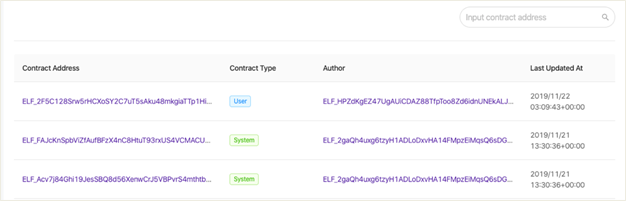
1.3.2 View Contracts and History


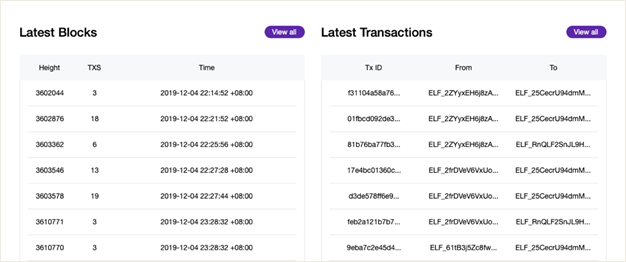
1.3.3 View Block Information and Detailed Transactions
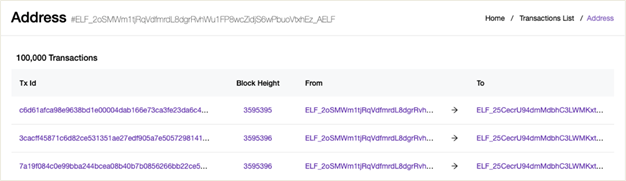
1.3.4 Check Addresses
1.3.5 Join Node Election and Vote

1.3.6 Purchase Resource
Users can purchase RAM, CPU, NET, and STO resources for on-chain governance through aelf’s Block Explorer.

· aelf Telegram community: English, Türkçe, Español, 한국, 日本語, 中文,русский, العربية, Deutsch, Italiano, Français, हिन्दी, and Tiếng Việt,
· aelf Twitter
· aelf Facebook
· aelf YouTube
· aelf Instagram
· aelf Reddit
· aelf Medium (for the latest update and articles)
· aelf Github (complete aelf project codes)






