

TLDR: Login to Streamlabs and check your ‘recent events’ tab. Look for the audio icon (shown below). If it’s red with a line through it click it (unmute) and see if that fixes your audio issues with alerts.
 Muted audio alerts
 Unmuted audio alerts
As a streamer who uses a 1 monitor set up, I heavily rely on audio alerts from Streamlabs to inform me of new follower and host events while I’m live on Twitch.tv. When those alerts fail and I don’t know to check the Twitch activity alerts panel, I feel bad for not taking the time to thank those individuals. So, when this exact problem happened to me, I felt rather sheepish and went straight to researching how to correct the issue.
I don’t really ever login to Streamlabs. I have no need to. My alerts had been set up and working fine for years and I only used the audio alert as a way to notify me to check the activity feed in my Twitch dashboard. So when I did login to Streamlabs and went to each of my alerts and tested the audio file associated with each of them, there was no issue. Everything sounded fine. So I tried sending some test notifications to the stream and OBS, but now there was no audio… What waHappy audios going on?
I spent time googling/duckduckgoing “Streamlabs audio issues” and went down a rabbit hole of checking computer audio output settings, OBS audio settings, and what to do if you were using virtual audio cables. Basically, a lot of wasted time reading up on issues that had nothing to do with what I was experiencing.
I was getting ready to try creating a new alert profile within Streamlabs and re-creating each alert when I saw something on the main page of the
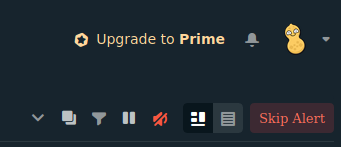
Streamlabs dashboard on the ‘Recent Events’ tab. Look up, look waaaaaay up…and to the right…
There it was, that red little speaker icon with a line through it. The answer to my ‘Where’s Waldo?’ of the Streamlabs audio world.
Sad Audio
Happy audio
After clicking this audio button and having it change to the grey speaker icon matching the look of its icon brothers and sisters beside it. Everything was grand! Audio alerts worked once again.
I couldn’t believe that there was such a simple solution to an issue I had spent so much time researching through forum and Reddit posts, all of which didn’t even have this as a potential place to check. Most curiously is I don’t even know how this option was changed to begin as I never log in to Streamlabs.
My hope is that this information may help someone else struggling to answer the question of ‘why don’t I have audio on my Streamlab alerts’.






