
"Collection of Quality Data in these days is like finding a light of Hope in an endless tunnel."
How to collect or scrape data using Beautiful Soup in Python..?
To start a business or to do a project in any field, the most basic & fundamental requirement is the data. Now the major problem arises, how to gather bits and pieces of information to achieve our goal.
Hi, I’m Gyan Vardhan & will provide you the basic idea, how to scrape the data using Beautiful Soup in Python.
Step 1:- Choose the website you want to scrape.
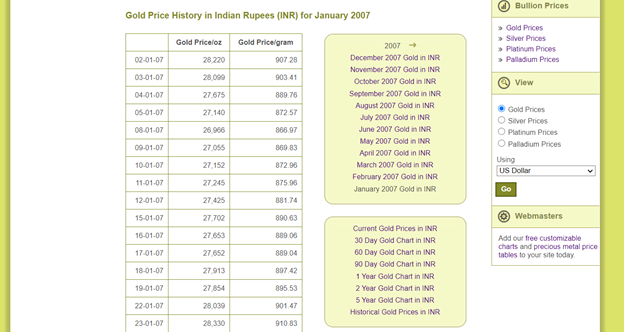
Today I scrape the gold prices from the website "https://www.bullion-rates.com/gold/INR/2007-1-history.htm"
Sample Table Data
This is data we need to scrape.
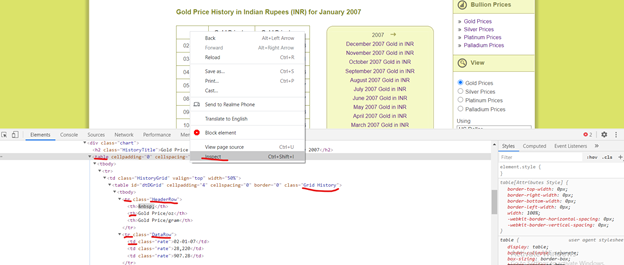
Step 2:- Understand the website better in terms of their HTML tags. In a website all the information resides within the tags, we just need to look closely & find the exact tags in which our data are present. Let’s get started with finding the correct HTML tags. If you right click on the page & select inspect option then you can see all the HTML tags. But we need to find the exact tags so go to gold price table & do inspect.
Inspect the Elements
In above screenshot you can see the HTML tags we need. The data we need from the website are in table format so our 1st approach is to check, Is there any table in the HTML tags & then find its respective table rows & table data. So I already highlighted the tags we need to scrape the data.
Step 3:-
Python Code
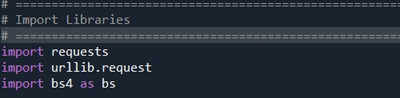
Importing important libraries
Required Libraries
We need these 3 libraries to run the code.
Step 4:-
Set the url of the website & access it through requests library.
URL Setup
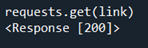
If the requests get passed or successful then response will be 200; check below images.
Check the Response Code
Now, (a) we have to write the code to find the table in which our data resides, there might be more than one table in the website, so in that case we have to give the class of the table to identify the exact table. In our case class of the table is “Grid History”. We use find() function & it will return our desired table.
Code will be like:-
(b) Identify the rows of the table:- Tag for the row is “tr”. To get the row we will use find_all() function, it is just like find() function but it will give all the matching results.
Code will be like:-
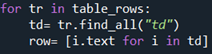
(C) Finally, we reached our last destination & Now, we have to find the body which resides in tag “td”. And to get all the data of all row, the code will be same but we need to loop the code to extract all the information at once.
Code will be like:-
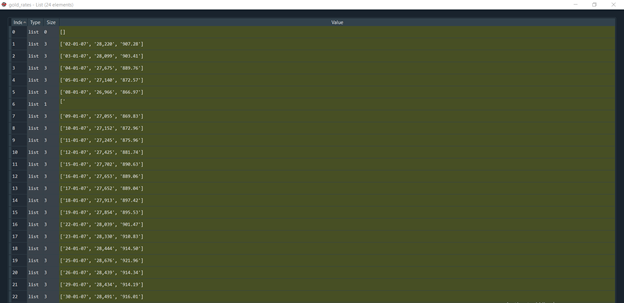
Our Final Scraped Data
Scraped Data
Conclusion:- Web Scraping is an amazing tool, that makes anyone’s life simpler.
Find full code on



If you have any questions about the code or web scraping in general, reach out to me on
Stay tuned guys, for more updates.






