
Don't have time to read then Bookmark it 🙃
Hey publish0x lovers Good Morning 🌞
Did you noticed something new here 🤔
If not then try again ok I hope you have discovered the new feature available on publish0x. If not then it's ok, they have added three button under the title of every post two of them for sharing and another one is for saving the content so that you can check out later
The two sharing buttons will give you power to share an article on twitter and Facebook.
This is another Update on Publish0x Platform that means they are working on Publish0x and trying to make Because tter with every update. And I congratulate them for this Update but they had forget to add another social media's share button so that we can also share it or they can add copy link 🔗 Button which helps reader to copy the article and share it on his/her favorite social media platforms.
Ok the third Button with the feature to Bookmark 🔖 the article is awesome and I love it 🤫
Whenever I found an interesting article on any platform then I save it as bookmark 🔖 on my Brave Browser so that I can read it whenever I want. So I Love this Bookmark button 🔖
How to use these buttons 🔵
And I know you are great so I don't need to share about first two sharing button but you need to know something deleted to last button or Bookmark button.
Whenever you like an article by its title and not enough time to read it then simply open the article and bookmark using bookmark button and do your important work 💼 now you can read this article when you want but where will I find these saved articles?
You don't to learn rocket science to search saved article on Publish0x.com
This is so simple you need to open your publish0x dashboard where you will find a new option called Bookmarks
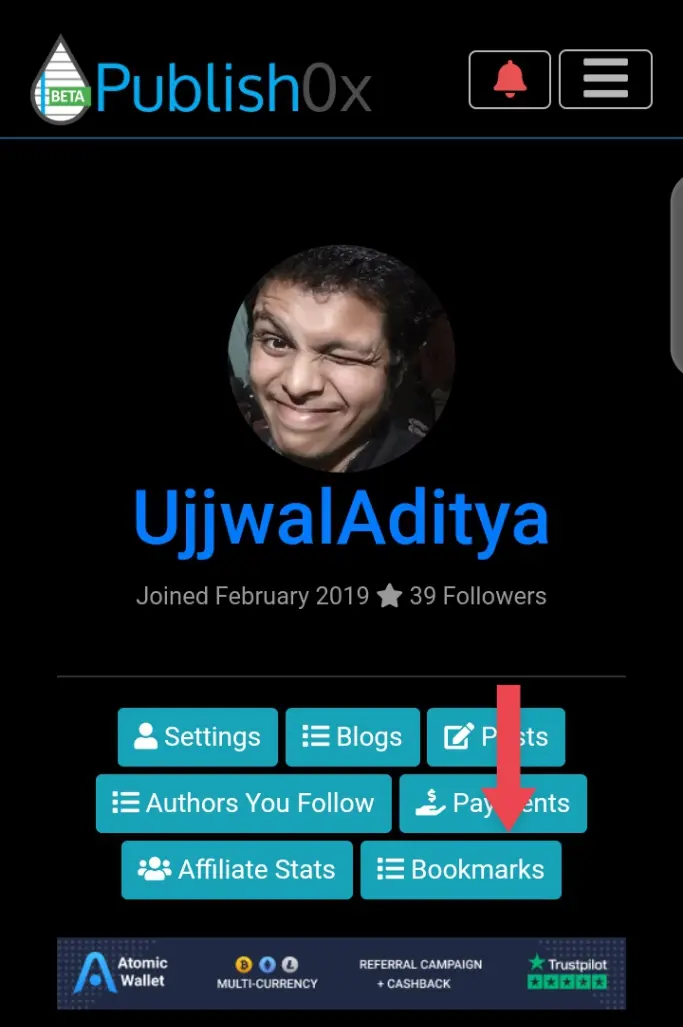
Where you will find your saved article🤪
Like this article check out other articles ✍
https://www.publish0x.com/coinmantra/so-you-tipped-publish0x-xdrrpod
https://www.publish0x.com/ujjwaladitya/6-ways-to-repair-smartphone-network-xxexxd






