
I've used different writing applications throughout the years. I used "Word Perfect", "Word", and then "Pages" after moving to the Mac world. But then I discovered Scrivener. There are so many things I like about this app and I realize not everyone knows about it so I thought tell you about it.
Scrivener is especially great for larger projects. I also use it to store the articles that I post here. I don't need a hundred files to store my articles or have a massive unorganized file in Pages or Word. Here is a video comparing Word to Scrivener. (There is a 20% discount link below the video.)
Scrivener is available on Windows, Mac, and IOS. Here are some Scrivener features...
- There is an area for planning that can include character development information, location information, calendar, or any other planning needs.
- Everything is in one file, including images, weblinks, and research.
- Work on your project in chunks. Each piece is separate but is then easily put together for printing or exporting. The pieces can be easily moved around without "cut & paste".
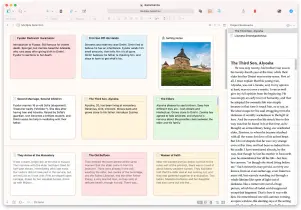
- One of my favorite features is the Corkboard with 3x5 cards that can be viewed and moved around. If you move around the 3x5 cards, the text for that section moves with it. The cards also can be tagged and/or color-coded.
- There is an outliner mode that can also be sorted by title, label, status, and more.
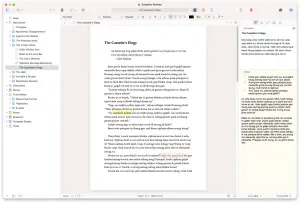
- You can split the screen to look at different parts of the document, or a webpage, planning documents, etc.
- Like other word processors this does have formatting styles too.
- You can take a snapshot before making changes.
- There is even a name generator to help with character names.
- You can set and keep track of word count goals.
- Some of the formats you can print are: "PDF", "Word", "html", eBook (epub), Kindle (mobi), screen play, and paperback.
There are templates when you open the application and more can be found on the internet. If you would like to learn more about Scrivener check out their site literature and latte. This application has a lot of nice features. The standard price for Mac or Windows is $49.00. The cost for IOS $19.99.
Thank you for reading. And HAPPY WRITING to the writers out there.

The images are public domain from pixabay.com except the images of the Scrivener app that I got from their web page.





