
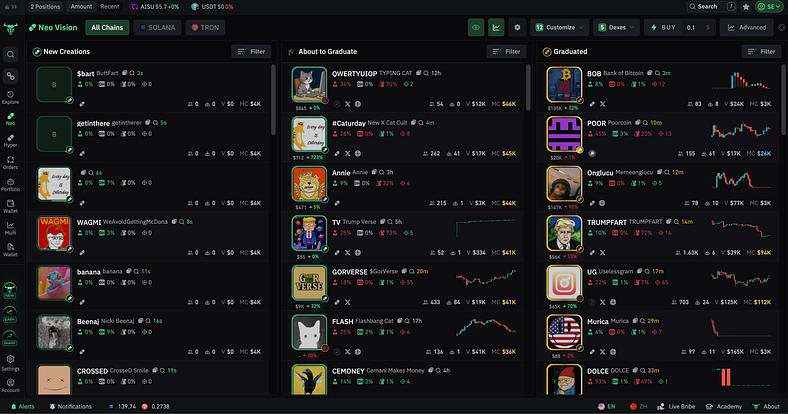
BullX Neo’s NEO Vision is built for one thing: Finding early tokens before they explode.
If you trade new memecoins or use pump.fun this is how you stay ahead of the bots.
Here’s how to actually use NEO Vision to enter early, avoid rugs and print.

Step 1: Open NEO Vision
Inside the BullX Neo web app:
-
→ Select "NEO Vision"
-
You’ll now see a list of trending tokens with real-time data
No more guessing what’s launching you get:
-
Token name, price, volume
-
Holder distribution
-
Deployment time
-
Wallet bundles / deployer flags

Step 2: Filter Smart
Click “Filters” and apply:
-
Market Cap: Set min ($100K) and max ($5M)
-
Holder Count: Avoid tokens with <10 holders
-
Wallet Distribution: Look for low concentration (<10% top wallet)
-
Exclude Bundles: Hides tokens where deployer holds 50%+ supply
This instantly removes:
-
Scam deployments
-
Low-liquidity rugs
-
Bots trying to farm exits

Step 3: Choose a Token
Tap a token in NEO Vision to get:
-
Chart view
-
Live wallet buy/sell feed
-
Holder breakdown (ranked by size)
-
Contract metadata
If the deployer shows a clean history + early buys come from wallets with track record = green light.
Step 4: Trade With Rules
Hit “Sell” and set:
-
Amount: e.g., 2 SOL
-
Slippage: e.g., 2%
-
Auto-Sell: 50% at $5M market cap, 25% at $10M
-
Stop-Loss: optional, set exit if token drops below X
BullX lets you lock these in before launch no manual clicking.

Step 5: Track After Entry
Go to Wallet Tracker:
-
Monitor token price
-
Watch holder shifts
-
Get alerts if deployer sells or top holders exit
You can also copy top wallets from this token into your Watchlist.

TL;DR: NEO Vision = Early Entry Without the Guessing
https://t.me/BullxNeoBot?start=access_5GH7PAGG99Q
NEO Vision is the only reason I still trade pump.fun. Everything else is exit liquidity.






