
Since my last post on a similar subject whereby I rant about WhatsApp reading my messages and sharing with Facebook. Somehow various algorithms had observed my annoyance at this data insecurity and my searches must have triggered a Spotify 'suggestion' to listen to a podcast called 'Darknet Diaries'.
So I gave it a listen and oh my this was an eye opening experience for me. The episode I chose to listen to, was one where the (excellent) host, Jack Rhysider, discusses the LinkedIn data breaches. Being a LinkedIn user myself stemming from an aggressive job search a couple of years ago, I wondered if my details had been compromised. This was the entrance to the rabbit hole I willingly stepped into, not fully comprehending how deep and winding the warren went.
Have I been pwned?
Yes I had. Shit.
PSA: Before I continue, I'd recommend a visit to https://haveibeenpwned.com/ and enter your email address. If your data was included in a breach, you can find out and do something about it. Knowing what they know, is a good starting point to protect yourself. It takes less than a minute to search.
I entered my email and hit return, about 10-15 seconds later I got the news...

And the culprit - LinkedIn
I won't go in to the detail on how they did the hack, but users contact information and password data had been taken and made available for sale. I doubt anyone would get anything good from my account anyway, so I wasn't too bothered about that, but what worried me was I had committed a cardinal sin.
I had re-used my LinkedIn password on other sites/ services. This meant that nefarious actors could try using that combination of username and password on other sites to try and gain access to more of my data - Double Shit!
I was calmed a little by the thought that I'd used a more professional email address for LinkedIn. But... I had also used that for a crypto exchange account. Needless to say I immediately logged in to that account and changed the password, luckily I have 2FA activated and so I couldn't see any signs of suspicious activity.
I was relieved, but also annoyed at myself for being lazy when setting up my password for that account. Granted I was new to Crypto when it was created, but still I'm lucky as it could have been a hell of a lot worse.
I'd re-used my email on this occasion for this account, but I wondered where else I had used that combination of credentials. How to check? Luckily my laziness actually did me a favour for this bit.
Forgive Me Internet Gods, for I have sinned
The functionality to save passwords to browsers is useful. The ease and simplicity of auto filled passwords certainly saves a lot of time and memory tests when logging in to a service. I've been blindly trusting these services and so far have not seen any reason not to. But I am beginning to get sceptical,. Maybe I've listened to too many of the Darknet podcasts, but it seems that almost anything can potentially be hacked and data stolen. So I'm rethinking which passwords get saved on my devices.
But as it turns out, this functionality does have a really good use case. To do a security audit on all your accounts. And so I did. I went to my Google account pages and searched for the password check-up service. I hit run and it did its thing. Coming back a few seconds later with a kick to my digital nuts:
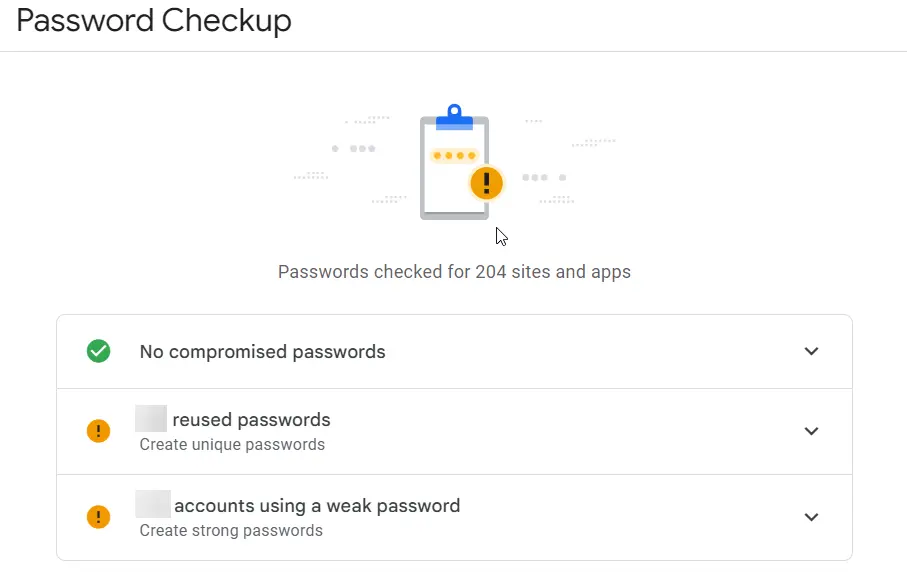
I've been lazy. It's hidden in the above image, but my re-used password count was embarrassingly and dangerously high. Note that it wasn't the same password used x times, but still re-using passwords any number of times is a bad habit.
Time to sort out my stuff and get these passwords updated. It took almost a full day to go to each account and change my login credentials to something more secure without re-using anything.
Fortunately, none of my password data had been compromised according to Google, although I bet Google (and various nation state spying agencies) know what they are.
One of the key takeaways from that Darknet Diaries episode I mentioned above, was the passwords that were contained in the breach. The word 'Password' is used far too many times, as is '123456' amongst other hilariously weak passwords. But I can't laugh about it too much as according to Google I had a number of accounts with a weak password. I reviewed them and yes they are weak, but not as bad as using password as a password. (I'm going for a record of how many times I can use the word password in a paragraph about passwords).
My next job is to strengthen those accounts identified as having a weak password. Even though some of these are 'Throwaway' accounts, they may still contain sensitive data of some sort.
You know what they say about guys with big feet? Big footprints
I've had a username that has followed me around emails and social media since about 1999. It's linked to most of my stuff. I wasn't that imaginative back then and stuck with the first good user name I thought of that I liked. Checking through the google saved password list gave me a rough idea of all the services I've linked this to, but I wanted to know everything I could about my online presence.
So for this tunnel of the rabbit warren, I decided I had to dip my toe in the narcissism pool and search for myself. I did various combinations:
- My full name
- My user name
- My full name +username
- My full name + city + username
...and so on.
Another job to add to the list - delete myself from those services I no longer use (Foursquare anyone?).
[Note to self: Research the EU General Data Protection Regulations, specifically the right to be forgotten.]
Accidentally becoming a Dork
No not that kind of Dork. I had stumbled into a technique called Google dorking. This is a term used for describing the act of manipulating Google search and its advanced searching capabilities to get information that may not be as easy to find with a regular search. You can try it, pop this little string into google search: site:publish0x.com intext:"dotmatrix"
I found accounts I had created before I'd started saving passwords to Google, never mind having 2FA enabled. These accounts had laid dormant all this time and could potentially contain some sensitive information. So another job to the list - recover my access to these accounts and nuke them.
If you've made it this far - Thank you for coming with me on this journey. I actually hadn't realised how much I've learnt and to write it out has given me some perspective. But this isn't the end of the story no. There's work to do to plug the holes in my security fence.
The most worrying thing to me is that the weakest link in the security chain is the squishy bit - people.
In my case I was lazy and had poor security across my accounts with reused passwords and inactive 2FA. I'm glad I got over my shock and decided to do this digital audit on myself. The first step to securing yourself is to know what needs to be secured.
At this point I'm well and truly stuck in this cyber security rabbit hole. I've come too far to turn back and head for safety. That's why I've written this post. It may not get much engagement, but it's been a safe space to write out some of the issues I've found with my online presence. It's the string of lights that dimly illuminate the dark tunnel of the internet where I am currently finding myself.
*Take it easy and stay safe out there.






