
Hi everyone today I am going to show you the steps I took to turn my dad's book into an Ebook and publish it without any cost.
It was a very simple process and I recommend it to any budding self publishing authors who have a limited budget.
Step 1
The first thing you will need to do is download Kindle Create which you can do with the following link https://www.amazon.com/Kindle-Create/b?ie=UTF8&node=18292298011 This is the application we will be using to create and publish the Ebook.

Step 2
When you open Kindle create you should select new project from file then navigate to your word document of your book that you have written. Then choose the type of book that you are writing. eg. text book, fiction novel etc.. This will then import your file which will take about a minute or two.


Step3
A pop up window will appear in the top left of your screen with suggested chapter titles. I personally rejected all of these changes because they didn't fit with what I wanted. If you are lucky you can accept these changes if it worked out properly.

Step 4
You can then scroll through the book to fix the layout. It is very likely that your images and text that are supposed to be on one page have been put onto two pages. In this example below of my dad's book you can see that the text from one page has spilled over onto a second page.
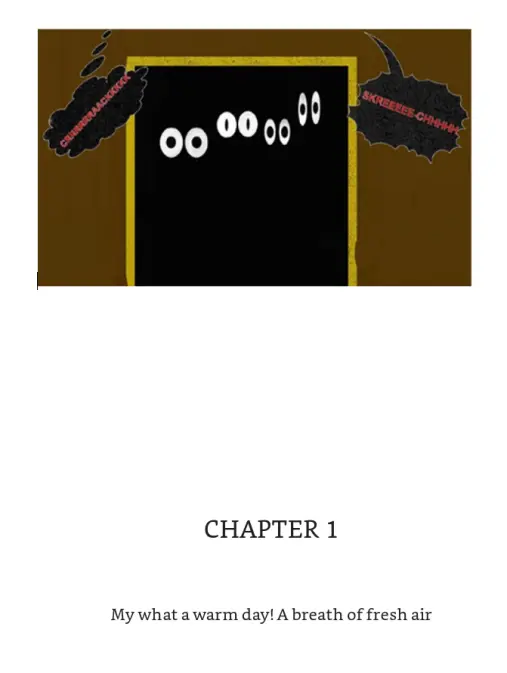
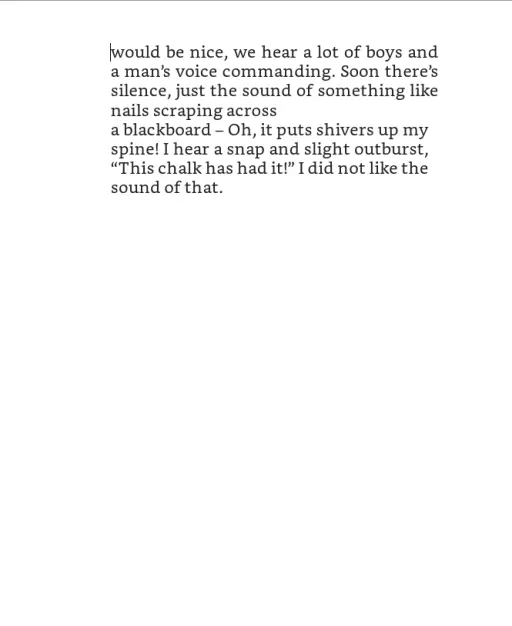
To fix this it was as simple as pressing the backspace button until the text fit onto one page. The same as you would using Microsoft word. You can also format your text on the right hand side of your screen to fit the style of your book.
Step 5
Check how your book will look by selecting the preview button in the top right corner of your screen. You should check both the phone and tablet previews and go through your whole book on both just to ensure it looks okay.


Step 6
Choose publish in the top right of your screen. This will create a type of file for your book that will allow you to publish it as an Ebook. From here you need to go onto Kindle Direct Publishing here https://kdp.amazon.com/en_US/ This is where you can publish your Ebook. You will need to enter your payment details for you to receive payment for any books that you sell on Amazon. If you enrole in Amazon's Kindle select program you will recieve 70% of any book that you sell.
I hope this has helped you to create your first Ebook
If anyone is curious about my Dad's Ebook here is a little information about it.
This story is about Cid, a piece of white chalk, the hero, along with his friends Peter (logical), Simon (intelligent), Barbara (excitable) and Joan (brave). They live in a school where strange happenings are going on (according to wise Mr Duster)! He says there are noises at night going through the classrooms, no one can explain why! They think he has a vivid imagination, maybe he’s mad, until Mr Duster thinks back over the past – it always haunted him, the disappearance of the schoolteacher. So they all come up with a daring plan of how to get to the bottom of the mystery. “I trembled at the prospect, ghost or human, what do we have to face?!”
The story is set against a backdrop of bad-mannered pupils, a snap-happy teacher and intolerable coloured chalks but comes to a grand finale that everyone will enjoy!
UK Readers can buy a copy of the book here if you wish https://www.amazon.co.uk/dp/B089669ZZ1/ref=sr_1_1?dchild=1&keywords=cid+chalk&qid=1590545809&sr=8-1
US Readers can get a copy here https://www.amazon.com/Cid-Chalks-Challenge-Frank-Mulligan-ebook/dp/B089669ZZ1/ref=sr_1_1?dchild=1&keywords=cid+chalk&qid=1591213983&sr=8-1
Thank you every sale will be very much appreciated
Stay safe stay at home
Thanks for reading!!!!
Download the brave web browser for no ads and speeds up to 3x faster than google chrome here:
Follow us on publish0x for more articles
https://www.publish0x.com/@Frank12
Follow our affiliate for software reviews and more information on Brave
https://www.publish0x.com/@G-Dog
Follow us on twitch here
https://www.twitch.tv/frankitaryan/






