
A Brief History of HCI
The history of human-computer interaction (HCI) includes the evolution of widespread practices. It also includes people, concepts, and advances in understanding that inspired new developments. Often decades elapse between visions or working demonstrations of concepts and their widespread realization (Obeirne, 2004). The field of HCI can be understood in terms of existing practices, new visions, and hardware that became substantially more powerful year after year.
Human Factors before Computers
Through the centuries, people developed highly specialized tools to support carpenters, blacksmiths, and other artisans. However, efforts to apply science and engineering to improve the efficiency of work practice became prominent only a century ago. Time and- motion studies exploited inventions of that era, such as film and statistical analysis. The principles of scientific management of the U.S. efficiency engineer Frederick Taylor, published in 1911, had limitations. Still, such principles were applied to U.S. assembly line manufacturing and other work practices in subsequent decades. World War I motivated a similar focus in Europe.
World War II accelerated behavioral engineering as complex new weaponry tested human capabilities. One design flaw could cause thousands of casualties. A legacy of the war effort was an enduring interest in human factors or ergonomics in design and training. (Another legacy was the creation of the first digital computers.). Early approaches to improving work and the “man-machine interface” focused on the nondiscretionary (mandatory) use of technology. The assembly line worker was hired to use a system. The soldier was given equipment. They had no choice in the matter. If training was necessary, they were trained. The goals of workplace study and technology improvement included reducing errors in operation, increasing the speed of operation, and reducing training time. When use is nondiscretionary, small improvements help.
Related Theory and Disciplines
The early 1980s were marked by a strong effort to provide a theoretical framework drawn especially from cognitive psychology for a field previously dominated by an engineering perspective. This effort was paralyzed by the rapid changes in the field. Graphical user interfaces and multimedia swept away interest in phenomena that been the focus of theoretical analysis, such as command naming (selecting memorable names for computer commands) and introduced a daunting array of new challenges. The growing emphasis on computer-mediated interaction between humans challenged the centrality of cognition, and awareness of the role of design and marketing further reduced the prospects for an encompassing theoretical framework.
Tailorable Software Design
There are different terms to describe systems that are changeable in the context of use. Such systems have been called “tailorable,” “malleable,” “adaptable,” and “customizable.” From various angles, explanations have been proposed to define what it means for a system to be tailorable. From a technical perspective, a system can be called tailorable if, during runtime, end-users can modify a specific aspect of its functionality in a persistent way (Giddens, 1984).The tailorability of a system is characterized by the design choices made for the following three elements:
- Representation of the tailorable system properties.
- Functionality to change this representation.
- The connection between the changes to this representation and the changes in the affected system properties
Design Principles for Desktop Applications
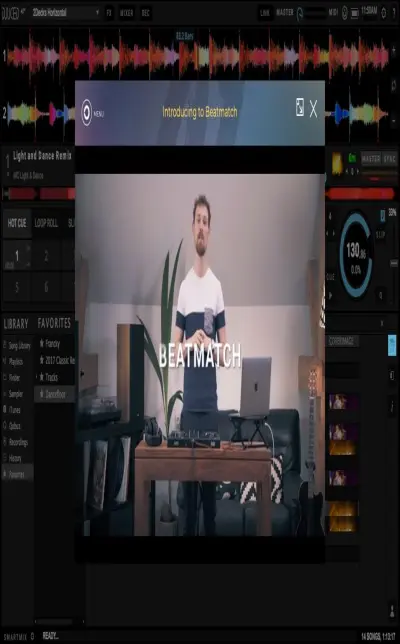
The use and arrangement of particular WIMP objects of the DJUCED desktop application support learning for beginners. There is a Help Mode option and a Dj Academy in a secondary window for beginners in DJUCED. When the user hovers the mouse over a button or pane, it automatically gives detailed information about it if the Help Mode is activated. A pop-up appears with detailed information and instructions about what that function is and how that function can be used. In addition to this, DJUCED supports learning for beginners with support page, blog site and with a detailed DJUCED user manual e-book on its website. There are also several tutorials on YouTube. The application caters to more experienced users when the users plug their Dj controller in. The application automatically opens the DJ controller mode. It closes the demo version and opens the Dj controller version with advanced options. There is no time or option limit in this mode. Users can create playlists, record their performances and even share on SoundCloud via linking their personal accounts.
Figure 1. DJUCED Academy (DJUCED Manual)
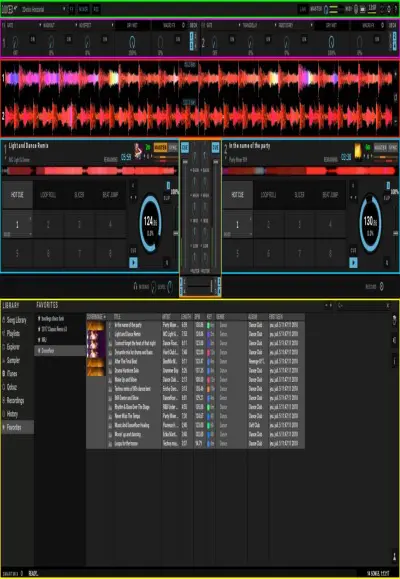
The arrangement of the panes is totally appropriate for the application's purpose and it makes the good workflow much easier. Sometimes there are problems with Browser pane. It shows a small pane for the tracklist and it’s hard to see all the tracks at once. A DJ needs to see upcoming available tracks beforehand while playing the current track. It affects performance in a bad way. Each pane is used for a different function. For example, main panes are used for Waveform, Browser, Settings, Track Deck and Intelligent Music Assistant. These are all appropriately arranged and customizable in size to some extent. The user can see all of them at once.
Figure 2. Adjustable Panes (DJUCED Manual)
Information is communicated to the user via symbols, colors, texts, and visual representations. This desktop application is so responsive. Information needs to be communicated so fast because the DJ should match the beats in a blink of an eye with precision. Even small mistakes in milliseconds make a big difference when you match the beats. Secondary windows are used for selecting Demo and Controller modes, Dj Academy, Speaker settings, Headphone settings, and Audio tests. There is only just one secondary window for these functions and it appears at the same spot all the time. It is highly interactive.
Figure 3: Waveform (DJUCED Manual)

Help Mode is present as a help and support feature. There are also links for the DJUCED website, social media channels, information page, news page, tips and tricks, tutorial videos and user manual. There are lots of different support features available on the internet. DJUCED is highly customizable. Users can change the panes in size, change their positions, zoom in or zoom out to them, make the application full screen. Some colors are customizable too, especially waveforms. There are 6 layout options for users. These options are 2Decks Horizontal, 2Deck Vertical, 2Decks Horizontal + 2 Samplers, 4Decks Horizontal, 4Decks Vertical, and Browser layout. Some of these layouts are for the ones who use 4 decks at the same time and some of them are for the ones who want to see the flow of the track vertically. Each one has a different outlook and a different function. There are several options to customize audio, connecting social accounts, mapping according to DJ controller buttons, keyboard shortcuts, recording the live performance in different formats and features, general preferences, mixer features, and browser display. Some of the panes can be customized in size and color.
Figure 4: Settings (DJUCED Manual)
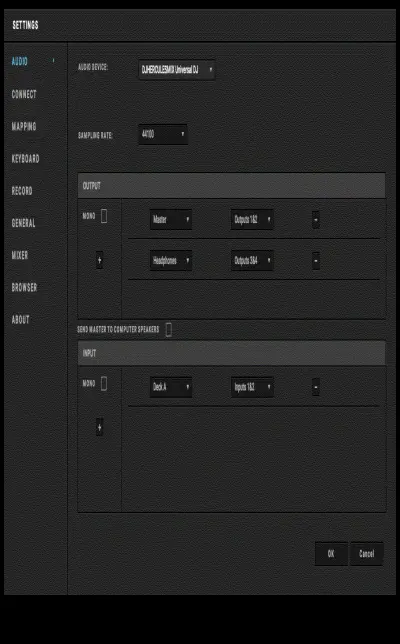
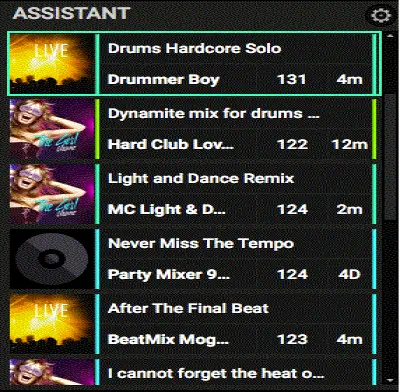
Data visualization is used for tracks in a waveform, for the crossfader while changing one track to the other, adjustable tempo displays for each track, virtual jog movements, adjustable volume displays for each track and adjustable mixer displays and buttons. DJUCED validates the data via Intelligent Music Assistant with artificial intelligence and manually in the Browser. Data validation can be improved by integrating data validation tools to the DJUCED application. These tools can add new data and validate them automatically, can check whether its duplicated or not and provide new options to the users.
Figure 5: Intelligent Music Assistant (DJUCED Manual)
DJUCED is appropriate for the context of use. Actually, this application was made for only this context of use. Users can see and control all the buttons of DJ Controller in DJUCED. When they can’t, they can arrange the buttons in mapping settings. Size is good for usability. It doesn’t show the unnecessary panes or displays in big sizes. It has Full-Screen Mode which occupies the screen completely. The texture is easy to recognize and get used to. A high-quality texture is being used for the best performance. Colors are easy to see and differentiate. They are the lively color in most cases. DJUCED shows different soundwave frequencies in different colors. There are also flashing colors to alert the user for important issues such as the end of a track. There is no need to focus on. One can see and use the whole application at one glance. The position is adjustable. You can move it to wherever you want. The text is very clear. Fonts and puntos are not ordinary. They were selected on purpose. Typography is well designed for the context of use in high quality.
Figure 6: Track Deck (DJUCED Manual)
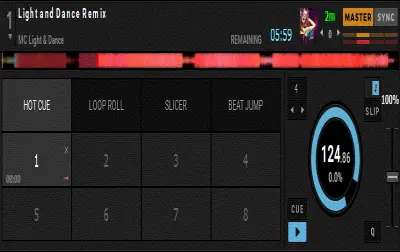
There are no skin packs for Dj controllers. In applications such as Virtual DJ, there so many skins pack almost one for each different DJ controller. Skin packs improve the coordination of hands and eyes. It also shows completes, a kind unity so to say, when the skin pack matches the DJ controller. It is much easier to appreciate.
The DJUCED desktop application doesn’t show the DJUCED mobile application as an alternative. In today's World, users prefer mobile devices more and more. Sometimes it's hard to work with a personal computer. Users can demonstrate a live performance wherever he wants with the mobile phone application. Also, mobile phones are now easy to connect to various speakers, headphones, and screens. This makes the application more convenient for the DJ.
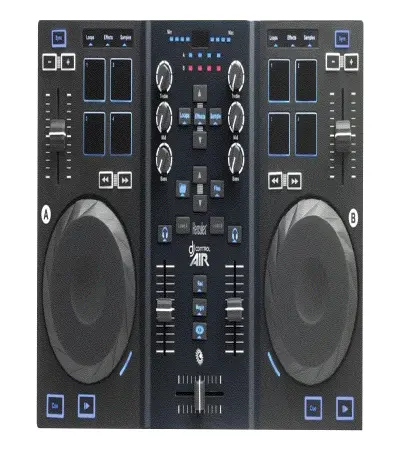
Different skin pack for each Dj controller can be selected in settings. These skin packs should come pre-installed. The image below is an example of the Hercules DJ Control AIR skin pack for Virtual DJ desktop application. It’s highly realistic and easy to use. It perfectly matches the DJ controller. All the other displays are position outside of this DJ controller skin pack. Dj controller is displayed as it is in the center.
Figure 7: Hercules DJ Control AIR skin pack (Virtual DJ - Hercules DJ Control AIR)
DJUCED mobile application link can be added to the settings, pop-ups, sidebars or secondary windows with the application’s banner, detailed information, and link. Here is an example of the DJUCED mobile application banner which is displayed on the internet. Different banners and images can be made for different application stores and mobile devices. Nowadays, a desktop application that is used also used as a mobile application is being considered as successful and widely used.
Figure 8: DJUCED mobile application banner (DJUCED App – Apps on Google Play)

The current design of the desktop application doesn't match the controllers visually and this makes the user feel an alienating effect. There are also many more buttons on the desktop application than the DJ controller has. They don't tackle the problem. There is no skin pack option for different Dj controllers in DJUCED settings. It is not being frequently updated. It is standardized in a way that doesn’t change through time.
Some users want to use DJUCED on their mobile devices and these numbers increases every year. The current advertisement and promotion of DJUCED mobile applications are not enough to inform every user. It can even reach to the non-DJ users and make them love djing as a profession. Some users with mobile phones listen to music on their way to home, school, and work. They can use this opportunity for djing instead of just listening to music. It is highly interactive and successful in terms of human-computer interaction.
Key Terms
Application: Computer software meant for a specific use, such as payroll processing.
Context: The structure or environment where special interactions occur (Giddens, 1984).
Human-Computer Interaction: The study of relationships between people and computer technologies and the application of multiple knowledge bases to improve the benefits of computer technology for society.
Icons: Icons are a principal feature of GUIs and are small pictures representing objects, files, programs, users, and so forth. Clicking on the icon will open whatever is being represented.
Interface: The way a user interacts with a product, what he or she does, and how it responds.
Mobile Devices: It can include a range of portable devices, including mobile phones and PDAs, but also can consist of wearable devices, such as HMDs and smart clothing, that incorporate sensors and location tracking devices.
User: The normative term used in the development of information devices, tools, and systems. Has been criticized for its impersonal, non-performative implications. Alternative suggestions include actor, audience, reader, and observer, depending on the context. No satisfactory term has been agreed upon that might take into account all of these contexts.
WIMP (Windows, Icons, Menus, and Pointing): This is a classical interaction technique found in most window managers like Microsoft Windows.
Conclusion
Studies in end-user development require many examinations and writing abilities. It results both in novel programming systems and new theoretical characterizations of human problem-solving. Unfortunately, only a few of these results—whether technical or theoretical—have achieved widespread influence. Nevertheless, they provide a better basis for future research than those who proceed in ignorance of past work, which is unfortunately still a common situation in this field. One successful approach has been the development of analytic frameworks that are specifically oriented toward helping system designers apply research results. Another that is urgently required is to broaden the field of inquiry further, investigating the facilities that will make EUD a practical long term activity, rather than simply a toy for technical enthusiasts to create relatively trivial programs that are used a few times and discarded.
References
Anon. DJUCED App - Apps on Google Play. Google. Available at: https://play.google.com/store/apps/details?id=com.guillemot.djuced&hl=en [Accessed March 17, 2020].
Anon. VIRTUAL DJ SOFTWARE - Hardware - Hercules DJCONTROL AIR. VirtualDJ Website. Available at: https://es.virtualdj.com/products/hardware.html?model=hecontrolair [Accessed March 17, 2020]
Giddens, A. (1984). The constitution of society: Outline of the theory of structuration. Berkeley:
University of California
Obeirne, R., 2006. Berkshire Encyclopedia of Human‐Computer Interaction2006242Edited by William Sims Bainbridge. Berkshire Encyclopedia of Human‐Computer Interaction. Great Barrington, MA: Berkshire Publishing Group 2004. , ISBN: 0 9743091 2 5 $295 2 vols. Reference Reviews 20, 15–16. doi:10.1108/09504120610685373





