
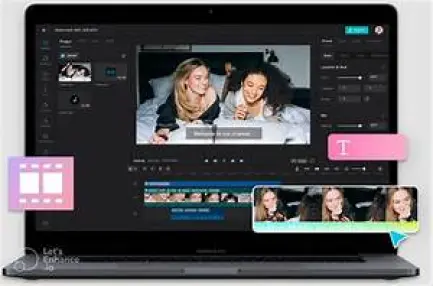
What is Capcut?
In the bustling realm of social media and digital content creation, there's an ever-growing demand for user-friendly, feature-packed video editing tools. Enter Capcut, a versatile and intuitive mobile video editing application that's been making waves in the digital sphere. But what exactly is Capcut, and why has it garnered such widespread popularity among content creators and enthusiasts alike?
Features of Capcut
Video Editing Tools
At its core, Capcut offers a comprehensive suite of video editing tools designed to empower users to unleash their creativity. From trimming and merging clips to adding text overlays and transitions, Capcut provides a seamless editing experience right at your fingertips.
Filters and Effects
One of the standout features of Capcut is its extensive library of filters and effects, allowing users to transform their footage with just a few taps. Whether you're going for a vintage vibe or a futuristic look, Capcut has got you covered with a plethora of options to choose from.
Music and Sound Effects
No video is complete without the perfect soundtrack, and Capcut delivers on this front with its vast collection of royalty-free music tracks and sound effects. With Capcut, you can easily enhance your videos with the perfect audio accompaniment, elevating your content to new heights.
How to Use Capcut
Downloading and Installation
Getting started with Capcut is a breeze. Simply download the app from the App Store or Google Play Store, install it on your device, and you're ready to start editing your masterpiece.
Basic Editing Techniques
For beginners, Capcut offers a user-friendly interface and intuitive editing tools that make it easy to dive right in. Whether you're trimming clips, adjusting playback speed, or adding text overlays, Capcut's simple yet powerful features make it a breeze to create professional-looking videos in no time.
Advanced Editing Features
For more experienced users, Capcut also boasts a range of advanced editing features that allow for greater customization and control. From keyframe animation to color grading and advanced audio editing tools, Capcut offers everything you need to take your videos to the next level.
Benefits of Capcut
User-Friendly Interface
One of the biggest advantages of Capcut is its user-friendly interface, which makes it accessible to users of all skill levels. Whether you're a seasoned pro or a novice just starting out, Capcut's intuitive design makes it easy to navigate and master.
Cost-Effective Solution
Unlike some other video editing apps that require a hefty subscription fee, Capcut is completely free to download and use, making it an affordable option for budget-conscious creators.
Wide Range of Editing Options
From basic edits to advanced effects, Capcut offers a wide range of editing options to suit any style or genre. Whether you're creating vlogs, short films, or promotional videos, Capcut provides the tools you need to bring your vision to life.
Capcut vs. Other Video Editing Apps
Comparison with Similar Apps
In a crowded market filled with competing video editing apps, Capcut stands out for its simplicity, versatility, and robust feature set.
Unique Selling Points of Capcut
What sets Capcut apart from the competition is its focus on usability and accessibility. With Capcut, anyone can create professional-looking videos with ease, regardless of their level of experience or expertise.
Tips and Tricks for Effective Video Editing
Maximizing Capcut's Features
To get the most out of Capcut, be sure to explore all of its features and experiment with different editing techniques. Whether it's adding dynamic transitions, applying creative effects, or experimenting with audio mixing, don't be afraid to think outside the box and push the boundaries of your creativity.
Enhancing Video Quality
When editing videos in Capcut, always strive for the highest possible quality. Pay attention to factors such as resolution, frame rate, and compression settings to ensure that your videos look crisp and professional across all platforms and devices.
Creating Engaging Content
Above all else, focus on creating content that resonates with your audience and tells a compelling story. Whether you're sharing personal experiences, showcasing your talents, or promoting a product or service, always aim to captivate and inspire your viewers with engaging and meaningful content.
Success Stories with Capcut
Influencers and Content Creators
From aspiring influencers to established content creators, Capcut has become a go-to tool for those looking to make their mark in the digital landscape. With its intuitive interface and robust feature set, Capcut empowers creators to bring their creative visions to life and connect with audiences in new and exciting ways.
Businesses and Brands
In addition to individual creators, businesses and brands are also harnessing the power of Capcut to create engaging and memorable content for their audiences. Whether it's crafting promotional videos, showcasing products and services, or sharing behind-the-scenes glimpses of their operations, Capcut offers businesses a powerful platform for storytelling and brand building.
Capcut Community and Resources
Online Tutorials and Guides
For those looking to master the art of video editing with Capcut, there's no shortage of online tutorials and guides to help you get started. From beginner-friendly tutorials to advanced tips and tricks, the Capcut community is a treasure trove of knowledge and inspiration for aspiring editors.
User Forums and Communities
In addition to tutorials, Capcut users can also connect with like-minded creators and enthusiasts through online forums and communities. Whether it's sharing tips and techniques, seeking feedback on your work, or collaborating on projects, the Capcut community is a supportive and vibrant ecosystem where creativity thrives.
Updates and New Features
Finally, Capcut is constantly evolving and improving with regular updates and new features. From performance enhancements to additional editing tools and effects, Capcut is committed to providing users with the best possible editing experience and staying ahead of the curve in an ever-changing digital landscape.






