
You can use vultr if you want a simple vps provider without kyc verification needed.
On this tutorial, i use Ubuntu 21.10 x64, if you're using other version/distro i didn't know it'll have error or not. also i use "Putty" as terminal.
Open up your putty, connect to your server/vps using ip. then follow these step by step. (run the code one by one if you didn't want to get an error show up.
sudo apt updatethis command will update your current os data if they have some obsolete system apps.
sudo apt install screenthis command will install "screen", if you got a confirmation text, just enter Y then enter (on your keyboard).
wget https://github.com/paw-digital/paw-node/releases/download/v1/paw_nodeit'll download the paw nodes version 1.0.0, you may need to change this in the future when there are new version available. to check the latest version of nodes, you can go here.
chmod +x paw_nodethis code will make the paw_node has access to be executed.
./paw_node --daemonthis code will run the nodes and create a new folder called "Paw", after running this, you need to stop the node using your keyboard CTRL+C
./paw_node --generate_config node > config-node.toml this code generate you node configuration
./paw_node --generate_config rpc > config-rpc.toml this code generate you rpc configuration
mv config-node.toml Paw/config-node.toml this code move the node config to the subfolder "Paw".
mv config-rpc.toml Paw/config-rpc.tomlthis code move the node config to the subfolder "Paw".
vi Paw/config-node.tomlthis code is for editing the node configuration, you can edit as you need, then press ESC then :wq to write and exit from editor.
vi Paw/config-rpc.tomlthis code is for editing the rpc configuration, you may edit like below:
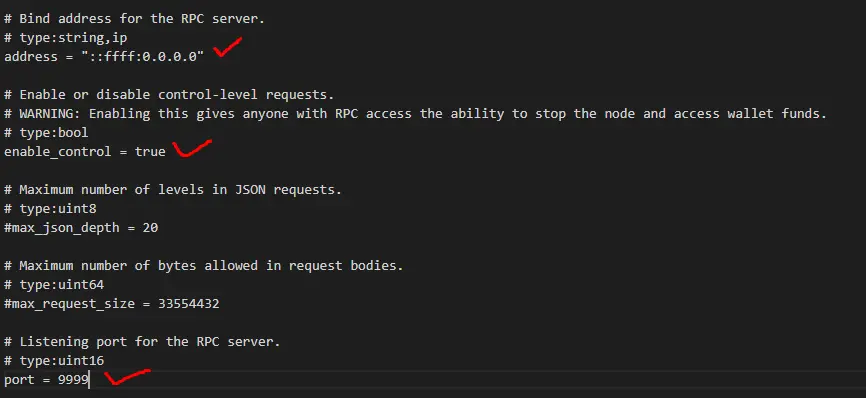
change the port as you want, never expose your node ip and port, anyone know the ip & port can interact with the wallet as the enable_control are active. if you're finish, then press ESC then :wq to write and exit from editor.
screen -S nodethis code will make a new screen session for your paw_nodes.
./paw_node --daemonthen CTRL+A+D to detach from session. and return to the main screen.
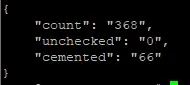
To check your nodes already active or not, you can check the block count with command below:
curl -g -d '{"action": "block_count"}' 'localhost:7046';and you'll see somekind like below:
note:
if you're getting error empty response, try checking your configuration above.
if you can't access your tribes (nodes) from outside (only inside through localhost), you need to setting up your vps firewall.
for this case i only run:
- sudo ufw default allow incoming
and it should works now :)
----
Donation welcome:
paw_1pawsayyn3prwdii958qjich6woidwqzk4j3ta953qrj1gbcq4ujctbs8ini






