
In this tutorial i recomended using Contabo (choose the NVME DISK!) and Vultr (SSD okay6, but better NVME) for most of my testnet (also for some mainnet nodes).
Why i'm not recomend the SSD Disk? Sometimes you may got out of sync. I've test it on nvme disk and it's good (till now when i write this article).
========
Part 1. Make your custom vanity address
Go to https://nanoaddr.io/ insert any character / words you want. but please not more character are hard to find (need very looong time to wait). i'll use simple 1-4 word as it's just need a few minutes to find the address. Click generate to start search your vanity address.
After few minutes you may got some address with prefix or suffix you're searching.
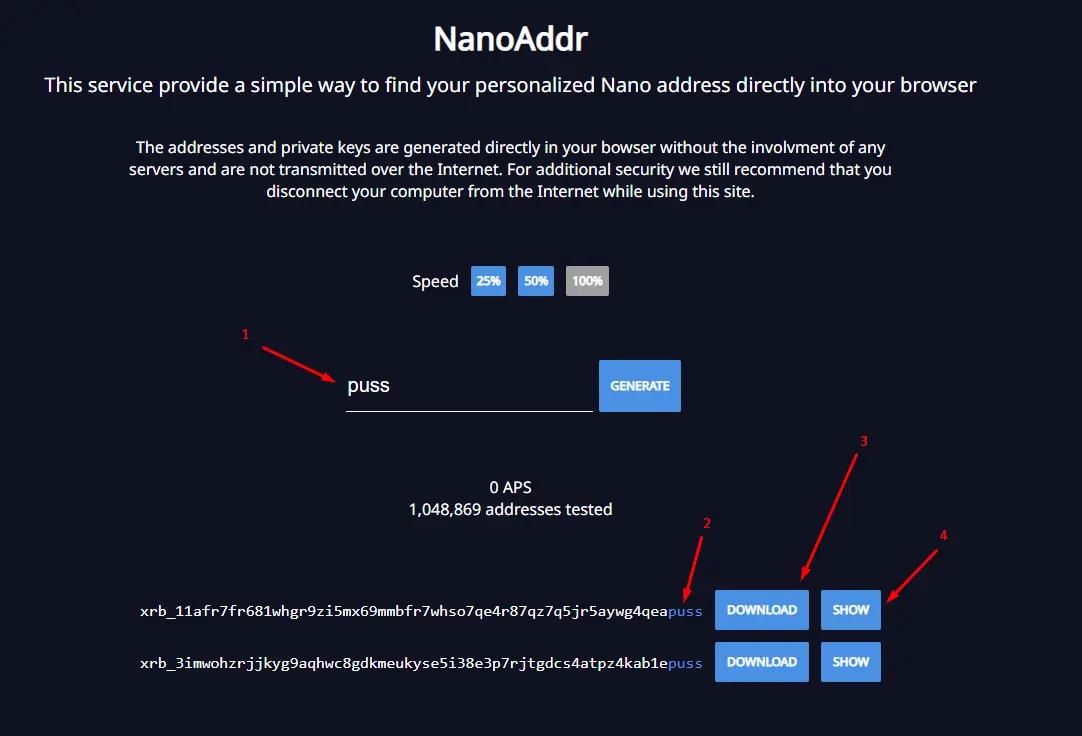
1. words searched.
2. suffixx we got (or it may prefix)
3. download the seed key data
4. show qr code, you can scan this with your mobile wallet (coming soon) for importing this address.
Make sure you're backing up the address and seed data. we'll need it.
**The xrb_ will be replaced to xdg_ if you're import the seed on DogeNano network (same as on nano (nano_) / banano (ban_) / raicoin (rai_) or any other nano forks).
=======
Part 2. DogeNano Nodes Installation
Prepare your vps, and connect to your vps using putty or termius (or any other ssh client you like).
update vps first
sudo apt-get updateinstall dependencies
sudo apt-get install wget jq screen curlget dogenano latest binary data
curl -s -L https://github.com/Dogenano-xdg/dogenano-node/releases/latest/download/dogenano_node_linux > dogenano_node_linuxchmod +x dogenano_node_linuxcreate xdg dir
mkdir Dogenanorun xdg binary once, then exit
./dogenano_node_linux --daemonuse CTRL+C to exit DogeNano binary
get default configuration
wget https://raw.githubusercontent.com/pramonoutomo/dogenanoNodeInstall/main/config_default.sh
bash config_default.shcreate new screen.
screen -S dogenanorun Xdg binary
./dogenano_node_linux --daemonuse CTRL+A+D to exit screen but keep dogenano node running...
=======
There is only 2 part for installing the DogeNano (XDG) nodes, and there is no rewards for running the nodes as of i'm writing this article. But you can use your own nodes for your own DApps, there is a DogeNano Hackaton to win $500 :) , more detail here https://medium.com/@contact_25748/dogenano-hackathon-contest-2ac973c81a75
Join My Discord (MoneyCamp) Server: https://discord.gg/xKTBGs9fMF
Join My Telegram Group (CodeBlockLabs): https://t.me/codeblocklabs
Subscribe My Youtube Channel: https://www.youtube.com/c/pramonoutomo






