
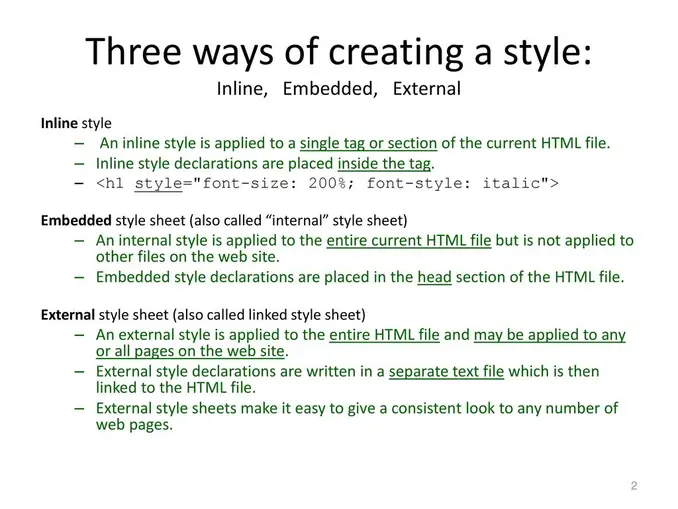
1. Importance of Separating Inline and Embedded Styles
Separating inline and embedded styles into external CSS files is a **best practice in web development** for several reasons. Inline styles (e.g., `style="color: red;"`) and embedded styles (e.g., ``) are often used for quick styling, but they can lead to **maintenance challenges** and **reduced performance**. By extracting these styles into a separate CSS file, you achieve **better organization**, **reusability**, and **separation of concerns**. This makes it easier to update styles globally, improves page load times through caching, and ensures consistency across multiple pages. Additionally, separating styles from HTML content aligns with the principles of **clean code** and **modular design**, making your project more scalable and easier to debug.
2. Benefits of Organizing Styles with a Python Script
Using a Python script to automate the extraction and organization of inline and embedded styles offers **significant efficiency gains**. Manually extracting styles from large HTML files can be time-consuming and error-prone. A Python script can:
- **Automate the process**: Extract styles, remove them from the HTML, and save them to a separate CSS file in seconds.
- **Ensure consistency**: Apply uniform formatting and naming conventions to styles, reducing the risk of errors.
- **Handle complex cases**: Manage multi-line styles, nested rules, and large-scale projects with ease.
This automation not only saves time but also ensures that your codebase remains clean and maintainable, which is especially important for collaborative projects or when working with legacy code.
3. Organizing Candidate Work for Future Reference
When organizing candidate work (e.g., for portfolios or documentation), a Python script can be a **powerful tool** to showcase your skills. By demonstrating your ability to:
- **Automate repetitive tasks**: Highlight your proficiency in Python and problem-solving.
- **Improve code quality**: Showcase your understanding of best practices in web development.
- **Create reusable tools**: Emphasize your ability to build solutions that can be applied across multiple projects.
You can reference the script as an example of your technical expertise and attention to detail. This not only makes your work more professional but also provides a tangible artifact that can be shared with potential employers or collaborators, demonstrating your ability to streamline workflows and improve efficiency.
By separating styles, automating the process with Python, and organizing your work effectively, you create a **clean, maintainable, and professional codebase** that reflects your skills and attention to detail. This approach is invaluable for both personal projects and professional development.
Provide this one:
import re
import os
from Npp import notepad

def save_to_file(file_path, content):
    with open(file_path, 'w') as file:
        file.write(content)

def extract_styles(html_content):
    # 1. Remove HTML comments:
    html_content = re.sub(r"(?=<!--)([\s\S]*?)-->", "", html_content, re.DOTALL)  # Correct regex for comments
    html_content = re.sub(r"//gs", "", html_content, re.DOTALL)

    # 2. Extract <style> tags (now that comments are gone):
    style_pattern = re.compile(r'<style[^>]*>(.*?)</style>', re.DOTALL | re.IGNORECASE)  # Case insensitive
    styles = style_pattern.findall(html_content)

    # 3. Remove <style> tags from the HTML content:
    cleaned_html = style_pattern.sub('', html_content)

    # Convert styles list to a dictionary with unique class names
    styles_dict = {}
    for i, style in enumerate(styles):
        class_name = "embedded-style-" + str(i + 1)
        styles_dict[class_name] = style.strip()  # Remove extra whitespace

    return cleaned_html, styles_dict

def flatten_css(styles_dict):
    flattened_css = []
    for cls, style in styles_dict.items():
        # Split the style into individual rules
        rules = style.split("}")
        for rule in rules:
            rule = rule.strip()
            if not rule:
                continue
            # Extract the selector and properties
            if "{" in rule:
                selector, properties = rule.split("{", 1)
                selector = selector.strip()
                properties = properties.strip()
                # Prepend the parent class to the selector
                flattened_css.append(".{} {} {{\n{}\n}}".format(cls, selector, properties))
    return "\n".join(flattened_css)

def extract_and_replace_inline_styles(html_content):
    inline_style_pattern = re.compile(r'style="([\s\S]*?)"', re.IGNORECASE)

    styles = {}
    cleaned_html = ""
    last_match_end = 0

    for match in inline_style_pattern.finditer(html_content):
        style_content = match.group(1)
        start, end = match.span()

        class_name = "inline-style-" + str(len(styles) + 1)
        styles[class_name] = style_content.strip()  # Remove extra whitespace

        # Find the opening tag more reliably (handles multi-line attributes)
        tag_start = -1
        for i in range(start - 1, -1, -1):  # Search backwards
            if html_content[i] == "<":
                tag_start = i
                break

        if tag_start != -1:
            tag_end = html_content.find(">", start)  # Find the closing >

            if tag_end != -1:
                tag = html_content[tag_start + 1: tag_end]  # Extract the entire tag

                # Check if class attribute already exists
                if "class=" in tag:
                    new_tag = tag.replace('class="', 'class="{} '.format(class_name))  # Add class to existing
                else:
                    new_tag = tag.replace(">", ' class="{}">'.format(class_name))  # Add class attribute
                new_tag = new_tag.replace('style="{}"'.format(style_content), '')  # Remove the original style attribute
                cleaned_html += html_content[last_match_end + 1: tag_end] + new_tag
                last_match_end = tag_end + 1
            else:
                cleaned_html += html_content[last_match_end]  # Handle malformed tags
                last_match_end = end
        else:
            cleaned_html += html_content[last_match_end]  # Handle malformed tags
            last_match_end = end

    cleaned_html += html_content[last_match_end:]
    return cleaned_html, styles

def main():
    html_file_path = notepad.getCurrentFilename()

    if not html_file_path:
        print "Error: No file is currently open in Notepad++."
        return

    try:
        with open(html_file_path, 'r') as file:  # No encoding in Python 2
            html_content = file.read()

        # Extract embedded styles
        cleaned_html1, styles1 = extract_styles(html_content)

        # Extract and replace inline styles
        cleaned_html, styles = extract_and_replace_inline_styles(cleaned_html1)

        # Define output file paths
        html_dir = os.path.dirname(html_file_path)
        cleaned_html_file_path = os.path.join(html_dir, "cleaned_" + os.path.basename(html_file_path))
        css_file_path = os.path.join(html_dir, 'inlinestyle.css')
        css_file_path1 = os.path.join(html_dir, 'embeddedstyle.css')

        # Save cleaned HTML
        save_to_file(cleaned_html_file_path, cleaned_html)

        # Format and save inline styles
        css_content = "\n".join([".{} {{ {} }}".format(cls, style) for cls, style in styles.items()])
        save_to_file(css_file_path, css_content)

        # Flatten and save embedded styles
        css_content1 = flatten_css(styles1)
        save_to_file(css_file_path1, css_content1)

        # Print success messages
        print "Inline styles extracted and saved to {} and cleaned HTML to {}".format(css_file_path, cleaned_html_file_path)
        print "Embedded styles extracted and saved to {}".format(css_file_path1)

    except Exception as e:
        print "An error occurred: {}".format(e)

if __name__ == '__main__':
    main()






