Nowadays, Microsoft Office is an integral part of almost any computer and mobile device. Having an office suite is mandatory for most users, as it allows them to open documents in every possible format. Office 2019 is not the latest version of the popular office suite, but it’s packed with all the features you’ll ever need. And most importantly, it's yours for a one-off payment, as opposed to the regular subscription fees required for Office 365.
Many users have switched to Office 365, but getting a retail version may be a better solution if you only need Word, Excel, PowerPoint, and Outlook for the simplest tasks. Instead of paying a subscription fee every month, you can resort to a one-time purchase. If you can live without various cloud-based features, then Office 2019 is an ideal choice for you. Here's what you get and how it works.
Table of Contents
- Office 2019 Review – An Alternative to Office 365!
- Value for Money
- Third-Party Sellers
- New Features
- Break the Language Barrier
-
Add Visual Impact
-
Inking is Where it's At
- Excellent Voicing and Reading Tools
- New Charts and Formulas
- Other Features Worth Mentioning
- Office 2019 Editions
- Microsoft Office Home and Student:
- Microsoft Home and Business
- Microsoft Office Standard
-
Microsoft Office Professional
- Microsoft Office Professional Plus
- Core Applications Explained
- Word
- Excel
- PowerPoint
- Outlook
- Access
- Office 2019 vs Competitors
- FAQ
-
Is It Worth Buying Office 2019?
-
Is it Better to Get Office 365 or Office 2019?
- Is Microsoft Office 2019 Discontinued?
-
- Value for Money
Value for Money
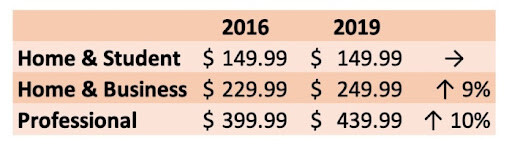
Before we delve into the functions of Office 2019, let’s focus on the most deciding factor – pricing. Microsoft Office isn’t cheap, and we expect the quality that the package is known for. Despite shifting focus to subscription-based Office 365, Microsoft still sells Office Home & Student 2019 for $149.99.
You can buy some of its apps individually, but considering Word 2019 alone is $139.99, it’s clear that Microsoft wants you to buy the whole package. The pricing difference is so small that it’s not even worth bothering. But is there a way to buy it legitimately cheaper?
Third-Party Sellers
Like with almost everything your money can buy; the official distribution is not the only way of acquiring your desired software. Third-party sellers offer the same products for only a portion of the retail price, which is often a bargain. How is it possible? They usually acquire software keys from official distributors in bulk for a significant discount.
For example, on RoyalCDKeys you can purchase Microsoft Office 2019 Pro Plus cd Key for as low as $4. It can be activated legitimately using official methods. Sounds better than paying a full retail price for the same product, isn’t it?
New Features
The latest features include new inking tools, data types, functions, translation and editing tools, motion graphics, and more! They are slotted almost seamlessly into the familiar interface, so you won’t even notice them unless you know where to look.
Of course, a regular user won’t probably need a portion of its latest features, but business users will strongly benefit from them. However, it all comes down to personal needs or the kind of work you're doing. You don’t even have to create a Microsoft account to get all the functions which is a huge plus. Here’s a list of new features that improved significantly compared to older versions of Microsoft Office.
Break the Language Barrier
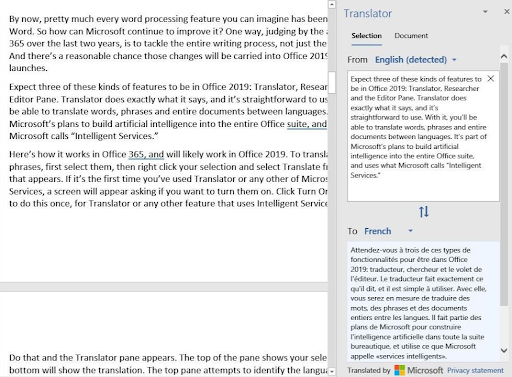
Microsoft Translator was specifically made to translate words, phrases, and other text selections into another language. It’s a very useful tool, far more convenient than free alternatives like Google Translate, making it an ideal solution for those who need to work in multiple languages. Here’s a quick tutorial on how to use it:
1. Select the words or phrases that you want to translate.
2. Right-click your selection and choose “Translate” from the menu.
3. The top of the translator pane shows your selection, while the bottom one shows its translation.
The top pane identifies the text's original language, and in most cases, it works flawlessly. If it misidentifies the language, you can always select the right one. The translator is also part of Microsoft’s Intelligent Services, the artificial intelligence behind features like Smart Lookup and Researcher. It ensures that translation is less robotic and more accurate. It’s not ideal but still better than free alternatives.
Add Visual Impact
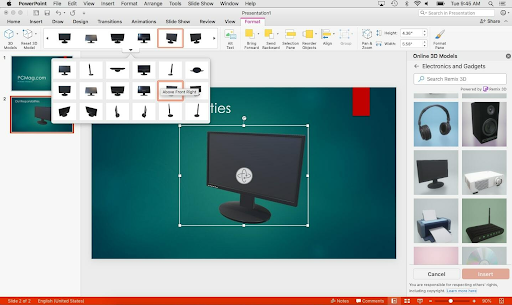
Morph transition is the latest addition to Microsoft PowerPoint's all-popular presentation creator. It’s a direct competitor to Apple’s magic move feature in Keynote. It shows separate objects moving to new locations from one side to the next. With Morph, you can make smooth animations, transitions, and object movements across your slides.
The Zoom feature also allows you to jump to any slide or section in your presentation without following the traditional linear order.
Additionally, you can bring visual interest to your documents, worksheets, presentations, and messages by inserting Scalable Vector Graphics (SVG) that have filters applied to them. This format is widely used on the web and is not yet supported by Apple’s Keynote, which is a huge selling point for Microsoft.
Office apps can also import 3D models from Microsoft’s Remix 3D community website and rotate them through 360 degrees. It perfectly correlates with the Insert an Icon feature, where you can choose from over 500 icons. You can use these icons in Word, PowerPoint, and even Excel documents for illustration purposes. They’re all black and white by default, but you can change their color however you please.
Inking is Where it's At
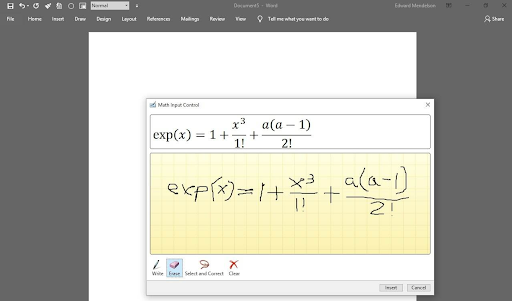
Drawing tools aren’t exactly the new feature in Microsoft Office, but it adds Ink features that weren’t present in earlier versions. Now you can convert ink to shapes, write out complex math problems, highlight text, and more. You can use a finger or a pen, but a mouse works too!
It’s clearly designed to work with a pencil or tablet, but even a trackball will suffice, as you can see in the picture above. Office 2019 enhances digital pencil support by adding pressure and tilt sensitivity and the ability to move the text by dragging it however you like.
Excellent Voicing and Reading Tools
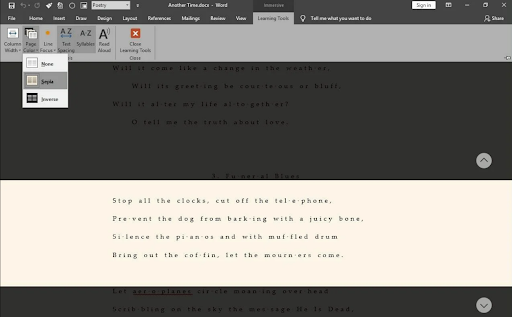
A well-hidden Speak feature in Office 2016 is now a fully-fledged Read Aloud tool. It's available from the new Learning Tools section. Now you can display widely spaced text for easy reading and text with dots between syllables.
You can display either just the current line or one or two lines above and below it, with the rest of the text almost invisible. Alternatively, you can change the background color or invert the colors (white text on a black background).
Microsoft Word has always outclassed every other word processor with its features. Oddly, on a Mac, the Learning Tools require an Office 365 subscription and aren't part of the standalone Office 2019 product, as they are on Windows. The same applies to the Zoom presentation feature in PowerPoint.
New Charts and Formulas
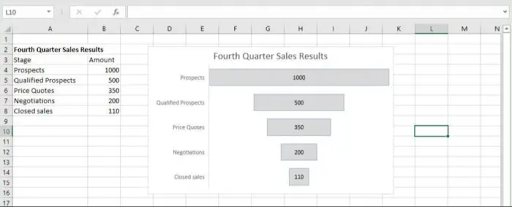
Excel has stayed the same throughout the years with only minor tweaks to its functionality. The newest version adds some tweaks for data analysis, funnel charts and 2D maps, the ability to publish from Excel to PowerBI, and enhancements to PowerPivot and PowerQuery.
Funnel charts are used when you want to display values at multiple stages in a process. It’s a nice graphical feature that improves readability.
Here are other features for more advanced users:
- TEXTJOIN and CONCAT. They let you combine text strings from ranges of cells with or without using a delimiter separating each item, such as a comma.
- IFS and SWITCH. It helps you specify a series of conditions when using nested IF functions.
- MAXIFS and MINIFS. Filter and calculate data in several different ways.
Overall, these are excellent additions to Excel 2019. Too bad there aren’t more of them.
Other Features Worth Mentioning
If I’ve tried to explain in detail every single feature of the new version of Office 2019, this review would be overly long. The amount of available features is overwhelming; thus, I’ve decided to point out and shortly explain the rest of them.
Here are other features:
- Precision Selecting. Ever selected too many cells or the wrong ones? You can now deselect irrelevant cells without having to start over.
- Timeline filters. Want to take a look at your PivotTable data across years, quarters, months, or even days? Quickly filter a PivotTable with a timeline filter by sliding the date range.
- Timelines across time zones. Traveling across time zones? Create an event with different start and end time zones, and Outlook will take care of the conversion. No mental math is required!
- Video support. Add an online video to your slide and watch it without leaving PowerPoint.
- Gesture support. Swipe right or swipe left? You decide! Set gestures to the actions you use most. Choose from Delete, Archive, Mark as Read, Flag, or None.
- Accessibility Checker. This feature is better than ever, with updated support for international standards and handy recommendations to make your documents more accessible.
- Learning Tools. Give your eyes a rest. Adjust text spacing, column width, and page color. Or listen as Word reads your document aloud, highlighting text as it's read.
Office 2019 Editions
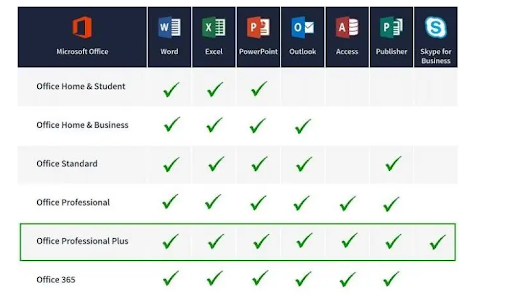
As usual, Microsoft includes more versions of their software than we ever wanted to have. Regardless of your choice, they are licensed for one Windows PC or Mac only. The four major releases we’re going to cover are more than enough for regular and business users:
- Home & Student for PC/MAC: Core applications only.
- Home & Business for PC/MAC: Core applications plus Outlook.
- Professional: Core applications plus Outlook, Publisher, and Access.
- Professional Plus: Obtainable through volume licensing channels; includes core applications plus Outlook, Publisher, Access, and Skype for Business.
Microsoft Office Home and Student
Office 2019 Home and Student includes core apps like Word, Excel, and PowerPoint. It also comes with OneNote, a note-taking app that allows you to create detailed notes using text, images, music, weblinks, and more. This edition of Office 2019 is ideal for students, teachers, and creative writers.
Microsoft Home and Business
The Home and Business edition of Microsoft Office includes the flagship core products like Microsoft Word, PowerPoint, and Excel. It includes Outlook instead of OneNote, assuming that powerful email management and features are more critical to business owners than taking extensive notes. Outlook allows you to track and manage appointments and projects effectively, plus you get superior email management.
Microsoft Office Standard
The standard version of Microsoft Office brings you the 3 core apps, Word, Excel, and PowerPoint, plus you get Outlook and Publisher. This can be looked at as an extended version of Office Home and Business. Microsoft Publisher is a desktop publishing application that allows for powerful design layouts of many different types of documents, from newsletters to posters.
However, this version of Microsoft Office is only available through volume licensing. This means that the standard version of Office will primarily be used for schools and businesses that purchase bulk licenses.
Microsoft Office Professional
The difference between this version of Microsoft Office and the other versions is the inclusion of Microsoft Access, a powerful database. If your business needs a database app, this is the version you’re looking for. It also includes Microsoft Publisher and does not require volume licensing. The three core apps are included, along with Outlook.
Microsoft Office Professional Plus
Apart from core applications, this one also includes Publisher, Access, and Skype for Business. This is for big corporations and power business owners with many employees. Volume licensing only for this version.
Core Applications Explained
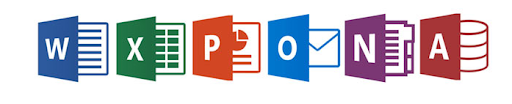
Microsoft Office 2019 includes the essential apps for every office suite user: Word, Excel, and PowerPoint. As you can see in our review, they offer more depth and control over your documents than you'll ever get from Google Docs or open-source alternatives. Here’s a brief explanation of all the most essential apps you can get with Office 2019.
Word
Microsoft Word is the ultimate writing tool for every journalist and copywriter. It’s also great for simpler tasks such as writing letters, quick newsletters, or essays. No matter what kind of word processing job you’ll throw at it, MS Word will do it all. Despite its wealth of features and tools, the Ribbon interface ensures it stays simple and accessible. It’s still an undisputed leader even after 30 years.
Excel
No other spreadsheet program comes close to Excel in terms of advanced capabilities. New features aren’t its strongest point, but that's only because it already has everything you're going to need. It’s hard to compete with the tool with so many calculation and computation capabilities used in every company and home office.
PowerPoint
Office 2019 further enhances the capabilities of PowerPoint, including support for advancing slides with Bluetooth pens, a new zoom interface for jumping between slides, and an excellent morph transition. However, competition grows strong with applications like Google Slides, but due to the popularity of PowerPoint, it will remain the king of presentation apps for years to come.
Outlook
Outlook, similar to Excel, hasn’t received many upgrades in recent years. However, it excels in managing your emails across multiple accounts, especially with the new Focused inbox feature for your most important messages only. A solid option if you’re using your email often.
Access
Microsoft Access database application is still available to you when you pick up an Office 2019. In the newest version, you’ll see improved chart types, support for new data types, and accessibility upgrades as well, but nothing major.
Office 2019 vs Competitors
FAQ
Is It Worth Buying Office 2019?
Absolutely. A software suite that includes word processing, spreadsheet, and presentation apps is enough for most people. If you work on a single computer and you don’t need additional storage for online documents, it’s the best you can get.
What’s more, you can get it significantly cheaper from third-party sellers.
Is it Better to Get Office 365 or Office 2019?
It depends. For a regular user who only uses core applications for basic document editing, Office 2019 is perfectly enough. However, if you’re a business user who needs an office suite powerhouse with all bells and whistles and regular updates, then lean towards Office 365.
Is Microsoft Office 2019 Discontinued?
Mainstream support for Office 2019 will end on October 10, 2023. Unlike other versions of Microsoft Office, Office 2019 will only get two years of extended support, which means that support for Office 2019 will end on October 14, 2025, the same day that Windows 10 and Office 2016 will end support.