
If you are planning on holding your crypto, you might as well passively earn while doing so. Staking is the most popular method of passively earning, but lending your crypto can be another option.
Kucoin has a very intuitive and easy system of lending out your coin, I will take you step-by-step through the process.
1) Sign in/Sign up
If you already have an account, merely log in with your details. If you don't already have an account, you can sign-up to Kucoin here.
Make sure to set up 2-FA and to make your account secure.
2) Find the Link
After you are successfully logged in, click on the 'finance tab' that you will find at the top of your screen:

Under this tab, you will see the option for 'Crypto Lending':

Click on that link and you will be brought to the lending page.
3) Decide which coin you want to loan
This part is entirely up to you of course, and will depend on what you are holding. Different coins will have different Daily Interest Rates and Annulized Rates compared to other coins.

For example, the image above show the statistics for lending your Eth - currently there is an annualized rate of about 20%. But it can change from week to week. Other coins can have either a higher or lower rate: For example, you can currently loan out your USDT for about 4-5%, other coins will be as low as 1%. So your returns will depend on what you want to lend.
4) Select your coin

Not every coin will be available to lend but there are quite a few options. Type in the search bar or scroll down to find and select the coin you want to loan. In this case, we will use Eth.
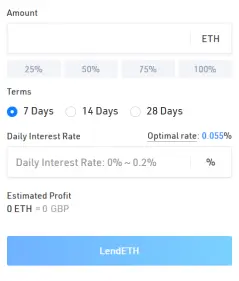
Input the amount of the coin you want to lend and select how many days you want to lend it for. It is important to note that your coins will be locked in when you lend and you can't pull them out - so be wary of that while selecting how long you want to lend for.
Then click on the 'optimal rate', which will give you the optimal daily interest rate to lend out your coin and simply click on the 'LendETH' button below to start lending. It will also tell you your estimated profit to help you decide if it's worth it.
After confirming that you want to lend, your coins will be put on offer until someone decides to borrow your coins. Click on the 'MyLendings' tab to look at your lendings and see if anyone has borrowed them.
On this page, go down to whichever coin you have lent and click on the 'Check Details' on the right hand side. This will bring you into another menu where it will give the details of your lending as the image below demonstrates.

Immediately after confirming your lend, you will see your 'Open Orders' in this section. This is where your coin will be when it hasn't yet found a borrower. Once it does find a borrower - your coins will move over to the 'Unsettled' section.
It will stay in that section until the end of the lending period specified or until the borrower decides to give the coins all back, which can sometimes happen before the lending period specified. Once it has been completed, you will see your lending earnings and details in the 'Settled' section above.
5) Is it worth it?
In my opinion, lending with Kucoin is a pretty good and safe method of earning income passively. The main risk comes from locking in your coins and the market dumping while you can't access them. But if you plan to be a long term holder, this shouldn't be too much of an issue.
Overall, it has worked well for me but it is entirely dependent on which coins you want to lend out. VET for example used to have a daily interest of 0.012% which was pretty decent - but it is now merely 0.003% which only gives a return of about 1% in a year. So your returns will depend on how many coins you want to lend, which coin you want to lend, and the changing daily interest rates offered.






