
How to use the in-game map and teleport.
Facts about the map
- X and Y start from -2 in the bottom left corner of the entire map and goes up to 2048.
- -2 to 0 coordinates can't be used to teleport. As well as 2047 and 2048. Most likely to solve the "cloud hiding castle glitch" there was in beta.
- The coordinate shown on the coordPad when moving around the map is the coordinate on the cell in the center of your screen.
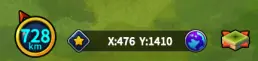
- The coordinate pad, I'll call it the coordPad; You can enter coordinates by pressing on the text in the black box.
- Here you can see the different options on the Field view.
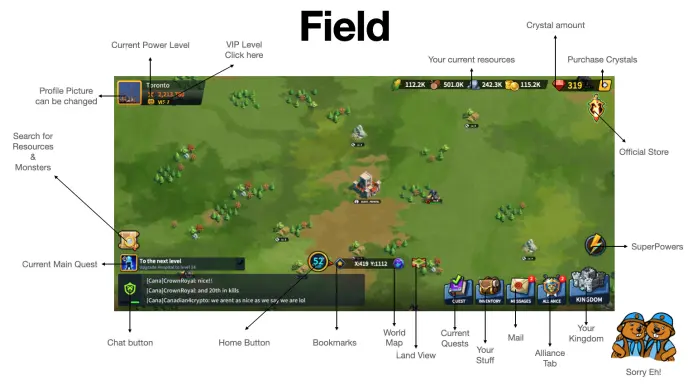
Image provided by @Canadian4Crypto and CANA-university
How to use the teleport items
- Castle are 4 cells in size, 2 high by 2 large.

- It is not possible to use a teleport while you have troops outside your castle. At the moment it will prompt a message at the top of the screen. You do not lose your teleport, don't worry 😉
- The coordinate that are shown and used in the coordPad are the coordinates of the top left cell of your castle.
First you will have two options, if you don't have the coordinates;
Open the world map and click manually the area where you desire to relocate, just you view to see where you want to teleport. Then,
Go in your inventory in the "other" section and select an Advanced Teleport (see objects below if you plan to use a different teleportation method).
Why so? because when you select the teleport item, you can't access world map anymore. Hence, if you don't have the coordinates at hands, follow method above.
If you have the exact coordinates, go select a Advanced Teleport right away.
Now when you used the teleport. You either enter coordinates in the pad at the bottom center of the screen or drag your castle to the desired location. When you are sure you are located at the right location press the "TELEPORT" button.
And there you go! you are now ready to start a new adventure!
Available teleport items
There is at the moment 3 different teleport items.
- The Random Teleport, it can be bought in the Trading post basic shop. For 500 gems.

- The Advanced Teleport, it can only be purchased with Victory medals earned when conquering point of interests, like Shrines or the congress. It is also frequently given or made available by the Game studio through gifts, quest or paid bundles. Keep an eye out for those 😉

- The Orb of teleportation, Found in your Treasury, on the right side of your castle. You will need to build the orb and master a first bonus to unlock Teleport level 1. This require 160 Orb fragment.

The pieces can be found in the VIP shop in the Trading post, 10 are available each week after you reached VIP level 6. They are also available for money in the "Official shop" where you see the bundles and other packages. Purchasing the orb require to buy VIP package 2 to VIP package 6, which come up to a 180$ US.
Overall, always try to keep in mind your movement needs on a 2 week basis. You will usually receive one teleporter per 2week period, it can change anytime. I hope this guide will help you save teleports and build awesome Hives.
@27aume

Join us in League of kingdom:
official website (game available on any device); https://leagueofkingdoms.com/
League of Kingdoms official twitter; https://twitter.com/leaguekingdoms
League of Kingdoms official telegram; https://t.me/LoK_global
League of Kingdoms official discord server; https://discord.gg/dWrFMG5






