
The Crypto Scanner I Wish Had Existed When I Started Trading
800+ coins. 90-second scans. 7 proprietary signals. Here is how BearTrap Scanner works and why I built it.
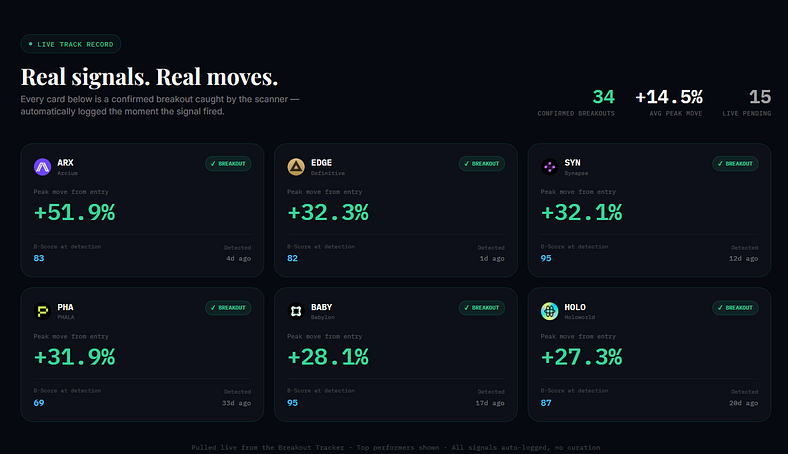
I still remember the exact feeling.
I had been watching a mid-cap altcoin for weeks. The chart looked interesting. Volume was starting to pick up. I kept telling myself I’d set an alert, research it properly, then enter.
I waited one day too long.
By the time I checked the next morning, it was already up 40%. Twitter was flooded with people calling it. YouTube thumbnails were being written. The move was done.
I hadn’t missed it because I was wrong about the setup. I missed it because I was slow.
That kept happening. Over and over.
So I stopped trying to manually keep up with the market, and I started building something that could do it for me.
That’s how BearTrap Scanner was born.
The Real Problem With Crypto Tracking
Here’s what most people don’t talk about.
The crypto market doesn’t have 10 coins. It doesn’t have 50. It has 800+, and they all move differently, on different schedules, for different reasons.
A serious move can start forming on a coin you checked two days ago and dismissed. By the time it shows up in a Telegram group or a YouTube video, the early entry is gone. You’re buying someone else’s exit.
The people who find opportunities early aren’t smarter. They’re watching more data than you are.
I couldn’t do that manually. Nobody can. So I automated it.
What BearTrap Scanner Actually Does
Press enter or click to view image in full size
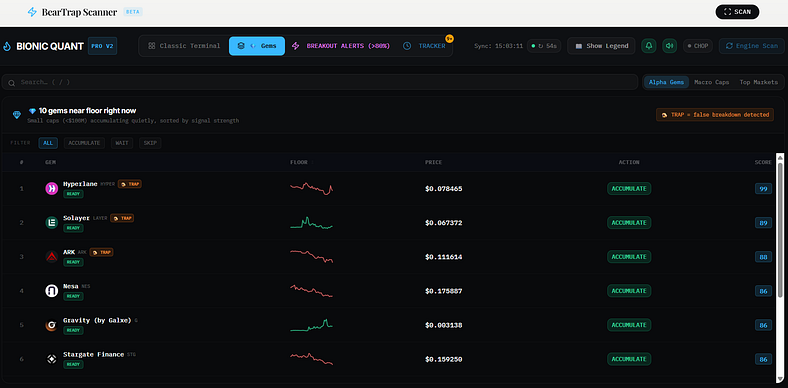
Every 90 seconds, the scanner fetches data across 800+ cryptocurrencies and runs each one through a quantitative scoring model called the Q-Score.
The output is a ranked list. Coins showing the most interesting combinations of activity float to the top. The quiet ones stay buried.
Instead of opening 50 tabs and eyeballing charts, I open one dashboard and immediately see where unusual things are happening.
But the ranking is only part of it. The more interesting features are the signal detections. These are pattern labels the scanner applies when it recognises something specific is happening with a coin.
Let me explain each one.
Bear Traps: The Signal That Saved Me Most
A bear trap is when a coin drops hard, looks like it’s collapsing, and then reverses sharply.
It’s one of the most common patterns in crypto. A coin breaks below a key level, retail traders panic sell, and then it snaps back above that level within hours or days. The people who sold the fake breakdown end up chasing the price back up.
BearTrap Scanner detects this pattern automatically. When the algorithm sees a sharp recent drop combined with price stabilising or recovering above support, it flags the coin. The idea is to catch potential reversals before they become obvious on social media.
This has kept me from panic selling more times than I can count. When I see a bear trap signal instead of a clean breakdown, I stop, think, and wait rather than react.
Stealth Breakouts: When Nothing Looks Interesting
Press enter or click to view image in full size
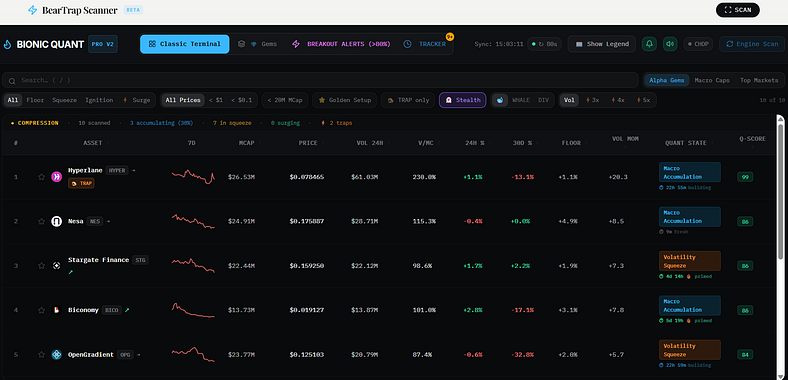
One of my favourite filters is the Stealth mode.
A stealth breakout is when a coin is quietly accumulating, not showing up in trending lists, no social media noise, no recent hype. On the surface it looks boring. But underneath, the volume structure is changing.
These are some of the cleanest setups the scanner finds, because there’s no FOMO premium baked into the price yet. You’re early, not late.
When I apply the Stealth filter, the scanner shows me only the coins where something is building quietly. Most of the time the list is short, which is the point.
Whale Divergence and Whale Accumulation
Press enter or click to view image in full size
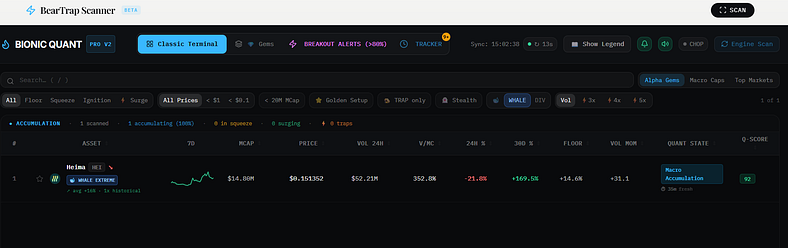
This one requires a bit more explanation.
Whale divergence is when on-chain or volume-based signals suggest that large holders are accumulating, even while the price looks weak or flat on the surface. Smart money is building quietly. The chart isn’t showing it yet.
Whale accumulation goes a step further. It’s a stronger confirmation that institutional-scale buying is happening, sustained over time, not just a one-candle spike.
Elite plan users get a dedicated Whale Accumulation filter that isolates only these coins. Combined with positive price structure and no distribution signals, this is one of the most valuable filters on the platform.
I don’t use it as a primary trigger. I use it as confirmation. When a coin looks good on the Q-Score and the whale signal agrees, that’s a much higher conviction setup than either signal alone.
Distribution vs. Accumulation: Reading Who Is Actually Selling
Not every pump is the same.
Some coins surge because genuine demand is building. Others surge because large holders are unloading into retail buying pressure. That second type is called institutional distribution, and it’s the setup where most new traders get wrecked.
BearTrap monitors the relationship between volume behaviour and price action to estimate whether a coin is in accumulation mode (smart money building positions) or distribution mode (smart money exiting into your buy orders).
If a coin scores well but shows distribution signals, I leave it alone. The score looks good on paper but the structure is deteriorating. That’s a trap.
FOMO Traps and Exhaustion: The Moves That Are Already Over
Press enter or click to view image in full size
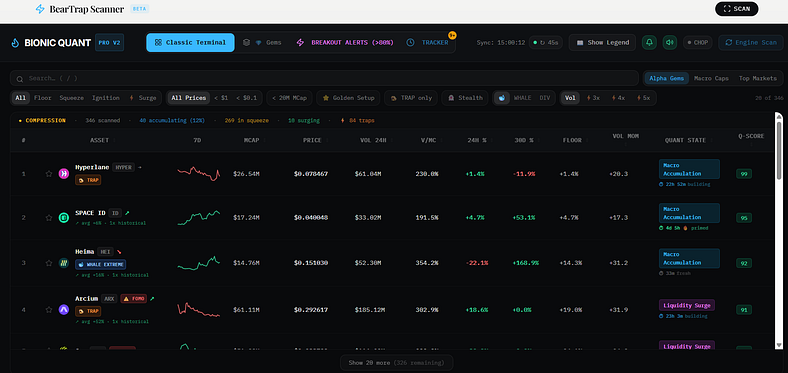
When a coin has already moved significantly off its low, volume is spiking because of attention rather than accumulation, and the price is extended relative to its recent range, the scanner marks it as a FOMO setup or exhaustion signal.
This is critical because it filters out exactly the coins showing up on Twitter just as they’re about to drop.
A high Q-Score combined with a FOMO tag usually means the coin looks great on a screener but is already past its best entry point. I skip those almost every time.
Alpha Gems: Small Caps Near Their Floor
This feature is aimed at a specific type of opportunity that most scanners completely ignore: small caps under $100M market cap that are trading near their historical floor with smart money quietly accumulating.
Each Gem gets one of three labels: ACCUMULATE, WAIT, or SKIP.
ACCUMULATE means all signals are aligned. The coin is close to its floor, accumulation is confirmed, and the setup is clean. This is the highest-conviction signal the scanner produces for small caps.
WAIT means the coin looks interesting but the timing isn’t quite right. Something is missing.
SKIP means the signals are conflicted or negative. Not worth the risk.
These setups rarely show up on trending lists. That’s why they’re worth watching.
Golden Setup: The Strictest Filter
Press enter or click to view image in full size
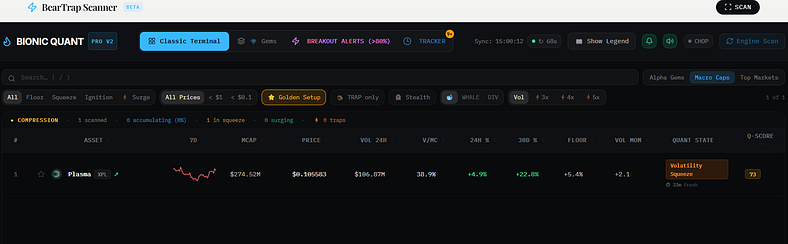
Golden Setup is a strict filter that combines multiple conditions. A coin only qualifies if it is close to its structural low, showing clean volume activity with no FOMO-driven spikes, passing the bear trap check, labelled as stable from a signal perspective, and scoring above a threshold that adapts based on the market cap category.
Most days, very few coins pass it. On some days none do.
That’s the point.
When Golden Setup shows me 3 or 4 coins, those are the cleanest setups across the entire 800+ coin universe at that moment. Not the flashiest, not the trending ones. The ones with the best risk-to-reward structure based on data.
When I only trade Golden Setup coins, I make far fewer reactive mistakes.
The Volatility Squeeze
A volatility squeeze happens when a coin’s price range compresses over time. Narrow bands, shrinking volatility, low activity. It looks boring. Most traders ignore it.
But compressing volatility usually precedes an expansion. The energy is building. The question is just which direction it releases.
The scanner flags volatility squeezes because they represent potential pre-move setups. Not actionable on their own, but combined with directional signals like accumulation or positive momentum, they’re early indicators worth watching.
The Breakout Tracker: Closing the Loop
Press enter or click to view image in full size
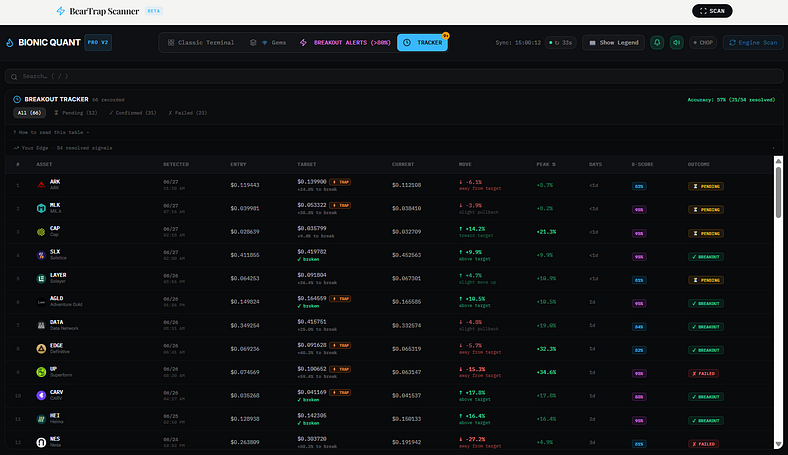
Once a coin shows a strong setup, the scanner doesn’t just forget about it.
The Breakout Tracker keeps a rolling history of detected setups and monitors whether they followed through or failed.
Each tracked entry moves through states: active, confirmed (the coin broke out and held), or failed (it hit the stop loss threshold or timed out without following through).
This does two things. First, it builds a performance log so you can review which signals actually worked. Second, it shows you in real time which current setups are still live versus which ones have already resolved.
I check it almost every day. Seeing a setup go from active to confirmed feels like watching the thesis play out. And a failed label is just as useful because it keeps me from re-entering a dead setup with fresh capital.
The Trading Modal (Elite)
Press enter or click to view image in full size
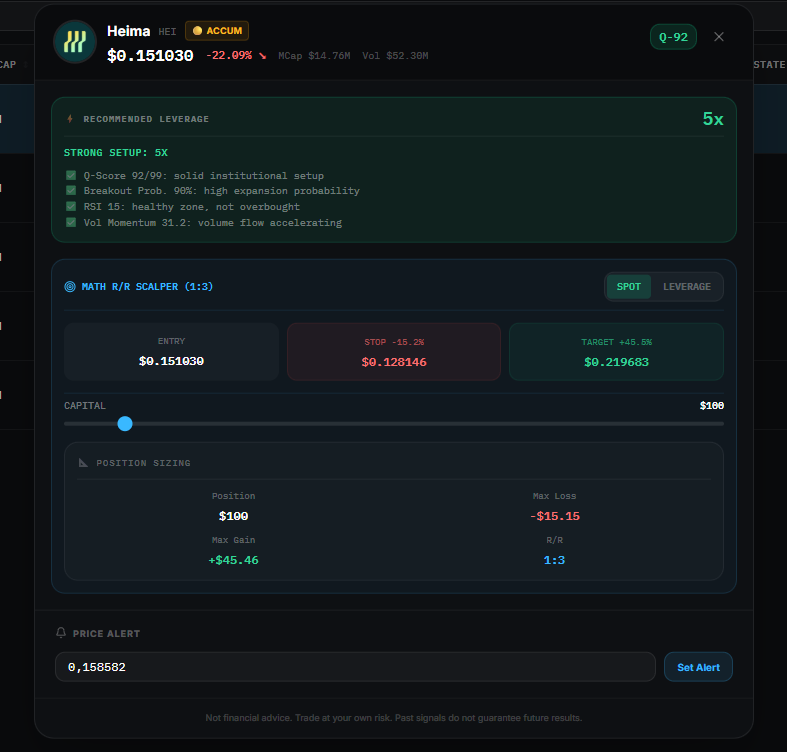
Elite plan users get a full Trading Modal inside the coin detail view.
When you open any coin, you see not just the signals but also position sizing guidance: entry price, target level calculated from resistance, leverage options with liquidation price automatically computed, and your win/loss amounts based on your capital input.
This turns the scanner from a filter into a complete decision support tool. You go from “this looks interesting” to “here’s the exact setup, risk amount, and exit level” in a few seconds.
What the Dashboard Actually Looks Like in Practice
I’ll walk through a real session.
I open the scanner. I see 800+ coins ranked by Q-Score. The top already narrows it to maybe 30 interesting ones. I turn on the Golden Setup filter. Down to 4 or 5.
I look at each one. Most are tagged stable with no bear trap and no distribution signal. One has a whale divergence label. Another is showing a volatility squeeze alongside confirmed accumulation.
I open those two in the Trading Modal. I check the entry, the resistance target, the risk amount. If the structure is clean and the numbers make sense, I add it to my watchlist.
That whole process takes under 10 minutes.
Without the scanner, getting to the same two coins manually would have meant checking hundreds of charts, probably missing half the signals along the way.
The Plans
Press enter or click to view image in full size
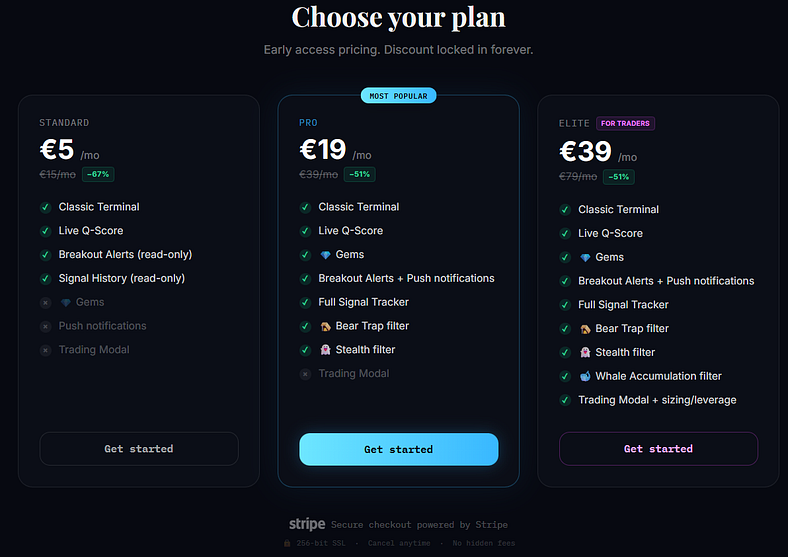
BearTrap Scanner has three tiers, all currently at early access (founding member) pricing.
**Standard at €5/month** (regular price €15) gives you the Classic Terminal with the live Q-Score, and read-only access to Breakout Alerts and Signal History. This is the right starting point if you want to evaluate the tool before committing to a higher tier.
**Pro at €19/month** (regular price €39) unlocks the full platform: Alpha Gems, full push notifications, the complete Signal Tracker, the Bear Trap filter, and the Stealth filter. This is what most active traders use.
**Elite at €39/month** (regular price €79) adds the Whale Accumulation filter and the full Trading Modal with position sizing and leverage guidance. Built for traders who want every signal the engine produces plus trade structuring tools in the same interface.
All plans can be cancelled anytime from the Stripe billing portal. No questions, no fees.
What BearTrap Is Not
I want to be direct.
BearTrap is not a trading bot. It doesn’t place orders. It doesn’t tell you exactly when to buy or sell. It doesn’t predict the future.
It is a market filter. It takes an overwhelming amount of data and compresses it into a clear, ranked view, then adds signal labels that help you understand the quality and character of each setup.
The decisions are still yours. BearTrap just makes sure you’re making them with better information, faster than you could gather it alone.
Why I Built It Instead of Buying Something
There are plenty of crypto scanners out there. I tried most of them.
The problem is that they’re either too simple (just showing 24-hour volume gainers, which is nearly useless) or too complex and expensive, aimed at institutional traders with Bloomberg terminals.
None of them combined what I actually wanted: a scored ranking system, proprietary signal detection for the patterns that matter most to retail traders, and a breakout tracking layer to close the loop on each setup.
So I built it. And then I opened access to other traders who were dealing with the same problem.
Try It
If you spend more than an hour a day monitoring the crypto market and still feel like you’re missing things, the problem probably isn’t your analysis. It’s the volume of data you’re trying to process manually.
BearTrap Scanner is at [beartrapscanner.com](https://www.beartrapscanner.com/)
Follow me @Web3InsiderGuy
Standard starts at €5/month.
**Legal disclaimer:** This article is for informational and educational purposes only. Nothing here is financial advice. All scanner signals (Q-Score, Breakout Score, Quant State, Bear Trap detection, Whale signals) are algorithmic outputs based on public market data and do not predict future performance. Cryptocurrency markets are highly volatile. You may lose all your capital. Do your own research and comply with local regulations.






