Doodles are simple drawings that can have a concrete representational meaning or can simply be composed of random and abstract lines, usually without lifting the drawing device from the paper, in which case they are referred to as "scribbles."A doodle is a drawing made while someone's attention is diverted from something else.
But in this software, it goes beyond its actual meaning and you create moving doodles or cartoons/animation to explain whatever you want to explain by just clicking and doing a few drags and drops. It can really boost your sales and click-through rates if used properly. No need to hire a graphic designer or pay lots of money to someone and then explain many times before the final product is ready.
Doodle videos are a unique type of animation that shows a hand drawing a cartoon while a narrator speaks your marketing message. Doodle videos are an alternative to the typical boring informative videos that lull viewers to sleep and cause them to abandon your videos. I am sure you have seen these doodle videos and want to do the same for your business too.
What exactly is DoodleMaker?
Doodlemaker is a doodle video maker app powered by Artificial Intelligence that promises high-impact video creation in three simple steps. I have seen and used a lot of high-tech software that needs you to sit all day and learn a lot of commands but this one is the simplest one and almost anyone can use it. Just plan what you want to show and say in the video and in a very short time you are done.
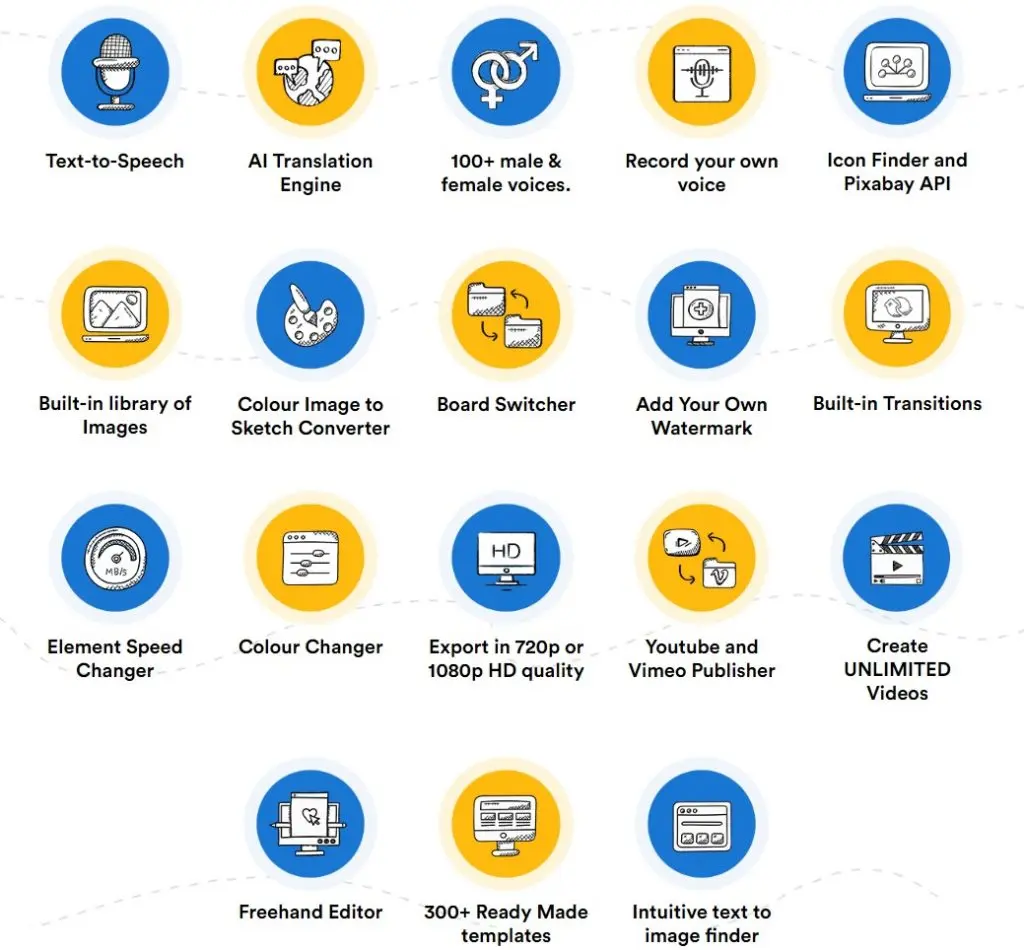
Making doodle videos isn't easy, but it can be if you use Doodle Maker, which comes with 300 pre-made templates, unlimited HD video creation, multilingual text to speech and vice versa, a whiteboard, blackboard, and glass board switcher, and a color image to doodle sketch converter. The app comes with a variety of built-in tools that can be used to improve videos and leave a lasting impression on viewers.
The best part about this app is that it is designed in such a way that even a complete novice can pick up the tools and create one of the most popular doodle videos in no time.
What does Doodle Maker offer?
Doodle maker offers a wealth of useful and ready-to-use tools and features to the user. Some of the main tools:
Convert a photograph into a sketch
It allows users to convert a photo to a sketch without having to create a sketch or spend hours recreating a photo. You simply upload the image, and the in-built tool converts it into a sketch that can be easily used in the video according to the user's needs. And this is one of my favorites due to the endless possibilities it brings.
Full HD Quality Videos
Doodle maker allows users to create high-quality videos in full 1080p without having to worry about uploading issues or video distortion when viewed on a large screen. Some people don’t even notice this until a video is playing on a large screen and this software has this feature built-in.
Upload with built-in options for YouTube and Vimeo
You can even share them on social media because you don't have to worry about saving your videos or exporting them to YouTube, Vimeo, and other sites. Doodle Maker makes it simple to transfer your videos to the appropriate platform and has cloud-based storage.
Simple to Use
I am repeating myself here but the most important and beneficial feature of DoodleMaker is that it is designed for both newbies and experts to use the app quickly and easily. Anyone can make a high graphic great quality video with the help of several in-built and ready-made tools, and they don't have to worry about the quality because the video is available in 720p and 1080p.
Three different video styles and backgrounds.
The user has the option of selecting one of three video styles: Whiteboard, Glassboard, or Blackboard. It helps to choose the mood of the video and what suits the user for any particular video.
Color Doodle Videos
The user has the option to use color or black and white and that gives an advantage over other software that don’t have this option.
Multilingual Videos
The software can instantly translate any video into more than 60 languages. Choose from over 160 human-sounding voices to bring your message to life. Plus you can record your own voice if needed.
These were just a few features but you can go to the main page and check more with full detail and see the videos of this software in action.
How to use the software:
It takes only three steps plus the easy work on the scene you are creating.
No 01 - Choose a Whiteboard, Blackboard, Glassboard, or Custom Background Canvas. Choose from more than 300 ready-made templates or start from scratch. Alternatively, you can enter your YouTube URL to repurpose your own old videos.
No 02 - Make your doodle your own for a more personal touch. Change the images, colors, texts, and animations, add a voice, and change the language if you don’t want to use English or the default language.
No 03 - Click Generate and in a few minutes, you'll have high-quality, beautiful doodle videos in ANY language.
You basically can create an endless versions of a video in a few minutes.
Warning: for new users, it can get a bit overwhelming to see so many pictures and templates. Just relax and pay attention to the screen and everything will be cleared.
One of the videos on the main page is hosted by the company owner and he speaks with a heavy accent, please understand that he is not a native English speaker and this product is not about how he speaks. Just concentrate on what he is telling you about this product and how useful of a thing he is introducing to you.
I give it 95/100 for the ease and usefulness.
Check out the main page and don’t forget to watch the video of this software at work on that page (Soon I’ll try to add video here also.)
You may find some bonus options but it is up to you to add those bonuses or addons. These addons can be useful if you really want to expand your self as a doodle maker for hire or just to have a fully licenced software with royalty free music and pictures to use with the videos.
Check the software, watch the video of the software in action and get more info here (Use Coupon " DOODLE" For $18 OFF. This code is active at the time of writing 08/19/2021:
https://jvz8.com/c/1715351/357045
- - - - - - - - - - - - - - - - - - - - - - - - - - - - - - - - - -
Any kind of support, even a simple 'like, thumbs up or a small comment' is enough and helps me grow, create and freely do more stuff and work on projects for the benefit of many.
Buy Me A Coffee: https://www.buymeacoffee.com/Namsu
Help me grow into a global force: https://www.patreon.com/namsu
Support with crypto coins/tokens: https://cointr.ee/namsu
Check my blog to start earning extra coins/tokens/money here: https://referral-army.blogspot.com
Check my book reviews blog and contact me, if you want your book reviewed: https://book-reviews-by-namsu.blogspot.com
- - - - - - - - - - - - - - - - - - - - - - - - - - - - - - - - - -