
1. Introduction
Command shells are the foundation of working in Unix and Linux. They allow users to manage systems, automate tasks, and create scripts. In this article, we’ll explore their evolution, key features, and practical recommendations for choosing the right shell for your needs.
2. The History of Command Shells
Bourne Shell (sh): The Beginning of an Era
- Created by Stephen Bourne in 1977 as the first fully functional Unix shell.
- Introduced features for variables, command execution, and input-output redirection.
- In modern systems, its role is limited to maintaining compatibility with legacy scripts.
Bash: Bourne Again Shell
- Released in 1989 as part of the GNU project, improving upon
sh. - Expanded functionality, becoming the default for most Linux distributions.
- Despite its age, it remains popular due to its stability and compatibility.
Zsh: Flexibility and Power
- Introduced in 1990, combining features from
shandcsh. - Offers advanced functionality: auto-completion, syntax highlighting, plugin, and theme support.
- Recommended for use with the Oh My Zsh framework for convenient configuration.
Fish: Friendliness and Simplicity
- Introduced in 2005, focused on ease of use "out of the box."
- Supports auto-completion and suggestions without complex setup.
- Lacks POSIX compatibility, which may cause issues with certain scripts.
The Role of csh and ksh
- C Shell (csh): Introduced a syntax similar to C, popular among developers.
- Korn Shell (ksh): Combined features from
shandcsh, becoming a choice for complex scripting.
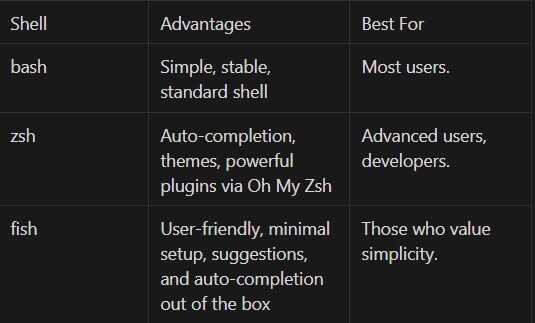
3. Choosing the Right Shell for You
4. Practical Examples of Usage
Setting up zsh with Oh My Zsh:
- Install zsh:
sudo apt install zsh2. Install Oh My Zsh:
sh -c "$(curl -fsSL https://raw.githubusercontent.com/ohmyzsh/ohmyzsh/master/tools/install.sh)" 3. Configure a theme:
nano ~/.zshrc 4. Change the line to:
ZSH_THEME="agnoster"
source ~/.zshrc  # Apply changes.
Working with fish:
- Install fish:
sudo apt install fish2. Try auto-completion:
fish
# Start typing a command, e.g., "git", and fish will suggest possible options.
5. Conclusion
Choosing a shell depends on your tasks and preferences. Bash is suitable for most users, zsh is ideal for those who love flexibility and customization, and fish is perfect for simplicity enthusiasts. Try different shells to find the one that fits you best!





