
Introduction
I was browsing through Odysee to see if there was any new content that piqued my interest. During the process, I stumbled upon this video from the channel, Mental Outlaw, simply titled LibreWolf Review. What caught my eye was not the title, but the amusing thumbnail that accompanied it: a meme that portrayed LibreWolf as the chad and Firefox the whimpering whelp.

The company behind Firefox, Mozilla, has been going downhill over the past few years mainly due to its insistent insertion into politics. Ex-CEO Brendan Eich stepped down in 2014 after a targeted campaign against him in light of his $1000 donation to California's Proposition 8. Since then, he started the Brave browser and from my personal experience, it works great.
Mozilla caught some flak for blacklisting the Dissenter app, a plugin created by Gab that allowed users to comment on basically any webpage, even YouTube videos that had their comments sections disabled. On August 2020, the company fired its Servo's, Wasmtime, and threat management teams. Most recently, current CEO Mitchell Baker made a rather alarming statement a few days after the January 6th Capitol protests and riots. The post is titled "We need more than deplatforming", basically tripling down on being the moral arbiter of the internet.
While I really like Brave and the BAT token rewarding system, it is also based on Chromium. Yes, Chromium is open-source and there are also other great Chromium-based browsers like Vivaldi. However, I worry that the browser market will be less diverse as Chrome and Chromium-based browsers eat away Firefox's already small marketshare. The issue is that Mozilla is a terribly run company with questionable philosophies. But by sheer coincidence, I stumbled upon a possibly viable Firefox alternative: LibreWolf.
What is LibreWolf and How to Install It?
LibreWolf is a fork of LibreFox which was a fork of Firefox. LibreFox was introduced as a privacy-focused alternative to Firefox, though the project is no longer maintained on GitHub. Eventually, the community moved to GitLab to start LibreWolf. As of now, you can install the browser on MacOS and certain Linux distributions like Arch, Gentoo, and Ubuntu.
My PC runs on Linux Mint 20.1 Cinnamon, which is based on Ubuntu. The installation is not the most intuitive and there isn't a PPA where you can update LibreWolf through the Update Manager. However, the process is not difficult. All you need to do is to click on "Browser", then "Linux". On the left hand side, click on "Releases" and download the AppImage version of the browser. What I did was create an "AppImage" folder in my "Home" folder and place the AppImage there. Right-click and go to "Properties" to change the permission to allow executing the file as a program.
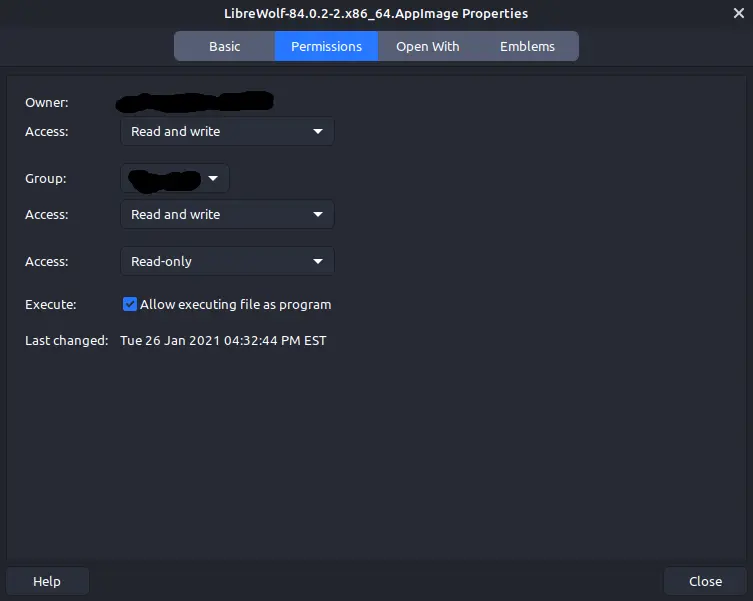
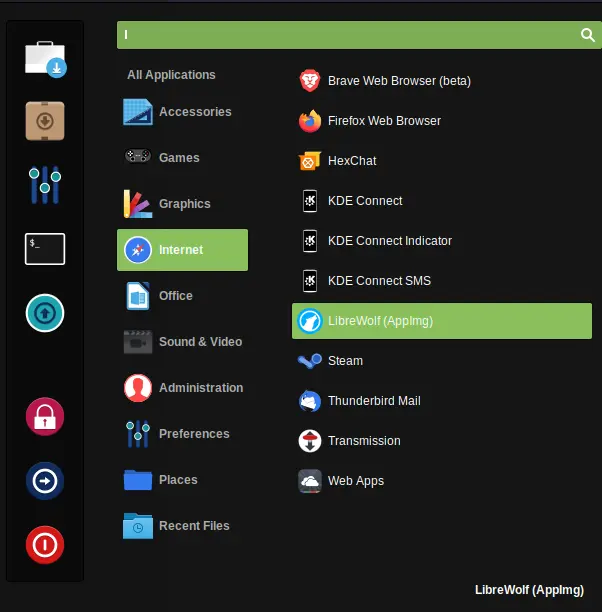
If you want to create a shortcut, right-click on the desktop to create a new launcher. Find the AppImage and if you want, change the icon to LibreWolf's if you have downloaded the icon. When you are asked to create the shortcut to the menu, say yes. However, Cinnamon will categorize it into "Other". To move it to "Internet", open the menu editor and cut/paste your LibreWolf launcher to "Internet". This is what it looks like on my system:
How's the Browser?
When you first boot up LibreWolf, the first thing you will see is a completely blank tab. The old-school, minimalist approach is honestly quite welcoming and reminds me of the days when web browsers were much simpler. On the top, uBlock Origin is already installed and DuckDuckGo is the default search engine. If you want to look under hood with "about:config", then you will discover a bunch of privacy and security-focused settings already set up for you. For example, most of the geolocation APIs are disabled and the browser can spoof your system's information. When I checked on deviceinfo.me, it thinks that my PC only runs on 2 cores when my CPU has 8.
So how about the actual browsing experience? I visited a variety of sites and played a bunch of media under different video players. Videos from Odysee and BitChute worked just as well as their YouTube counterparts. Speed-wise, I did not detect anything that was significantly worse or better. When you are done, LibreWolf will, by default, delete your browsing history, cookies, and site data, though you can change this if you want to.
What are the downsides? There are two main ones I can name. The first is the installation process. This is not something where you can simply go to your distro's software manager and install LibreWolf. While it is not difficult to get it working, it is a bit of an inconvenience. In addition, you will have to manually download a new AppImage when there are updates. The other main flaw is accessibility. As of now, you can run the browser on MacOS and certain Linux distros. Windows, which is the most used OS in computers, currently does not have its version available yet. On the bright side, I do not find these as deal breakers and these issues should be resolved in time.






