
Hi everyone , i will show you about log in through google account into your own website by visitors .
let's learn it by step by step.
1. firstly go to CONSOL.DEVELOPERS .GOOGLE.COM and log in There with your own google account.
link is here : https://console.developers.google.com/
you can see , i already logged in .
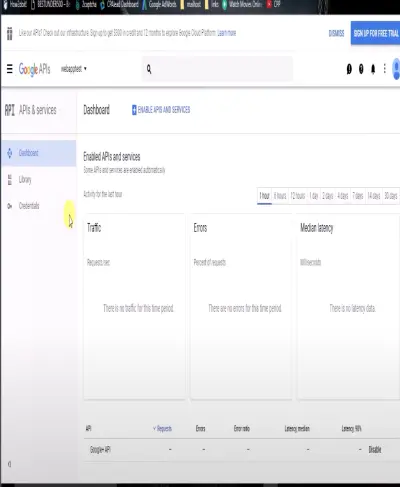
2. now, create a new project by just following me .just to inform you that i am here using my LOCALHOST AND PRE-CODED FILE FOR THIS Tutorial blogging .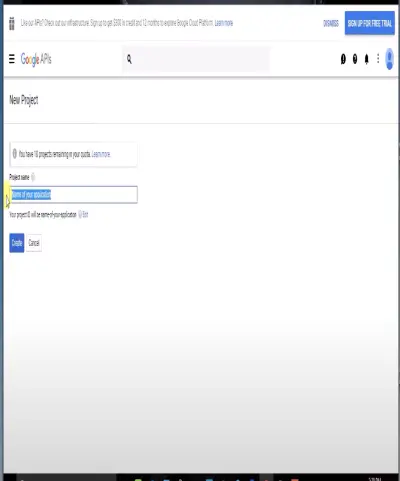
3. just reminder, you can also download the file(google login APi zip file) which i put the link here https://www.skill2up.in/learning-hub
4. now unzip the file and copy this folder to your localhost root folder .
5. now open your"phpMyAdmin" software and create a database .


if you don't have phpMyAdmin software then you can install from here https://www.skill2up.in/event-details/phpmyadmin

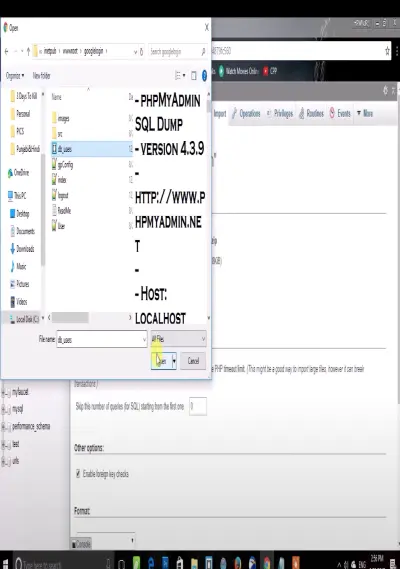
6. now select "import" then you just need to import SQL file from folder.
7. now we have table named "Users" where all user information will be stored .

8.now its time to proceed to your root folder and do some editing with some code.
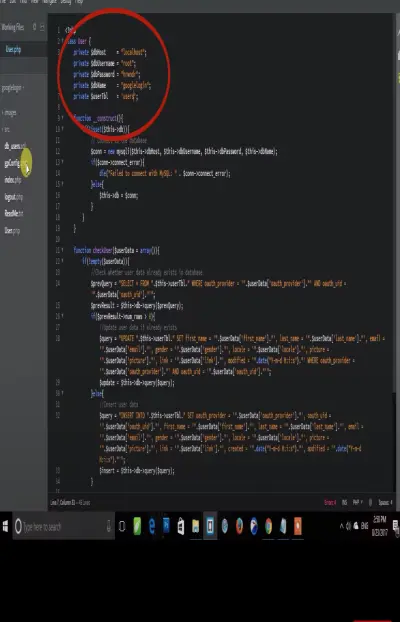
only we need to edit red circle area in screenshot ,just edit username, database .
9. after all , go back to google API console and need to get client id and client secret id.


10. after this, go back to google API console and get client id and client secret id then enable google+ API which already been enabled here.


11. now, we have client id and client secret id ,so copy both and paste it in our index file.


12. As you can see, we have successfully integrated google API to our website (all the user information will be saved in users table inside database)


Thank you for learning , please tip this blog and follow for great contents.
Resources:
https://www.skill2up.in/event-details/phpmyadmin
https://console.developers.google.com/
https://www.skill2up.in/event-details/google_login_api_hrwndr-zip-1






