What is Atomic Wallet
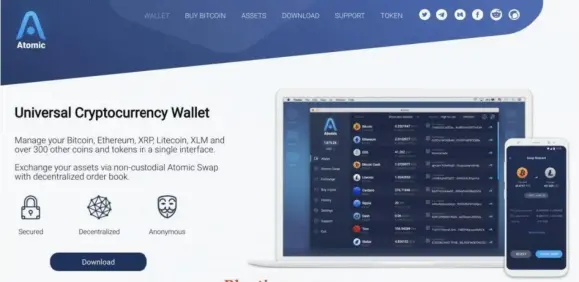
Atomic describes itself as a non-custodial decentralized wallet to manage, exchange, and be able to trade with over 300 cryptocurrencies in a single interface. AWC is a token issued by the cryptocurrency wallet AtomicWallet.io. As a group, AWC token holders receive benefits such as Staking, discounts on exchange trading services, additional features for trading, affiliate rewards and bonuses and dedicated support. It has established itself as the first wallet to carry out cross-chain atomic swaps.
Why Should Choose Atomic Wallet
-Advantages
Like other digital wallets, Atomic Wallet allows you to store Bitcoin, Ethereum, Bitcoin Cash, Ripple, Litecoin, Tron,... and more than 300 different types of Coin / Token without losing any cost come on. So it can be said that it is the most convenient wallet if you intend to store lots of coins. The interface is very user friendly, simple, eye-catching, easy to see and the security is quite safe.
-Defect
There is no support for many languages yet, so for those who are new to English, it may
be a little difficult to use.
How To Install, Secure And Use Atomic Wallet
-Instructions for Installation and Registration
Currently Atomic wallet supports a lot of versions for Destop and Mobile, to select the operating system, download the app here: https://atomicwallet.io/downloads
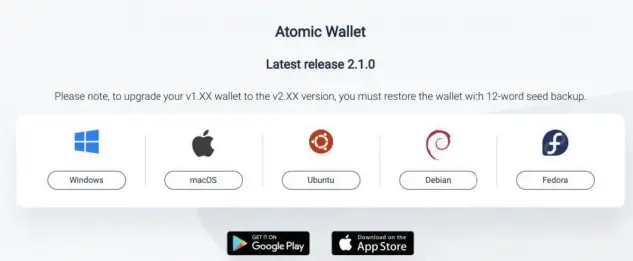
To create a wallet you need to follow three simple steps:
- Open the wallet
- Create a password and write down a 12-word backup phrase. (Don't forget to save it in a safe place!)
- Start using it
Or you follow the very simple video tutorial below:
That's it! All wallet addresses for your cryptocurrency will be automatically generated from the 12-word phrase above - I call it the seed for easy remembering. Seeds gives you full access to your wallet. For that reason, we recommend backing it up. Write it down, carve it on a piece of metal and store it in your safe or give it to your mother. When the seed is lost, you will no longer have access to the wallet!
That's it, the wallet creation part, because it supports more than 300 types of coins, the main coins of course will have, the junk coins are many, convenient to see if the coins you are keeping are supported, please go to the page this: https://atomicwallet.io/assets
How does Atomic wallet work?
Atomic Wallet was created as a convenient and active platform that supports the management of multi-chain cryptocurrencies, works entirely with buttons, blockexplorers and APIs already provided by certified services.
Seeds memorization
This is mentioned above
How it works?
All of your private keys and addresses are generated from a random combination of one word and they are hard to decipher. When your addresses and private keys are generated, you can use them. Some assets have their own requirements, like Ripple, Stellar, and TRON due to their blockchain rules.
Exchange (Exchange, trade)
When you use the Exchange options you are working with the services provided by ShapeShift and Changelly. We add their API to our wallets and all the actions are being operated by the vendors. Your balance and transaction history are governed by blockexplorers. That is why a stable internet connection is required. If some blockexplers are blocked in your country or your IP is banned by CloudFlare, you may encounter some problems with connecting to them and the balance will be reflected incorrectly in the Atomic Signs: (-) . In these cases try to use a VPN.
Note: All of your transactions go through the block chain and the Atomic Wallet operates in a decentralized and deposited manner. You only deal with blockchains and official nodes.
Atomic Swap
Atomic Wallet supports blockchain cross-exchange function. Now only three pairs are available. We will release Atomic Swap deployments for more new assets in the future.
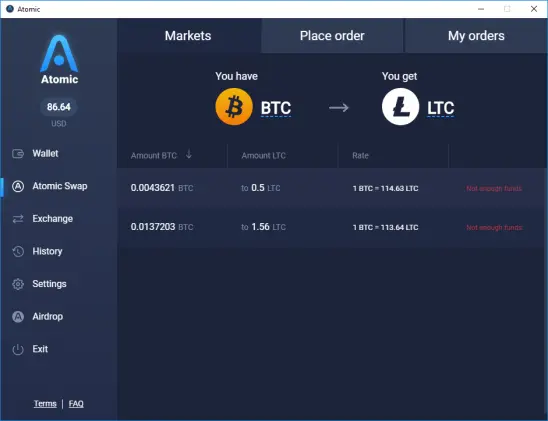
Atomic Swap is a smart contract-based technology that allows one currency to be exchanged for another without the need for a third party.
Setting
In the "Settings" tab, you can change the password, enter the private key or you can open all the private keys to export them to other services. To be clearer you can switch from Atom to other wallets that support 12 recovery words (seed): https://s3.amazonaws.com/cdn.freshdesk.com/data/helpdesk/attachments/production/36016732022/original/9OWY7sJEpOWWOTu2BJ2TXVqWUyelFAtiJw.gif?1537547553
Wallet
The Wallet tab gives you information about your property balance and you can also transfer your money using the "Send" option to other addresses.
Information regarding the balance received from blockexplorers and your USD balance is calculated according to the latest information on the market. It updates every 5 minutes.
Also by this tab, you can add custom ERC20 tokens that are not currently supported in Atomic Wallets. All you need to do is enter the token contract address you can find on https://etherscan.io/
Instructions To Send And Receive Coins
Get Coin
Follow these steps:
- Select a property you want to send and click on the address, so it will be automatically copied to the clipboard. Make sure the property selected is correct.
- Paste the wallet address into the corresponding "Send" field of another wallet. Then wait for 5-30 minutes. All money will be automatically transferred to Atomic.
- Check your transaction history to see your transactions.
See here:
Deposit Coin
- Click the "SEND" button.
- Insert the Amount, Address and Password of your Atomic Wallet and Destination Card as Tag or Memo (if required). The best trading addresses are the XLM, XRP, BNB, and other coins on the exchange.
- Calculate your amount with charge.
For example, if I have 1 BTC and want to transfer it to another address. The fee will be 0.0002. That means I will only be able to deposit 0.9998 BTC.
If your transaction is not carried out, try to reduce your amount and try again, possibly due to the increase of network fees, so you must perform at
Click "SEND" and check your conversion status in the blockchain: https://s3.amazonaws.com/cdn.freshdesk.com/data/helpdesk/attachments/production/36015330205/original/P1HsRB5NrXpikJGKnmfwhJcQJE1moa8bXQ.gif?1536155001
Transaction history
You can review the transaction history according to the basic instructions below:
Conclude
Through the article, you also know a little about Atomic Wallet supports more than 300 coins / tokens with basic features. Some advanced features you can visit their support area here for more details offline: https://support.atomicwallet.io/support/solutions. This is also an interesting option that can replace other types of wallets, depending on the taste of each person to use the appropriate wallet, wish you success.









