
Most folks know of Windows, Mac, and prolly even Linux (GNU/Linux, LiGNUx, etc). Chances are if they know Linux, they'll know of Unix and by association the BSDs. But BeOS? Not so much. But an open-source version of BeOS? You crazy!
Haiku got its start with BeOS, an operating system optimized at being a powerhorse for power users, film studios, and the like. Back in the day, BeOS was a leader in ideas. It pioneered multithreading and flawless multitasking that we take for granted today. But what happened? The same thing that happens every night, Pinky... they failed to take over the world!!
OpenBeOS was formed as a continuation of that thought process. Hating to see their beloved (and fairly sunk-cost) OS go bye-bye, a bunch of people much smarter than I got together and created the groundwork for what would become Haiku. Issues and needs changed over time, leading to a name change that nodded at the BeOS's clever usage of haikus in popups for system messages.
Haiku started as an attempt to be backwards/binary compatible with BeOS native applications. Basically imagine running Windows apps on a Mac without any extra software - drag, drop, and go! This worked out well for many, but others wanted to bring it into the current times. Thus, there had to be a split. This resulted in two versions of Haiku: 32-bit and 64-bit. The 32-bit build provides backwards-compatibility with BeOS at the cost of being limited to 32-bit constraints as well as a more limited software listing. The 64-bit build allows newer apps and better integration with today, though at the cost of losing that backwards-compatibility.
Haiku mainly targets Intel/AMD-based architechtures, with some decent hiccups along the way. Mileage does vary. My luck has been that it works out great on all my hp devices, though not so much anywhere else. I'm not lucky enough to own one of those XT2 thinkpads that all these alternate OSes seem to target, but I'm complacent with the fact this beast can run on some of the things I own. The only problem is that none of them are good enough to be my daily driver so it's limited in scope.
Haiku runs on me old ASUS ROG laptop from about 2011, my good ol' hp pavillion desktop from 2012, and an hp X2 detachable tablet-like abomination from 2018. Don't get excited, it fails with any of my graphics cards so that means Intel-video chipsets. Also, it has a lack of SDHC/eMMC/SD memory support. That means no luck with SD cards via PCIe and only if via USB bus. Also means that while it works on that nifty and small X2 abomination I like, it will not install. They have a driver for all that, but it only reads and doesn't write and even then it's very incomplete. I can't contribute because I have no clue about the SDHC architecture, their common driver interface, and C++. I'd have to learn 3 things which is offputting as I want to do other things.
Haiku can run a shockingly-large amount of POSIX-y-like-compliant software, much like you'd find on Linux, BSD, Mac, even on Windows. It uses BASH, supports Blender3D, LMMS, VLC, vim, EMACS, CLANG, GCC, Java, Nim, Fossil, Git, etc... However the packages are sorely outdated and better done by compiling them yourself. Trying to get Haxe on there was a pain, though that's thanks to the Haxe team moreso than Haiku (a sheer dependancy nightmare that just requires too much after the first 3 levels). It has its own software, which is fairly robust and inspiring. Some of them just suck outright and need a good overhaul. There's also some lying in terms of utilities. You have a FAT-32 utility that can read and write FAT filesystems to disks as well as disk images, correct? Well, what do you do when that's a bit of a lie as it writes a disk with FAT-16 headers? I had to hack around with xxd and manually look it over to discover this, which made it such a pain when I was trying to write a FAT32 bootloader onto a FAT16 disk...
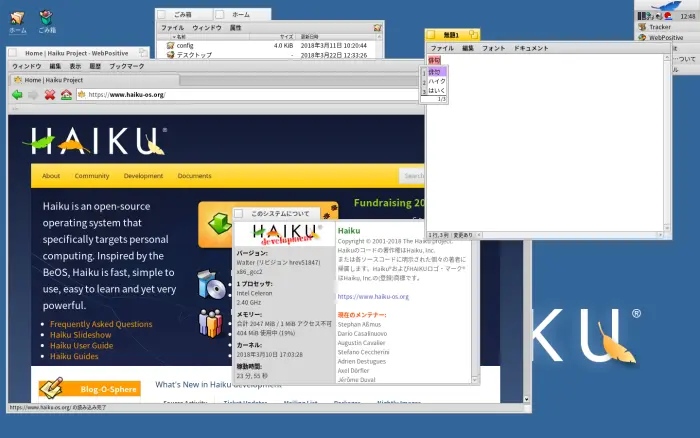
Nevertheless, it is a fairly great environment for development, even if choice is limited. I actually prefer working in Haiku for some reason, it feels simpler and it is less difficult to get distracted. From a creative standpoint, I feel like that joke about C programming and shooting yourself in the foot. Although, the whole house blows up too (yeas, an Assembly joke reference). The power is just not there in the available applications and there are some issues with the package manager acting wonky when you want to update. I had R1B1 and couldn't download LMMS without bricking the core library necessary to run the package manager. Trying to save it resulted in half the apps failing. Granted, this was about 6 months before R1B2 but man, be careful. My hp Pavillion running R1B2 was perfect until recently. It works with my intranet but good luck accessing the internet. Something has whacked out its settings. My router has not been changed since R1B2 was installed working and the settings don't seem to work whether static or dynamic.
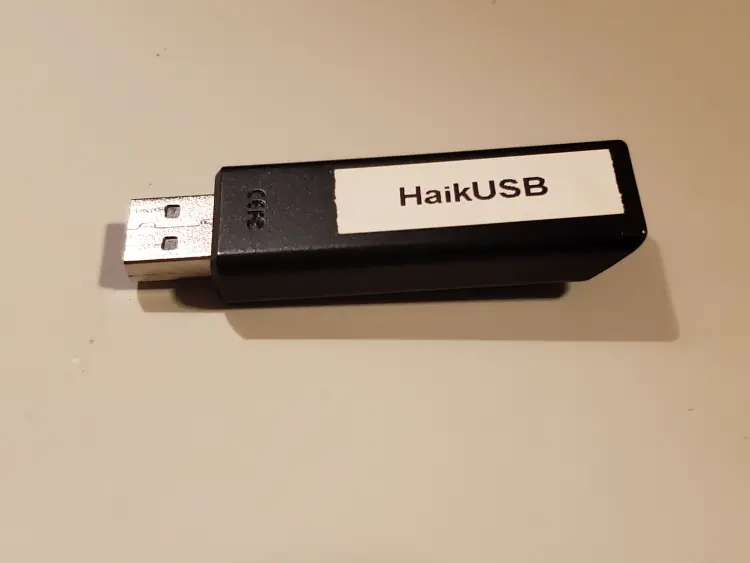
The beast of an OS has great points: you can control individual threads and processors. Yup, you can shut down 3 out of your 4 cores if you want to. You can find that annoying thread screwing up everything and kill it. That's epic. It's UEFI-capable and works great with even my EFI-only systems that it can boot on. Generally it is an issue with the launcher or disk that knocks it back. The UI is beautiful despite being dated and strange, with customization options that finally get it right. It is a fairly small OS, booting and running faster than Sonic after having bad chili dogs. It breathes life into old hardware that BSD and Linux fail to help. The design philosophy is brilliant and their documentation on getting started with writing apps and coding for the OS is so good it could be a standalone primer on C++ that rivals the big books out there. It makes a banger desktop OS and a good server too, though it would be more like Windows server since it runs that GUI. Oh, and installing from an established OS creates a literal copy if you write it to another disk. FANTASTIC. PURELY FANTASTIC! A portable install is phoenominal to me. Think TailsOS or Windows-to-go.
The source code looks good (despite being in C++) and there are so many ways to contribute compared to other OS projects. You a graphic designer? Go for the icons! You a coder? How about that SDHC driver or getting it on ARM! Random everyday user type that just wants something different? Spread the word or fill out some surveys and forms about what you could get it running or not running on! Haiku even had a sound contest in 2020 where the musically-minded could contribute! Compared to other projects that want to virtue-signal inclusivity with feminist codes of conduct and plans to involve so many from groups x or y vs z, Haiku just does it right. There's a place for everyone, no social justice dogma or diversity offices needed. No politics, religion, sports, or money. No jerks, no corporations. Just a whole community of folks wanting to make a great thing that they can take pride in.
For an OS vacation spot, Haiku has its quirks and problems. But despite all that, it's just so quaint and dandy that you might never want to leave! I know I don't want to; I'm awaiting the day it can become my daily driver for my everyday devices!





