
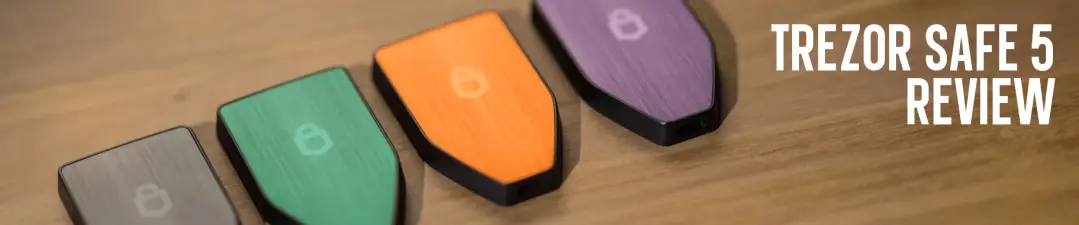
Trezor's entry into the modern touchscreen hardware wallet market began with the Trezor Safe 5. Arriving as the true successor to the aging Model T, the Safe 5 represented a major leap for the brand. It merges the powerful open-source security Trezor is known for, with a contemporary user experience. It was the first model in the series to combine a vibrant color touchscreen and a certified Secure Element chip. Accompanied by advanced features like SLIP-39 (Shamir Backup) into a single accessible device.
The following review breaks down whether the Trezor Safe 5 remains a compelling and security first choice, for the practical cryptocurrency user.
Key Takeaways
- Security First Without Compromise: The Trezor Safe 5 delivers strong and transparent security through its NDA-free EAL 6+ Secure Element, open-source design, Shamir Backup and optional MicroSD PIN encryption. Prioritizing protection over convenience.
- Modern Usability Done Right: Its responsive color touchscreen, haptic feedback and Gorilla Glass protection. Allow intuitive and reliable daily interactions. Offering a major upgrade from button based wallets without sacrificing security.
- Balanced Value for Serious Holders: Positioned between entry level and premium wallets. The Safe 5 is ideal for long-term and diversified crypto holders who want a refined experience and robust security. Without the Bluetooth or wireless trade-offs.
Hardware & Build Quality
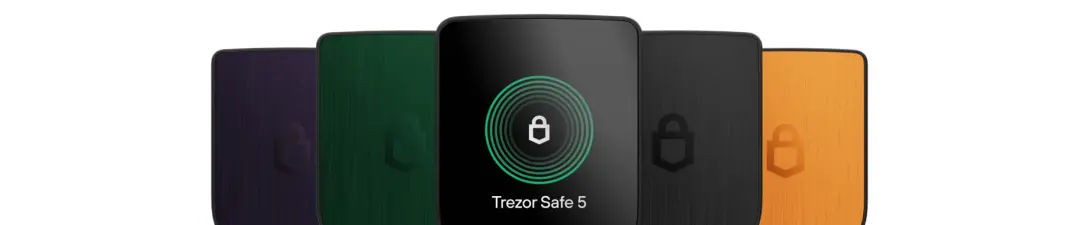
Weighing in at just 23 grams, the Safe 5 feels sturdy and compact without being bulky. The casing uses durable PC-ABS plastic with an anodized aluminum backplate, which gives it a premium feel beyond typical plastic gadgets.
The centerpiece is the 1.54-inch color touchscreen. It's a clear successor to the Model T's display and among the most responsive we've tested. Protected by Gorilla Glass 3, it's built to last for years in pockets, bags, etc.
The user experience is enhanced by its responsive haptic feedback. This essentially means that every tap gets a subtle vibrational response. This combination of a crisp color display and responsive touch controls. Makes navigating menus, entering PINs and verifying transactions, far more intuitive than two button systems. The device doesn't just look modern, it also feels modern when used in conjunction with your smartphone or similar devices.
Note: The Bitcoin orange version is installed with the Bitcoin firmware pre-installed. However once setup, you can manually switch to the multi-coin firmware in Trezor Suite.
Connectivity & Security
The Safe 5's security model is where it makes a pretty serious leap beyond basic cold storage. The connectivity is quite conventional and simple here. You get a USB-C port for power and data, with no Bluetooth or wireless features whatsoever. This wired only design of the Safe 5 is actually a core security strength. Though not air-gapped, it helps to eliminate multiple threats that wireless devices have to contend with.
The foundation of the device is its NDA-free EAL 6+ Secure Element (OPTIGA™ Trust M V3). The "EAL 6+" certification is essentially an internationally recognized benchmark for high security chips, designed to resist physical tampering and brute-force attacks. More importantly, "NDA-free" means Trezor has full transparency agreements with the chip manufacturer. This allows the entire design, from hardware to firmware, to remain 100% open-source. This allows the crypto community to continuously audit and verify everything.
This secure element works alongside several other security features. The MicroSD card slot on the device's side isn't meant for storage, it's meant for advanced PIN encryption. By encrypting your PIN with a randomly generated secret stored on the card, you create a mandatory two-factor physical check.
Firmware integrity is handled by secure bootloader verification. For recovery, the Safe 5 introduces the SLIP-39 standard (Shamir Backup), which lets you split your recovery seed into multiple shares with customizable thresholds. It also still supports the traditional BIP-39 standard (12 or 24 words) if you prefer.
For advanced privacy, the device supports creating a hidden wallet via a passphrase (often called a 25th word). This generates a completely separate wallet from your main seed, providing plausible deniability. A fairly powerful tool if you're dealing with sophisticated threat models.
Note: The lack of Bluetooth and iOS transaction support may seem like limitations. However, they're intentional trade-offs in favor of a non-wireless & physically controlled security model.
Trezor Suite & User Experience
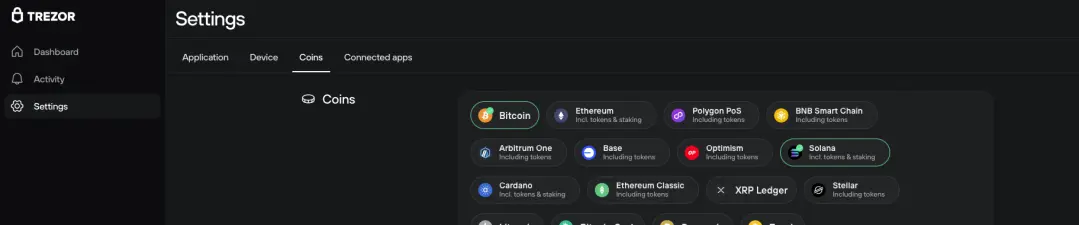
The Trezor Safe 5 doesn't operate on its own. Its real potential comes through Trezor Suite, the unified desktop application that pretty much serves as your control center for your crypto. Available for Windows, macOS and Linux. The Trezor Suite provides a clean dashboard for managing pretty much your entire portfolio. The experience is straightforward: plug in your Safe 5 via USB-C, enter your PIN on the device, and your assets are ready to manage.
Where the Safe 5's hardware really shines is in how seamlessly it integrates with this software. The vibrant touchscreen and precise haptic feedback make routine actions feel natural. Entering your PIN or passphrase feels as responsive as using a smartphone. While verifying transaction details is done with clear and confident taps on the device itself.
Adding a new asset is as simple as clicking a "+" icon. Sending crypto involves entering an address in the Suite, then reviewing and approving the details on the Safe 5's screen. For receiving, you verify the generated address on the device before sharing it. This consistent "see on device, confirm on device" workflow, drastically reduces human error and phishing risk.
The Trezor Suite also expands functionality beyond simple storage. You can stake Ethereum (ETH) directly through a partnership with Everstake, though this convenience comes with a 10% fee on rewards.
At the end of the day, the Trezor Suite and Safe 5 combination is built for secure and deliberate asset management. It's optimized for the disciplined holder, not the high-frequency trader. The process of physical verification, while essential for security. Adds moments of deliberation that make it ideal for safeguarding your core portfolio. Though not so much for sniping memecoin launches on Axiom Pro.
Coin Support & App Capacity
The Trezor Safe 5 takes a pretty wide approach to asset support. It natively supports over 7,000 cryptocurrencies and tokens directly through Trezor Suite. This includes all the major blue chip assets such as Bitcoin (BTC), Ethereum (ETH), Cardano (ADA) and XRP. Along with a vast array of ERC-20 tokens, memecoins and altcoins.
A key advantage is its universal coin management. Unlike some competitors that require you to install and juggle individual blockchain apps with limited storage. The Safe 5 handles all supported assets through its unified firmware. There are no storage limits or app installations. Every supported coin is available simultaneously.
For assets outside Trezor's native ecosystem, the open-source design provides flexibility through third-party wallet interfaces like MetaMask or Electrum. Essentially, the Safe 5 is built for the long-term holder with a diversified portfolio. It covers the vast majority of mainstream and established assets quite seamlessly.
Safe 5 vs. Safe 7 vs. Keystone 3 Pro vs. SecuX V20

The Trezor Safe 5 is fairly priced at around $169 USD, striking a balance between modern touchscreen convenience and powerful security.
Vs Safe 7
Choosing between the Safe 5 and Safe 7, is like picking between a flagship phone from last year and this year's AI enhanced model. For an extra $80, the Safe 7 adds the world's first transparent and auditable TROPIC01 chip in a dual-chip architecture. It removes the need for a physical cable by adding Bluetooth connectivity and Qi2 wireless charging. While additionally offering a larger 2.5″ screen, IP67 resistance and a "quantum-ready" bootloader. The Safe 5 is a top-tier touchscreen device, but the Safe 7 is the ultimate near future-proof choice if you're willing to spend more. For more details on how they compare, be sure to read our Trezor Safe 7 review.
Vs SecuX V20
This matchup pits open-source philosophy against feature rich convenience. The SecuX V20 is more budget friendly and mobile ready with Bluetooth and a 2.8″ screen. However, the Trezor Safe 5 offers stronger security with a higher EAL 6+ rated chip and fully open-source software. Go with the SecuX V20 for affordable Bluetooth access, or the Safe 5 for maximum transparency and deeper security features.
Vs Keystone 3 Pro
This is essentially a clash of philosophies: air-gapped isolation vs. connected convenience. The Keystone 3 Pro is 100% air-gapped, using only QR codes to help eliminate remote attacks entirely. It's also a heavier and larger device for those prioritizing absolute isolation. In contrast, the Trezor Safe 5 offers a more convenient and integrated experience via USB and the Trezor Suite. Go with Keystone for the gold standard in physical security, or choose the Safe 5 for a more straightforward and all-in-one approach.
Strengths & Limitations
While the Trezor Safe 5 performs well as a balanced hardware wallet, it makes specific trade-offs between security, convenience and ecosystem support.
Strengths:
- High-End & Open Security Foundation: The Safe 5's core strength is its NDA-free EAL 6+ Secure Element. This certified chip provides powerful hardware-level protection against physical attacks. Its "NDA-free" status helps ensure full transparency, allowing the security community to audit the code. Moreover, features such as microSD PIN encryption add a sophisticated and optional layer of protection.
- Modern & Intuitive Touch Interface: The 1.54-inch color touchscreen with haptic feedback, changes the user experience significantly. Entering your PIN and confirming transactions feels fairly responsive and accurate, similar to using a modern smartphone. This makes the device a lot more approachable for daily use without sacrificing on security.
- Durable & Practical Design: Built for longevity, the screen is protected by scratch resistant Gorilla Glass 3. Combined with a solid PC-ABS plastic casing and aluminum backplate. The Safe 5 is lightweight, yet feels sturdy enough to withstand being carried in a pocket or bag.
Limitations:
- Platform and Connectivity Boundaries: The Safe 5 prioritizes a pure security model, which means certain conveniences are absent. The iOS app is view-only, preventing transaction signing from an iPhone. It also lacks Bluetooth entirely and operates solely via USB-C. While its wired only approach helps to eliminate wireless attack methods, it does limit mobile flexibility.
- Premium Positioning: At $169, the Safe 5 sits at a premium price point within the broader hardware wallet market. For users with minimal holdings or those who only need basic Bitcoin storage, this investment may be harder to justify compared to more entry level models.
Final Thoughts
The Trezor Safe 5 is a significant upgrade from the Safe 3. Overall, we believe the Safe 5 is an excellent hardware wallet. It's built quite durable, has solid security, features a touch screen, and is reasonably priced among similar devices in its class.
For the crypto user who prioritizes a responsive touchscreen and thorough protection for a diversified portfolio. However, they don't require wireless connectivity. The Safe 5 represents a balanced and compelling choice. It delivers the core Trezor promise of self custody in a more intuitive package, making it a strong candidate for anyone looking to securely step up from a basic wallet.
To learn more information about the Trezor Safe 5 and how to purchase, click here ($169 USD). Prefer the Bitcoin-only Edition? Click here for more info.
To read the full review on our website, click here.
Disclaimer: Cryptocurrencies remain a highly volatile asset class, and participation involves significant risk. This content is intended solely for educational purposes and should not be interpreted as financial advice. Always perform your own research and due diligence before engaging in any crypto related investments or projects.





