
In May 2019, hackers stole 7000 BTC from Binance through a series of sophisticated exploits leaving the crypto world stunned. Binance went public with details of the attack and then went on to set up even more security measures to prevent any such further exploits from taking place again. They also made sure that user funds remained unaffected by the incident. As of the time of this writing, there have been no known security events on Binance ever since. With the world’s biggest crypto platform suffering a breach, everyone sat up and took notice of the modus operandi of the hackers.
Among the techniques used was a seemingly innocuous method – phishing. This meant that one or more of the attack vectors might have involved targeting specific individuals and tricking them into unknowingly sharing confidential information. With Binance subsequently strengthening its employee protocols, there may now be fewer angles of attack available to scammers when it comes to directly targeting Binance. However, this does not reduce the security vulnerabilities of the end user. Bad actors have turned their attention to steal from Binance users directly instead of from the platform itself. So let’s discuss how you can protect your Binance account from phishing and other scams.
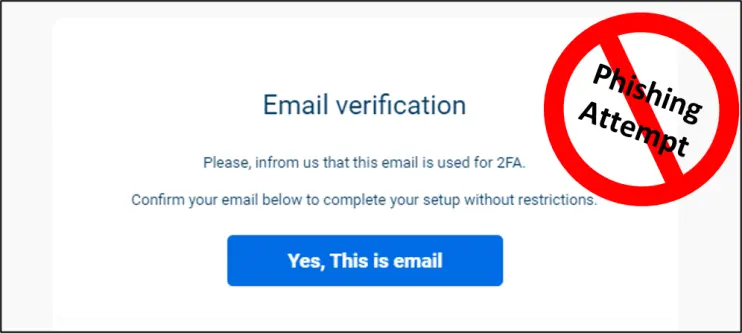
Example of an email phishing attempt (notice the spelling mistake and bad grammar?)
Phishing is a form of psychological manipulation aimed at tricking someone to divulge secrets through email or other digital means. Phishing falls under the umbrella of social engineering which is usually referred to similar forms of trickery outside of the digital realm. All these methods are meant to gain trust of the target and then use that trust to scam the person. Impersonating an authority figure like a senior Binance employee is a common way to gain trust. Another way is email spoofing where the sender address of an email message is forged to look like it came from a trusted source. Some scammers use fear while others use greed to create panic in the target. To instil fear, a malicious actor could impersonate a law enforcement officer.

4 signs of a potential scamming operation – invoking greed, gaining trust, instilling fear, creating panic
In almost all cases, however, the target is approached by the scammer and not the other way around. The approach could be through email, Telegram, SMS, Discord, WhatsApp, Twitter etc. It could be physical mail as well. In June 2021, fake Ledger devices and letters were physically delivered to targets. The attack medium changes from case to case. For example, WhatsApp and SMS-based fraudulent messages are commonly reported in Malaysia.

The medium of attack can be through anywhere that creates a connection with the target
In order to increase their chances, scammers often target people in bulk and then wait for someone to respond. Once a connection is made, the bad actor will try to get confidential information out using malicious links that direct to fake websites or support forms. They could also send attachments and files that inject malware such as keyloggers or clipboard hijackers into devices. In some cases, scammers target particular individuals when they have identified specific information about them. This is referred to as spear phishing. Something similar might have happened to Binance in the May 2019 incident.
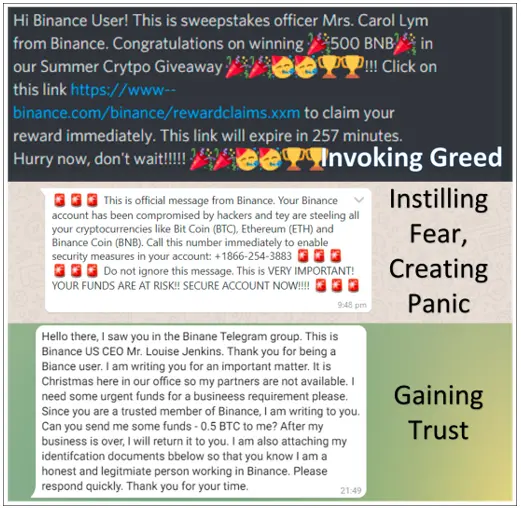
These are all too familiar templates of scamming – appealing to emotions. None of these messages are true.
So if you are an existing Binance user or someone who is planning to Register an account and start using Binance, the million dollar question is, how to spot red flags and identify scamming attempts? How to protect your Binance account from scams?
- If you receive an email, check if you are BCC’ed in a message that is addressed to you in the first person. This could be a bulk phishing email. Official emails don’t put the recipient ID in BCC.
- Phishing messages usually have typographical errors, spelling mistakes, grammatical errors. Official messages are drafted carefully.
- Phishing emails are sent from non-Binance addresses. Click here to see a few examples.
- Scammers will try to redirect you to non-Binance domains. To see where a link will take you, you can hover your mouse over it to be sure. For example the following text says “Binance.com” but it will actually take you elsewhere: Binance.com
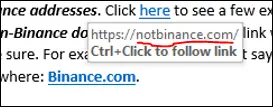
Look out for spoofed URLs
- Binance officials don’t DM first. So if you receive any message on Telegram, Twitter, Discord etc. from someone claiming to be Binance staff, you can consider it a case of impersonation.
- Sometimes fake support forms are posted in Twitter replies which ask for sensitive information like password, 2FA (Two Factor Authentication) backup key, passphrase, secret recovery phrase, private key, API key etc. Binance support will never ask for these.
- Scammers often ask recipients to download malicious files. Official Binance communications do not include attachments.
- Spoofed websites can be made to look like Binance pages and require confidential info to be entered. Look out for Cyrillic characters in the URL. For example, Ї, И, П, Б, Є, Ё, Д, С́, ё, č etc.
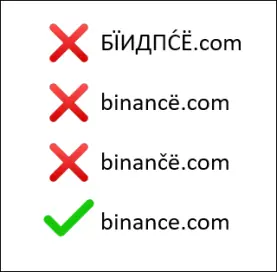
Always double check links
- All official Binance links, email IDs and phone numbers can be cross checked here: https://www.binance.com/en/official-verification
- Use a separate email ID (or phone number, if possible) for your Binance account that is not used for your other business or personal purposes.
- Set up an antivirus and firewall in your system. Update it regularly. Some allow you to set up a sandboxed browser for doing financial transactions which is more secure.
- Official Binance webpage links are all https (secure) and not http. Their SSL certificates will be up to date.
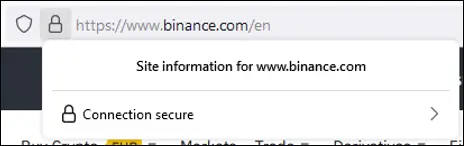
Site security certificate checks out
- You have probably heard this advice many times already. Doesn’t hurt to hear again. Use a strong password for your Binance account – more than 8 characters, a combination of letters (capital and small), numbers and special characters. A random password instead of one that can be predicted or relatable to you is recommended. Change the password regularly. Don’t share it with anyone. If possible, don’t store it on your phone or on your computer.
- Scammers often put up ads that direct users to a spoofed website. Do not click on Ads. For example, specific keywords can be used in Google ad words to show these scam ads for Google searches.
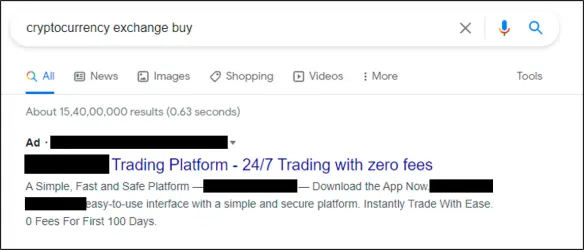
A search for "cryptocurrency exchange buy" led to an Ad for a spoofed website. Ad reported to Google.
- Enable Two Factor Authentication (2FA) using hardware or software (Google 2FA or SMS). Hardware 2FA using YubiKey is considered to be the most secure. Among software methods, Google 2FA is more secure than SMS Authentication because of the possibility of SIM swap. 2FA adds a layer of security over a password. So even if an account password is compromised, 2FA can restrict access from scammers. Please keep 2FA backup keys safe. Don’t share it with anyone. If possible, don’t store it on a phone or on a work computer. To use 2FA, go to your Security Settings and enable the preferred 2FA method.
- From the Security Settings you can also manage a list of authorised devices that can access your Binance account. Plus, a whitelist of addresses to allow withdrawals to.
- Binance also allows setting up an anti-phishing code which can be used to identify authentic Binance emails. For example, if you save “q1w2e3r4” in your anti-phishing code settings, this text will be included in all official emails from Binance. Any phishing email will not contain it. However, in the rare case that this code gets compromised, you can follow the other security steps mentioned in this article to make sure the email is coming from a secure source.
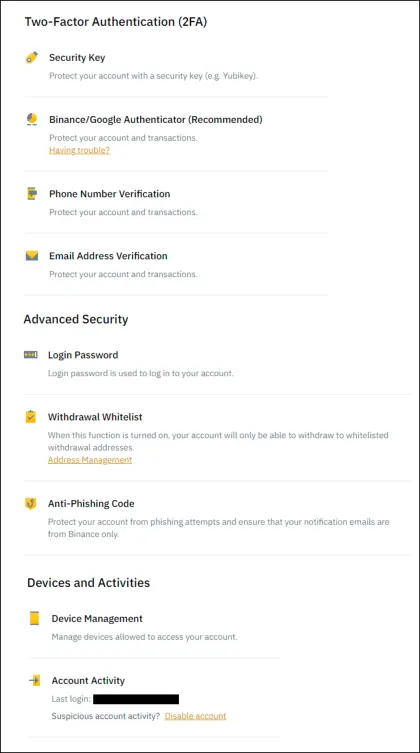
There are many security features in the Security Settings to protect your Binance account from scammers
If you see any suspicious activity, you can always report them to https://www.binance.com/en/chat. When something looks too good to be true (Eg. “send 1 BNB, receive 2 BNB”), it probably is not. Anything that raises your slightest suspicion or makes you feel mildly anxious is possibly a scam – it is your inner alarm bells going off to warn you of something fishy. In crypto, the golden rule is: Don’t Trust, Verify. If there’s one takeaway from all this, scammers have multiple attack vectors to reach you. Binance offers many measures to protect against them. So in case you are not a Binance user already, Sign Up for a free account and make good use of all of these measures.
Disclaimer: The author is not responsible for any security vulnerabilities that may occur in the Binance platform. It will be in the reader's best interest to enable multiple security options in their Binance accounts. The author would also like to thank Abhijoy Sarkar and Saurabh Hasija for their generous inputs, anecdotes and research.
This article is an English translation of Ömür Çataltepe's recent Medium article with full republish rights secured from Ömür.






