
- Connect your ETH wallet with Opensea
I used metamask which is embedded in the Brave browser. If you are setting up a new wallet, please remember to back up your recovery phrase and DO NOT SHARE them with anyone. - Create a collection
Click on your profile pic on the top right, and select My Collections. After that click Create a collection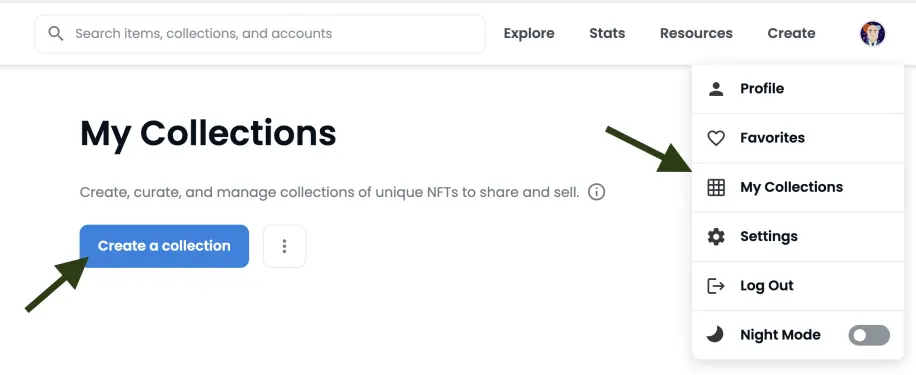
- Set up the collection
Pick a name, descriptions etc for your collection. You can set up multiple collections eg one for photographs, one for artwork, another for collectibles etc. The Blockchain option is the MOST IMPORTANT. It is only free IF you chose the Polygon blockchain
- Create your NFT
Once you have set up the collection, it is time to create your NFTs. Click on add items, and upload your creations, name it, give it a description etc. - Go back to your collections, select the items to sell
Here you can set the price, the number of copies you want to sell etc. - Market your items, and hopefully you are the next minted millionaire!
Sites that I personally use and recommend
Getting started? Try out the following exchangesGet $10$ in Bitcoin when they buy or sell $100 or more on Coinbasehttps://www.coinbase.com/join/QCXORSUse my referral link https://crypto.com/app/95am0vze6y to sign up for Crypto.com and we both get $25 USD :)BlockFi makes it so easy to buy/sell crypto and get loans! Join BlockFi now to get a bonus when you fund your account!https://blockfi.com/?ref=822962a9
Earn FREE crypto
Get paid for your websearchhttps://presearch.org/signup?rid=3349535Get paid for browsing the web usingBrave browser





