
Before we discuss Maven further, it's a good idea to get to know Maven. Since most people run Maven on Linux systems, it is rare to run Maven on FreeBSD. We deliberately present this tutorial for FreeBSD lovers to get to know Maven more closely, so that people don't think that Maven cannot be run on a FreeBSD system.
So, what is Apache Maven? Apache Maven is a framework that allows you to build projects (Java, C#, Ruby, Scala, and other languages) automatically based on the description of their structure in files in the POM language (English Project Object Model), which is a subset of XML. The word maven itself is translated from the Yiddish language as "collector of knowledge".
Apache Maven provides declarative, not imperative (unlike the Apache Ant build automation tool) project assembly. Project description files contain the project specification, not individual execution commands. All file processing tasks described in the specification are performed by Maven through a sequence of built-in and external plugins.
In the article we wrote on "publish0x", we will try to explain in detail about the process of installing and running Apache Maven on FreeBSD.
1. System Specifications:
OS: FreeBSD 14.1-STABLE stable/14-n268734-9f319352d7ac GENERIC amd64
IP Address: 192.168.5.71
Hostname: ns4
Maven version: Apache Maven 3.9.9 (8e8579a9e76f7d015ee5ec7bfcdc97d260186937)
Java version: openjdk version "20.0.2" 2023-07-18
2. Running Maven on FreeBSD
To run Maven on FreeBSD, you must first install the Java OpenJDK application on FreeBSD. In this article we do not discuss how to install Java on FreeBSD, you can read other articles that discuss Java.
If you have already installed Java on FreeBSD, let's continue by installing Maven. Write the command below to install Maven on FreeBSD.
root@ns7:~ # pkg install maven-wrapper
Maven wrapper is used as a wrapper Script for various Maven installations. After the Maven wrapper script has been installed, we continue with installing Maven.
root@ns7:~ # pkg install maven3
The final step of this process is to validate whether Java and Maven are working, by checking the versions.
root@ns4:~ # java -version
openjdk version "20.0.2" 2023-07-18
OpenJDK Runtime Environment (build 20.0.2+9-1)
OpenJDK 64-Bit Server VM (build 20.0.2+9-1, mixed mode, sharing)
root@ns4:~ # mvn -version
Apache Maven 3.9.9 (8e8579a9e76f7d015ee5ec7bfcdc97d260186937)
Maven home: /usr/local/share/java/apache-maven-3.9
Java version: 20.0.2, vendor: OpenJDK BSD Porting Team, runtime: /usr/local/openjdk20
Default locale: en, platform encoding: UTF-8
OS name: "freebsd", version: "14.1-stable", arch: "amd64", family: "unix"
If you see output like this, you know that Maven is available and ready to use. It is important for you to know, the Apache maven file is stored in the /usr/local/etc/maven-wrapper/instances.d folder with the file name "apache-maven-3.9".
root@ns7:~ # cd /usr/local/etc/maven-wrapper/instances.d
root@ns7:/usr/local/etc/maven-wrapper/instances.d # ls
apache-maven-3.9
Once we know where the Apache Maven files are, copy all the Maven files to the /usr/local/etc/maven-wrapper/instances.d folder.
root@ns7:~ # cd /usr/local/share/java/apache-maven-3.9
root@ns7:/usr/local/share/java/apache-maven-3.9 # cp -R . /usr/local/etc/maven-wrapper/instances.d
3. Using Maven
Now we will try to create a new project with Maven, we will save all the files from the project in /usr/local/etc/maven-wrapper/instances.d.
root@ns7:~ # cd /usr/local/etc/maven-wrapper/instances.d
root@ns7:/usr/local/etc/maven-wrapper/instances.d # mvn archetype:generate
First, the utility displays a list of all available templates and prompts you to select one of them. By default, you are prompted to select 2229, this is an example project using Maven.
Then, specify the archetype:generate version, just choose the default, namely 8. In the groupId option, write com. in the artifactId write com.package and package write App. For other options, just press the ENTER button. Look at the image below.
Choose a number or apply filter (format: [groupId:]artifactId, case sensitive contains): 2229: 2229
Choose org.apache.maven.archetypes:maven-archetype-quickstart version:
1: 1.0-alpha-1
2: 1.0-alpha-2
3: 1.0-alpha-3
4: 1.0-alpha-4
5: 1.0
6: 1.1
7: 1.3
8: 1.4
9: 1.5
Choose a number: 9: 9
[INFO] Using property: javaCompilerVersion = 17
[INFO] Using property: junitVersion = 5.11.0
Define value for property 'groupId': com.
Define value for property 'artifactId': com.package
Define value for property 'version' 1.0-SNAPSHOT:
Define value for property 'package' com.: App
Confirm properties configuration:
javaCompilerVersion: 17
junitVersion: 5.11.0
groupId: com.
artifactId: com.package
version: 1.0-SNAPSHOT
package: App
 Y: y
All configuration created in Maven will be stored in a file "/usr/local/etc/maven-wrapper/instances.d/com.package/pom.xml". You can view its contents, and the program sources are located in the folder "/usr/local/etc/maven-wrapper/instances.d/com.package/src/main/java/App/App.java".
Open the file "/usr/local/etc/maven-wrapper/instances.d/com.package/pom.xml", and find the script
<plugin>
<artifactId>maven-jar-plugin</artifactId>
<version>3.4.2</version>
</plugin>
Then we edit the contents of the file, so that it becomes.
<plugin>
<artifactId>maven-jar-plugin</artifactId>
<version>3.4.2</version>
<configuration>
<archive>
<manifest>
<addClasspath>true</addClasspath>
<mainClass>App.App</mainClass>
</manifest>
</archive>
</configuration>
</plugin>
After that, open the project folder that we created earlier and run it with the command "mvn compile, mvn package and mvn install".
root@ns7:/usr/local/etc/maven-wrapper/instances.d # cd com.package
root@ns7:/usr/local/etc/maven-wrapper/instances.d/com.package # mvn compile
[INFO] Scanning for projects...
[INFO]
[INFO] --------------------------< com.:com.package >--------------------------
[INFO] Building com.package 1.0-SNAPSHOT
[INFO]   from pom.xml
[INFO] --------------------------------[ jar ]---------------------------------
[INFO]
[INFO] --- resources:3.0.2:resources (default-resources) @ com.package ---
[INFO] Using 'UTF-8' encoding to copy filtered resources.
[INFO] skip non existing resourceDirectory /usr/local/etc/maven-wrapper/instances.d/com.package/src/main/resources
[INFO]
[INFO] --- compiler:3.8.0:compile (default-compile) @ com.package ---
[INFO] Nothing to compile - all classes are up to date
[INFO] ------------------------------------------------------------------------
[INFO] BUILD SUCCESS
[INFO] ------------------------------------------------------------------------
[INFO] Total time:  1.377 s
[INFO] Finished at: 2023-12-26T20:36:17+07:00
[INFO] ------------------------------------------------------------------------
root@ns7:/usr/local/etc/maven-wrapper/instances.d/com.package # mvn packageroot@ns7:/usr/local/etc/maven-wrapper/instances.d/com.package # mvn install
[INFO] Scanning for projects...
[INFO]
[INFO] --------------------------< com.:com.package >--------------------------
[INFO] Building com.package 1.0-SNAPSHOT
[INFO] from pom.xml
[INFO] --------------------------------[ jar ]---------------------------------
[INFO]
[INFO] --- resources:3.0.2:resources (default-resources) @ com.package ---
[INFO] Using 'UTF-8' encoding to copy filtered resources.
[INFO] skip non existing resourceDirectory /usr/local/etc/maven-wrapper/instances.d/com.package/src/main/resources
[INFO]
[INFO] --- compiler:3.8.0:compile (default-compile) @ com.package ---
[INFO] Nothing to compile - all classes are up to date
[INFO]
[INFO] --- resources:3.0.2:testResources (default-testResources) @ com.package ---
[INFO] Using 'UTF-8' encoding to copy filtered resources.
[INFO] skip non existing resourceDirectory /usr/local/etc/maven-wrapper/instances.d/com.package/src/test/resources
[INFO]
[INFO] --- compiler:3.8.0:testCompile (default-testCompile) @ com.package ---
[INFO] Nothing to compile - all classes are up to date
[INFO]
[INFO] --- surefire:2.22.1:test (default-test) @ com.package ---
[INFO]
[INFO] -------------------------------------------------------
[INFO] T E S T S
[INFO] -------------------------------------------------------
[INFO] Running App.AppTest
[INFO] Tests run: 1, Failures: 0, Errors: 0, Skipped: 0, Time elapsed: 0.079 s - in App.AppTest
[INFO]
[INFO] Results:
[INFO]
[INFO] Tests run: 1, Failures: 0, Errors: 0, Skipped: 0
[INFO]
[INFO]
[INFO] --- jar:3.0.2:jar (default-jar) @ com.package ---
[INFO] Building jar: /usr/local/etc/maven-wrapper/instances.d/com.package/target/com.package-1.0-SNAPSHOT.jar
[INFO]
[INFO] --- install:2.5.2:install (default-install) @ com.package ---
[INFO] Installing /usr/local/etc/maven-wrapper/instances.d/com.package/target/com.package-1.0-SNAPSHOT.jar to /root/.m2/repository/com/com.package/1.0-SNAPSHOT/com.package-1.0-SNAPSHOT.jar
[INFO] Installing /usr/local/etc/maven-wrapper/instances.d/com.package/pom.xml to /root/.m2/repository/com/com.package/1.0-SNAPSHOT/com.package-1.0-SNAPSHOT.pom
[INFO] ------------------------------------------------------------------------
[INFO] BUILD SUCCESS
[INFO] ------------------------------------------------------------------------
[INFO] Total time: 3.225 s
[INFO] Finished at: 2023-12-26T20:38:23+07:00
[INFO] ------------------------------------------------------------------------

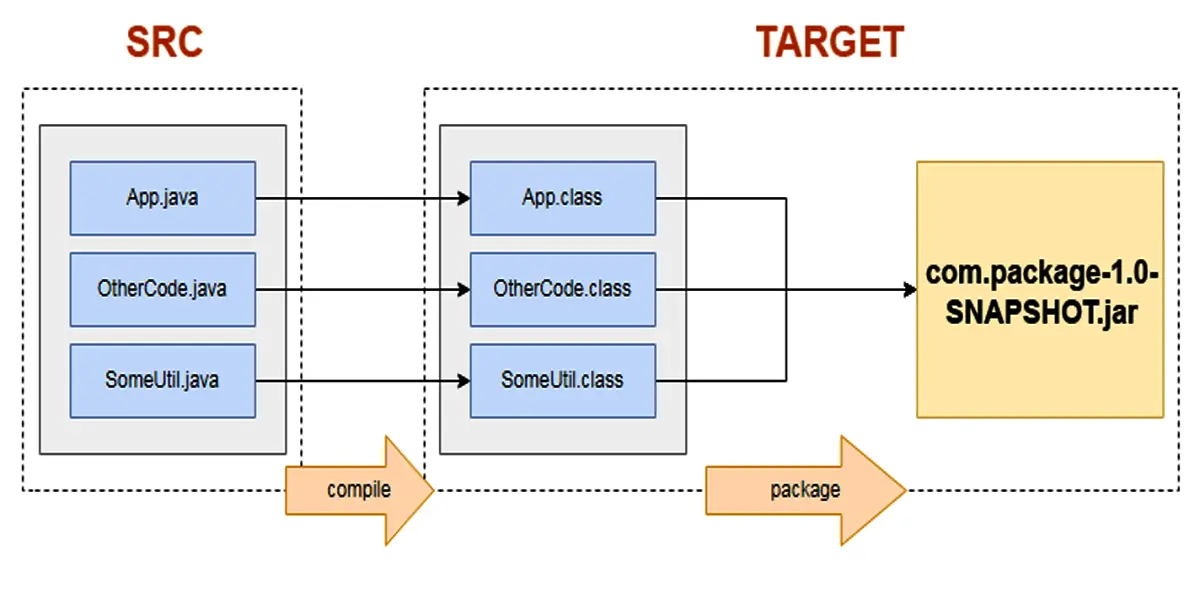
The three commands above will execute the files in the "/usr/local/etc/maven-wrapper/instances.d/com.package/src" folder to the "/usr/local/etc/maven-wrapper/instances.d/com.package/target" folder. Look at the image below.
The final step is to test with the "JAR" file.
root@ns7:/usr/local/etc/maven-wrapper/instances.d/com.package # java -jar target/com.package-1.0-SNAPSHOT.jar
Hello World!

Installing Java and Maven on a FreeBSD server is a simple and easy process that can be completed in just a few easy steps. By following the steps outlined in this article, you will be able to set up a fully functional Java development environment on your FreeBSD system in no time. With Java and Maven installed, you'll be able to build and run Java applications easily, and take advantage of the many benefits that FreeBSD has to offer.






