
I want to share a couple of website hacks with everyone on the site that don't specifically relate to crypocurrency, but the first of the two hacks I am going to share does relate to publish0x so it seems fitting.
The hack I will share that relates to publish0x will help you stop losing commissions. I added this little hack because I got annoyed today when I shared one of my posts with someone in a conversation but forgot to add my ambassador link.
Website hacks are really not "hacks" at all, they are just tiny scripts you can inject into websites to make your life a lot easier.
In order to inject the scripts in chrome, brave or other chromium based browsers I use a little plugin called cjs. CJS just allows you to inject javascripts into webpages and is a handy little tool.
If you use firefox instead of chrome I will recommend a plugin called CodeInjector which performs the same functionality but requires a couple extra steps.
So before you begin reading I would recommend you install these plugins. I am fairly sure you will thank me by the end of the post.
After you have installed one of the plugin visit the front page of publish0x.
Then click on the plugin icon at the top of your screen. If you are using a Chromium based browser you should see the following screenshot.

If you are using firefox insead of a Chromium browser you will have a simlar window popup on your will have to click a button saying "add new rule" first.
Publish0x Script
Next you will want to copy and paste the following code into the window:
var url = window.location.href; if (url.indexOf('?') < 1){ url += '?a=l9avZvVaG1'; window.location.href = url; }
Make sure to replace the bold l9avZvVaG1 with your own ambassador id from the ambassador page.
Firefox users need to click the button that says "current host".
Now simply save!
On Chromium browsers you may have to right click the plugin and select on publish0x.com under the dropdown "this can read and change site data".
From now on, anytime you visit any page on publish0x, the page will instantly refresh to contain your ambassador link! Any articles you share with the sidebar social buttons will contain your ambassador link. Any articles you copy and paste to others will contain your ambassador link.
Never lose potential commissions or signups again!
Twitter Script
The second script I am going to share doesn't really relate to cryptocurrency but it does relate to twitter which it seems the majority of people in cryptocurrency use.
This script removes all sponsored posts from your stream.
The process is exactly the same as above with a few exceptions. First visit the front page of twitter.
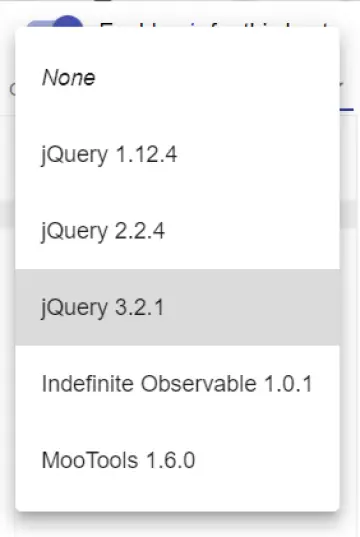
Next for Chromium browser users click on the "You can inject your own external scripts or predefined one" and select jquery 3.2.1.
Firefox users will need to click the "files" link and enter the following url: https://ajax.googleapis.com/ajax/libs/jquery/3.2.1/jquery.min.js and then click on the tab titled "javascript".
Then you will want to copy and paste the following code into the window:
document.addEventListener('scroll', function (event) { $('span:contains(Promoted)').parent().parent().parent().parent().remove(); });
Firefox users need to click the button that says "current host".
Now simply save!
Just as with the first script Chromium browser users may need to right click the plugin and select on twitter.com under the dropdown "this can read and change site data".
Now when you visit twitter, as you start to scroll down the screen - all those annoying sponsored posts you don't want to see will vanish.
Remember When
You may be remembering back when I wrote my post Why I say no to Brave wondering how I can be against brave when I am hiding sponsored posts (ads) myself.
There are two things to keep in mind about that post:
- First I said "that is mostly irrelevant as users want ads blocked, but they shouldn't be allowed to block ads". This means I don't specifically have a problem with hiding ads.
- Second I said "its the small time website owners who have no other means of paying for a websites operational costs". This means I don't have a problem blocking giant corporate website which make more than enough money to cover their bills already.
In any event I hope these little tidbits will help you in your travels.






