

First off, what is Phemex? According the to the Phemex website they are known to be “The Fastest Cryptocurrency Derivatives Exchange”. Phemex is relatively new to the exchange scene and is led by eight former Morgan Stanley Executives. Their exchange operations started a few months ago with just trading BTC and ETH but have gradually increased to XRP, LTC, XTZ, Link and Gold. Phemex is starting to gain traction and have been adding more and more options for their customers. Their mission and goal is to be recognized as a trustworthy derivatives exchange.
MAIN MENU
Upon opening the mobile app, the first thing you’ll see is the log in screen. Once the Phemex symbol goes away, it will prompt you to log in and this is where you’ll enter your username and password or sign up for your initial account. The account signup process is relatively simple and if you are interested in signing up you can use the link below to get your free $2 sign up bonus and an additional $10 just for following Phemex on Twitter, retweeting their pinned tweet and tagging three of your friends. This will be your first initial $12, free for derivative trading with no strings attached. You’ll also qualify for an additional $60 funding bonus if you deposit up to .2 BTC into your account.
MARKET MENU
Once you’re all set up with your account or fully logged in, it will bring you to the market screen. This screen will give you the current market prices of everything you can trade on Phemex. Just click on the perpetual that you would like to start trading and you’re off to your first trade in seconds. If you decided that you would like to add more funds or withdraw your funds you can click on the three horizontal lines in the top left corner also known as the hamburger icon. This will bring up your profile menu.

PROFILE MAIN MENU
Once we get to the profile menu this is where you can follow your asset and track your profits. This is also where you can make your deposits, withdrawals, setup sub accounts, adjust your settings and contact Phemex for technical support. As mentioned earlier, Phemex is extremely prideful and want to be known for their trust. They are extremely fast and able to assist you as best as they can. Sub accounts is what sets Phemex apart from the rest of the exchange platforms. You could theoretically set up a long and a short at the same time if you wish to, but in my personal opinion that would just provide minimal gains towards your portfolio. You can instead set up trailing stop losses to help or keep you from being liquidated.
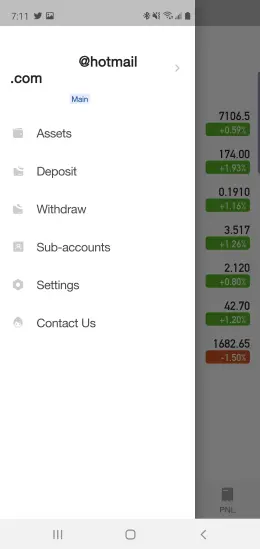
CHART SCREEN
The chart screen is where the meat and potatoes of your exchange trading will take place. As you can see in the screenshot, and if you’re familiar with technical analysis you can follow trends and spot technical angles to assist with your trading strategy. You can also touch a spot on the screen and it will give you the daily opening and closing as well as the highs and lows. You can elect to change the charting to give you other options of daily, hourly, 30 minute charts etc… You’ll even have the option to use the line chart if you so choose to. I prefer candle sticks because it immediately pops out, and I can see the green and red immediately and identify trends. Also towards the bottom you can see the trade volume as well as the Moving Average Convergence Divergence (MACD) which identifies strength, direction, momentum and durations of trends.

TRADE SCREEN
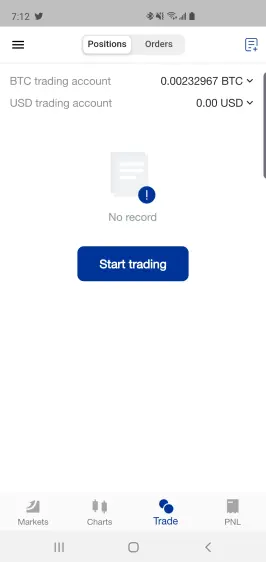
This is where you can conduct your trade. It’s pretty simple and straightforward. All you have to do is click on start trading and open your position. You can either choose to long or short, and also have the option to use up to 100x leverage. Additionally, you can setup a stop loss that will trigger a predetermined level to close your position. Once you open your position you’ll submit it and at this point you can relax.
PROFIT & LOSS SCREEN
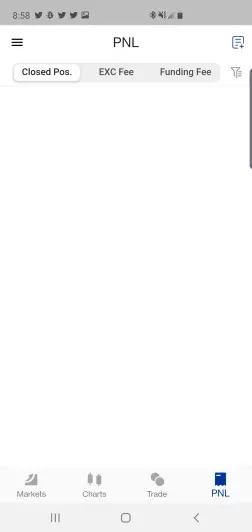
Finally, this is where you can track your profits and losses. All your closed positions and any exchange fees will be totaled on this screen. It’s pretty fast with no lag and you’ll immediately see the totals added to your asset screen in your profile menu (the hamburger icon). Phemex again is new to the game but relatively simple and straightforward. For a company that respects their customers and prides themselves on trust, it’s a win-win for both the consumer and company alike.
Free $12 just for signing up and retweeting on twitter as mentioned above. https://phemex.com/web/user/register?referralCode=D9DKK






