
Last month, my SOC Team recently received a phishing email that pretended to be a Google Voice missed call notification.
At first sight, it looked real because it had the Google logo, a “Play Audio” button, and even the Google Voice support links.
— — — — Forwarded message — — — —
From: Voice <[email protected]>
Date: Mon, 1 Sept 2025 at 12:33
Subject: Notification
To: <[email protected]>
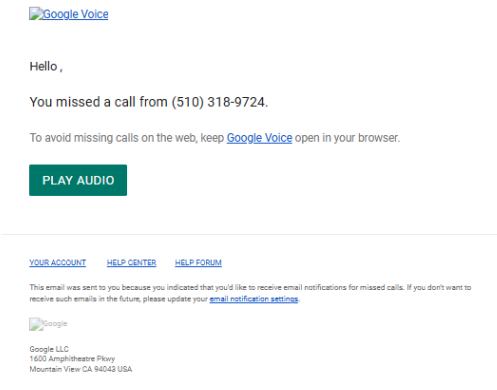
Above is the forwarded message to the Security Team. In this demo, the real email addresses have been altered. When we looked closer at the email headers, another story came out.
What Happened
- Sender domain: The email claimed to come from [email protected], a Swiss domain, not a Google domain.
- Mail Path: The message traveled through Google’s servers and was delivered internally via our Google Groups which made it look more legit.
- Authentication: Checks like SPF and DKIM failed for the real sender, but since the domain’s DMARC policy is set to “none”, the receiving servers did not block or quarantine it.
- The email claims a missed call from (510) 318–9724: The Area code 510 = East Bay, California (Oakland/Berkeley area). There is no association with Google voice official numbers either and this is likely used as a social engineering lure to make the missed call appear real.
- Content: The link behind the Play Audio button led to an apparently non-malicious Microsoft Dynamics page and not a Google page (https://assets-fra.mkt.dynamics.com/.../standaloneforms/). The problem is that phishers often abuse Dynamics links to host redirectors or forms. Actually the link could redirect to a malicious file or a fake voice login page for credential theft.
Why This Is Possible
After email headers analysis, the domain [email protected] has weak email protection (SPF and DKIM are misconfigured):
- SPF: Pass for acme-corp.com forwarding but is irrelevant for the original [email protected] sender.
- DKIM: Pass for acme-corp.com forwarding, not for [email protected].
- DMARC is set to p=none, which means: “Check and report, but don’t stop bad emails.” DMARC: Pass again only for the company forwarding domain, not for the original sender.
In practice, this allows attackers to spoof (impersonate) the domain easily.
Risks
The real origin domain [email protected] has no valid DKIM/DMARC alignment making it easy to spoof. These fake emails trick users into clicking links usually to steal credentials (logins) or deliver malware. Also the domain has no blocking policy, so attackers can continue abusing it.
Remediation and Recommended Actions
- Block the domain ([email protected]) at our email gateway (Blacklist the sender in the spam list).
- Warn users: do not click “Play Audio” links unless they clearly come from a real Google domain (@google.com).
- Report the malicious link to Microsoft for takedown. Also report [email protected] to Swiss GovCERT or registrar for abuse.
- For the domain owner:
- Fix SPF and DKIM.
- Move DMARC from p=none → p=quarantine → p=reject.
- This would stop spoofed messages from being delivered.
Learning point
Think of email protection like a nightclub door policy. SPF/DKIM are the bouncers checking IDs and DMARC is the rulebook telling them what to do if the ID looks fake.
- p=none : “let them in anyway.”
- p=quarantine : “send them to the side room for questioning (spam).”
- p=reject : “kick them out immediately.”
Indeed, email security works like a nightclub with two bouncers and a rulebook.
SPF (Sender Policy Framework) is the first bouncer: it checks if the email is coming from an authorized mail server listed by the domain. It is like checking if someone is entering through the approved entrance on the guest list.
DKIM (DomainKeys Identified Mail) is the second bouncer: it looks for a digital signature in the email and verifies it against the domain’s DNS record. In this case, it is like checking whether the person’s ID stamp is genuine and hasn’t been forged.
Then comes DMARC (Domain-based Message Authentication, Reporting, and Conformance), the rulebook that tells the bouncers what to do if either of those checks fail:
- With p=none, the bouncers still let people in even if the ID looks fake;
- with p=quarantine, suspicious guests are sent to the side room (spam);
- With p=reject, they’re kicked out immediately.
Together, SPF and DKIM verify the sender’s legitimacy, and DMARC enforces the rules making sure only trusted emails get through.
Right now, [email protected] is running its nightclub with bouncers who check IDs but let everyone in, even with fake ones. That is why the phishing email got through.
Key Stats & Trends
Recent studies show that email spoofing remains a massive problem across the internet. More than 90% of the top 1.8 million domains are vulnerable because they don’t enforce strict DMARC policies, with only about 7.7% of domains using p=reject to fully protect themselves (EasyDMARC, InfoSecurity Magazine).
In fact, around 52% of domains have no DMARC record at all, leaving them wide open to abuse, and SPF adoption is only about 56.5% among 12 million domains studied (arXiv “Lazy Gatekeepers” study). On the operational side, the scale is staggering — an estimated 3 billion spoofed emails are sent every day (Valimail).
Put simply, a vast majority of domains remain vulnerable to spoofing, fewer than one in ten use strong DMARC enforcement, and billions of fraudulent emails continue to exploit these weaknesses daily.
Bottom Line
Email spoofing is still rampant because most domains don’t enforce strong protections. In our case, the weak setup of [email protected] (SPF/DKIM failures and DMARC set to none) allowed attackers to impersonate it and deliver a fake Google Voice email.
This is not an isolated issue as over 90% of domains worldwide remain vulnerable, and billions of spoofed emails are sent every single day.
Threat actors are actively exploiting Microsoft Dynamics 365 forms with a staggering one in five forms currently representing a threat. These malicious forms often deceptively do not resemble typical forms and are primarily characterized by their function to redirect users to another domain. This is a classic setup for a phishing attack.
Furthermore, a telling indicator of malicious forms is that they utilize captcha mechanisms at a significantly higher rate than legitimate forms do.
As for spoofing, the first real defense is proper configuration of SPF and DKIM combined with strict DMARC enforcement (quarantine or reject) and continuous user awareness. But email security shouldn’t rely on a single layer.
Instead, defense in depth means combining multiple controls: using an email security gateway for impersonation and URL/attachment filtering, enforcing SSO and MFA with strict OAuth app permissions, monitoring via DMARC (rua/ruf) and TLS-RPT reports, and watching for look-alike domains to take down. This way, even if one control fails, others still protect the organization.
About Me
I am a Blue Team SecOps analyst in the FinTech insurance sector. My focus is on safeguarding sensitive assets by applying threat-informed defense strategies and ensuring strict adherence to industry standards (e.g., ISO 27001, ISO27701, NIST).






