
This is the new entry of a series of blog posts i will do, they will target new people on the cryptocurrency community. In this post i will explain you how to add the Matic Network to your metamask and other none native networks.
The Matic ecosystem is currently booming, Polywhale has currently over $130M locked and QuickSwap is currently growing a lot both in users and value. So, to be able to enter in this ecosystem, we need a Matic compatible wallet. Gladly Metamask lets us add this network, this way we can keep our erc20 tokens, our bep20 tokens and even our Matic/polygon tokens in the same place. Lets see how can we do this:
Adding Matic to Metamask
Open your metamask wallet and press the button on the top right corner
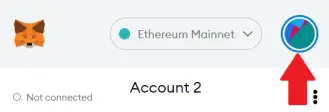
Press "Settings" and scroll down until you find "Networks", click it, scroll down and click on "Add network"
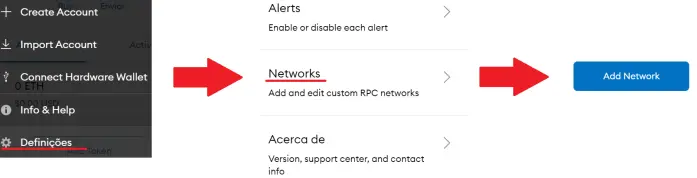
Now, you will need to give some information to metamask about the network that you want to add.
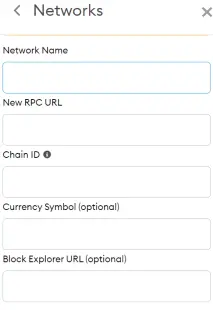
Network Name: Matic Network
New RPC URL: https://rpc-mainnet.maticvigil.com/
Chain ID: 137
Current Symbol: MATIC
Block Explorer: https://explorer.matic.network/
Once you’ve added the the information to the respective fields, click on "Save". You will be directly switched to Matic’s Mainnet, keep in mind that your Matic will be listed as ETH, so, in my case sadly the 95 ETH in display are in reality 95 MATIC.
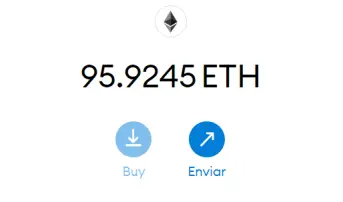
The process to adding MATIC to metamask works for any other custom network, even for test nets, the only things that you will need to change are RPC URL, the Chain ID and the Network Name.
You can expect new blog posts soon, i will make guides explaining some other common crypto things. If you have any topics you would like to see covered, leave me a comment!






