
So, after getting settled in and understanding the basic operation of my Bitaxe Gamma, it was time to start working with the settings to tweak out a better performance. Up to date, my Bitaxe was giving me something just sly of 1 Th. With a bit of tweaking, I'm now getting closer to 1.3 Th in performance, which gets me higher into the possibility of a block band and a bit further away from just being another expensive toy on my shelf humming loudly (no pun intended).
Without any kind of overclocking via code or extensive work, the Bitaxe OS, or Axe OS, does come with some options for changing the settings. The trick is in finding the sweet spot of settings and performance. Ideally, keeping in the 60-65C range of heat is desired. Crank the Th performance as much as possible but don't burn out the machine. With some quick tweaks to ASIC frequency and power input, some easy results are possible. A bit of research zeroed in on getting the frequency up as close to 700 Mhz as possible, and the power setting no more than 1200 core voltage. Those aren't quite possible with the provide settings in the OS, but you can get close. The OS gives a user a menu choice, with a default setting of 525 Mhz and 1150 core voltage. You can raise these up to their limit, and with testing you find your optimum level. After that, if you want more, then it has to be done by script.
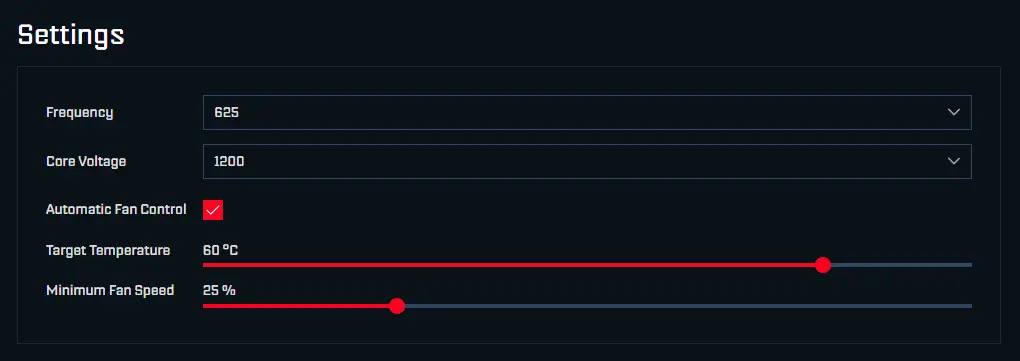
Once you have the new setting dialed in, then you hit the save button at the bottom, and the Bitaxe through your wi-fi adjusted to the new parameters. What you see, over time, is the increase in fan speed, temperature, and most importantly, Th performance increasing. There will always be spikes as the unit works with the demands of hashing and sending or receiving data. Overall, however, you want to focus on seeing an increase in hashing performance without any spikes in temperature that signal an overload.
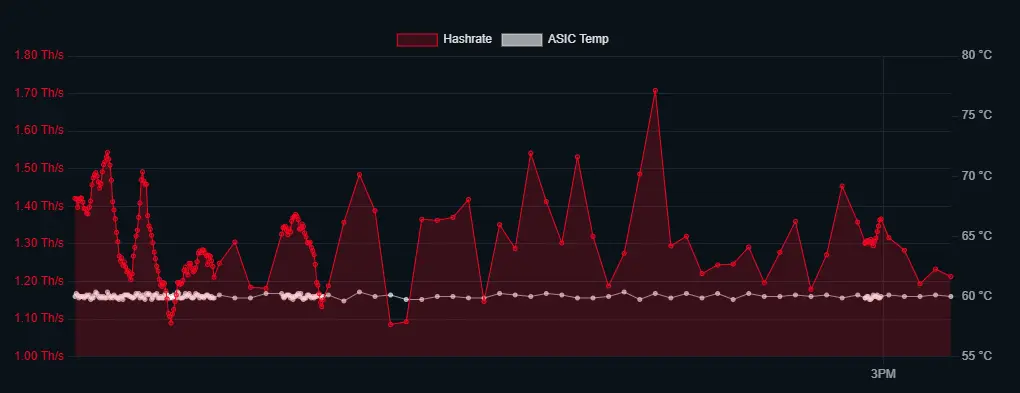
The above might seem complicated, but after you make that first change and see the results, it's all actually pretty simple. Plus, you realize how much more control you have over the process when you experience input/output relationships with the device versus just leaving the Bitaxe in default mode.
Will it make you richer? Hell if I know, but someone else just got a block with these little buggers, so the possibility is there. There are also lots of in-depth articles on how to tweak, what to expect, and what's possible. Read them here if you want to go down the rabbit hole on Bitaxe overclocking.






