
No this is not geology harvesting. It’s an interesting and new crypto mining project on the Solana network. Better known as $ORE token, the platform provides a CPU-style mining approach through a web platform. I’m always game for trying out a new project, and I dived into this one yesterday to see how it works.
Using my old standby laptop which runs an Intel I7 with a 3050 GPU and is heavily cooled with a dual-fan approach, I clicked on the link to the website and got connected within about 5 minutes.
First, you will need a Solana type wallet with some SOL in it to pay for network fees. I used Phantom as it was generally pretty easy to work with while on the $ORE site itself.
Second, this is CPU mining. Your GPU video card won’t do you any good. So, expect to be brutalizing your primary power computing source in any computer you hook up.
So, with the prerequisites taken care of, I clicked on the mining button and got started.
We’re Actually Mining Something!
Once connected after you click the get started button on the home page, you’re going to then be faced with a very simple mining GUI that shows you your wallet connection in the top right corner, your going balance of $ORE, and then the most current activity. You can toggle this feature from global to personal to see your mining in particular.
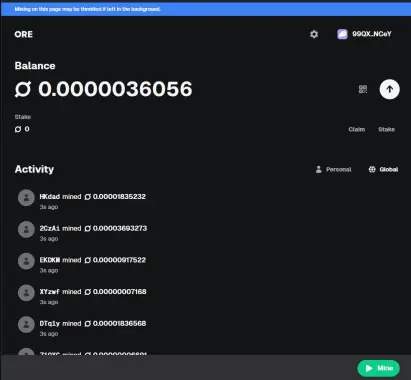
The claim or stake options are, predictably, to either withdraw your mined $ORE to your wallet or stake it for a bigger mining multiplier.
Now the big thing to pay attention to, aside from your CPU temperature, is the notice at the top of the screen. You have to be active on the web page. There’s no 24/7 running in the background and forget-about-it. This is probably intended to avoid bots, but it’s really annoying as you have to monitor the transactions and confirm their activity. That confirmation charges a network fee to your SOL wallet so that the mined $ORE gets put in your mining balance. You can quickly see how irritating this can get if your mining works really well and produces results every few seconds.
So we then get into balancing the workload. Once your are mining, the ribbon at the bottom turns green in the GUI. This shows your active account working on the hashing.

It also provides a link to your mining settings. In the sub-page you can then control how many cores in your CPU are committed, which also has a direct impact on your heat level and your mining rewards frequency. Playing with it a bit, I saw a big drop-off to almost no rewards running just 5 cores (50%). When I was at 10 cores or 11 (my top max), I was getting rewards on average every 45 seconds. However, remember those fees I noted? Each reward was a network charge to my SOL wallet. While it’s only a penny or two, after an hour I had about $0.30 in charges. What was my reward? Not quite the cost/benefit analysis I expected.
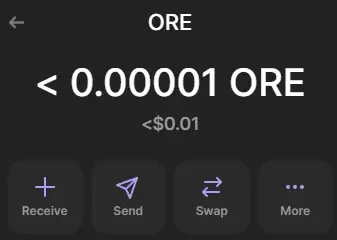
More like $0.01 of $ORE, and I still had another fee transaction to set up the ORE account on my wallet as well as transfer my first earnings. So total loss for an hour was $0.68.
$ORE mining might be interesting for those who are hoping the token will take off. It was pricing at about $100/token yesterday as of this article writing.
CPU Damage a Real Risk
Any kind of CPU mining is going to beat the hell out of your computer, so it’s never a good idea to dedicate your primary or best PC to the job if you want to continue. This chart shows basically the difference of going from 11 cores to 5 and then back to 10 cores. I was easily into some ugly temperature ranges as well, and this was on a gaming laptop designed to take this kind of beating. (Col 1 — average, Col 2 — min, Col 3 max).
My GPU was busy folding to measure $ORE mining with some stress testing at the same time.
There is a LINUX CLI Approach Available
The testing above was done on a Windows PC, but there is a Unix-based approach as well. The details are an article in themselves, which I’ll probably post later when I try that route myself on my Linux PC. You can get the details here though already.
In Summary
So, $ORE is interesting and fun, it gives a user a sense of crypto mining with some real results to your Solana wallet, but long-term it’s not recommended unless you have a throwaway computer to sacrifice on the job. And you’re likely to pay more in SOL right now than what you’ll get for $ORE. But, who knows. It might pay off too.






