When you delete a file in Windows, the file is not deleted.
And many people do not seem to know about this.
When you delete a file in Windows, only the entry that tells the computer where the actual file is saved will be deleted from the master file table.
In this way, the deleted file can still be recovered with data recovery software.
Those deleted files are just sitting on your hard drive until they are overwritten with new data.
Seed Phrases, Passwords, and Other Sensitive Information
If you are a cryptocurrency user, and you have ever had seed phrases or other important information stored on your computer, you may want to make sure that the information is permanently deleted.
⚠️ There is a probability that in some distant future, someone will get your 'old' laptop and try to recover files.
⚠️ If your laptop or computer needs a repair and you take it to a repair shop, you may come across a not-so-honest person who in the process of repairing your device decides to recover deleted information and keep it for future use.
⚠️ If a hacker gets access to your computer, this malicious but technically competent person may try to recover deleted information in the hope of getting access to seed phrases, private keys, passwords, or any other valuable information.
Overwrite Deleted Data To Make It Irrecoverable
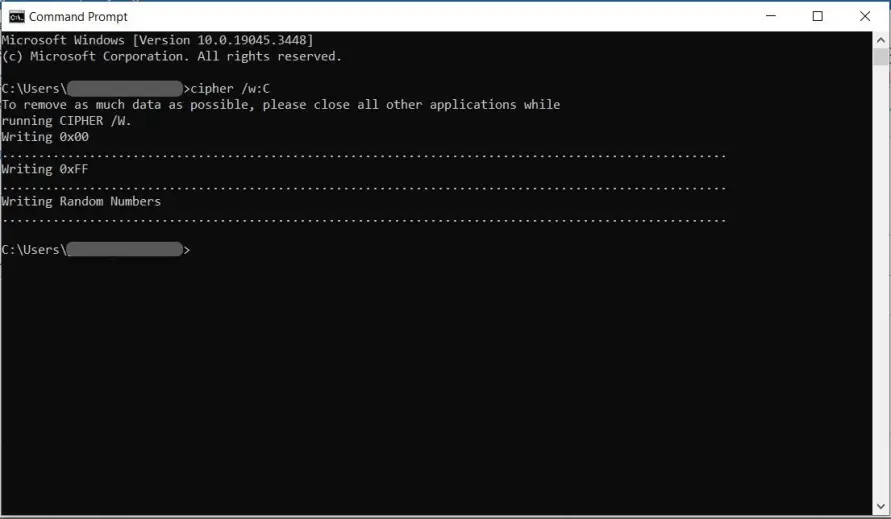
Windows computer users can use the cipher command to make deleted data irrecoverable.
In the picture below, the cipher command is overwriting deleted data in drive C using:
- 0x00: This is the hexadecimal representation of the number zero in computer programming
- 0xFF: This is the hexadecimal representation of the decimal number 255
- Random Numbers
This way, the original data is fully replaced by random data.
If you have never used Cipher, it may be advisable to make a backup copy before using it.
Some of us, use cipher regularly as a good practice. Because we avoid risks, even if the probability of any issue is low and running cipher takes only a few minutes.
👉 For Windows users, to learn more, please have a look at this Cipher Windows Guide.
👉 For MacOS users, there is also a command that can be used to permanently wipe out data. Sorry but as we don't use MacOS, better to do your own research.
👉 For Linex users... well, if you are a Linux user we are sure you already knew about this topic anyway...
Congratulations on completing this 5-minute digital safety power-up.
We hope this 5 minutes read was worth the time and you have learned some valuable information.
For more short but important articles about Crypto and Digital Good Practices, please consider subscribing to our blog.