
Good morning, friends. I hope you are having a lovely day. As usual, today we have a #pixelart practice session, where I continue trying to learn this wonderful art of bits and pixels. I have taken the learning of pixel art calmly and, above all, little by little. The most important thing is to have fun and learn along the way.
Today, it was time to learn how to create simple characters that can be used in video games. I was very scared to reach this part, especially because creating characters can be very difficult in terms of detail and the small workspace. In this case, I tried to ensure that the characters did not exceed a height of 32x32px and, as always, I limited myself to the default color palette of the creation program.

To create characters, I divided my study into four parts and I would like to share them with you in case you are interested:
- References: It is very important to look for references on the internet and observe the composition and proportions in detail. I wanted to be inspired by the sprites of one of my favorite games, the first three Final Fantasy games, and some indie video games.
- Character Base: Before adding details like clothes, accessories, and colors, I need to create the base body, in a single color, with few shadows and the eyes, which will indicate where the character is looking.
- Personality: Choose a personality for the character. This goes beyond the emotions I want to convey; it answers the questions: Who is this character? What does he/she do? Is he/she a hero, a villain, or an NPC? Does he/she have powers? Does he/she stand out in something?
- Observation and Improvement: Observe the final result, look for those details that do not convince you, that you can improve and how. Compare it with your references. Repeat and improve.
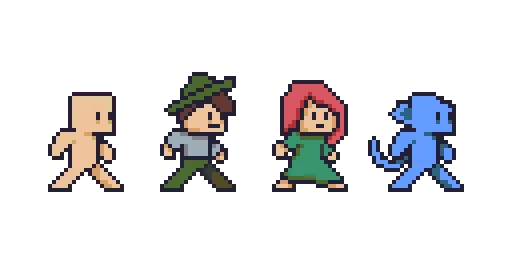
For my exercise, I created two base bodies and drew the following characters: an adventurer, a red mage, an aquatic reptile enemy, a skeleton, and a village boy.
And although the result did not fully convince me and I know there is much room for improvement, I am happy with what I achieved. A few months ago, it was impossible for me to think that I would improve so much and feel comfortable enough with the editing program. I encourage you to try #PixelArt; it can be a relaxing and enriching experience. By taking small steps every day, you will improve and progress.
I sincerely want to thank you for taking the time to read this article. Your support means a lot to me and motivates me to continue sharing content that can be useful and interesting for you. If you found this article useful or enjoyed reading it, I would greatly appreciate your comments. Best wishes.
Translated with DeepL.com (free version)
I apologize if there are any grammatical errors, English is not my native language, I have tried to be as careful as possible.
I regularly create images on Pixabay, which are free of copyright. Access my gallery by clicking here.
All assets, illustrations and banners have been created by me and are original content, unless otherwise specified.






