
Step 1: If you haven't already, Join their Discord and Crew3
- https://discord.gg/uAzDTf7h
- https://crew3.xyz/c/dotshm/invite/Rhbn7Gp-v5exJDn8aUPKE
- https://crew3.xyz/c/shardeumofficial/invite/xhAs81awr0JMw7EuXOC9V
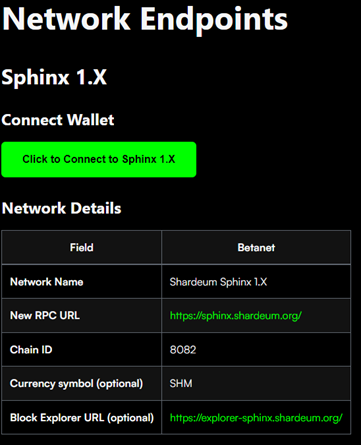
Step 2: Connect your wallet to Shardeum Sphinx 1.x network
- Go to Shardeums docs here and connect your wallet by clicking on connect wallet.
Step 3: Deploying token in OpenZeppelin
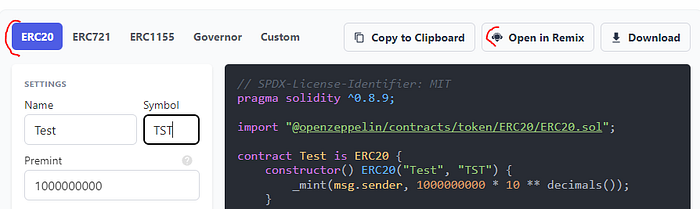
- Go to OpenZeppelin here
- Set a name, a symbol and on the Premint field type 1 000 000 000
- Click on “Open in Remix”
Step 4: In the Remix App
- Click on Compile Contract in the “solidity compiler” tab
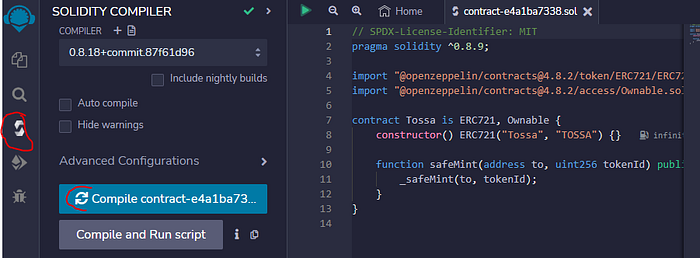
- After compiling to go to the “Deploy and run transaction” tab and in the Environment field switch to “Injected Provider MetaMask”
- In the account field, you should see your MetaMask address if the above step was completed correctly
- Press on deploy

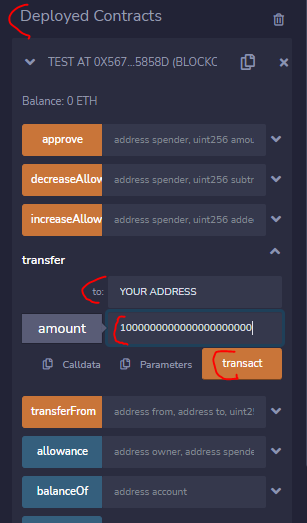
Step 5: Transfer token
- Scroll down on the same tab and click on “deployed contracts” and press on Transfer. On the “To” field add your MM address and on the “amount” field add “1000000000000000000000” (21 zeros) and press on “transact”. Once its successful, you are done.
Step 6: CreateNFT in OpenZeppelin
- Go back to OpenZeppelin here
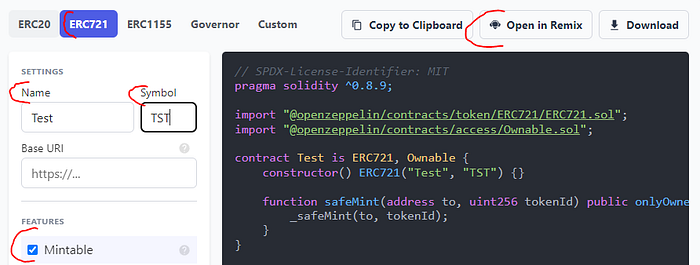
- Set a name, a symbol and on the “Feature” section press on “Mintable”
- Click on “Open in Remix”
Step 7: In the Remix App
- Click on Compile Contract in the “solidity compiler” tab
- After compiling to go to the “Deploy and run transaction” tab and in the Environment field switch to “Injected Provider MetaMask”
- In the account field, you should see your MetaMask address if the above step was completed correctly
- Press on deploy
Step 8: Mint NFT
- Scroll down on the same tab and click on “deployed contracts” and press on SafeMint. On the “To” field add your MM address and on the “TokenID” field add “10" and press on “transact”.

Step 9: Confirm transactions were successful
- Go to explorer-sphinx.shardeum.org and enter your address int he search bar and make sure your transactions were successful.
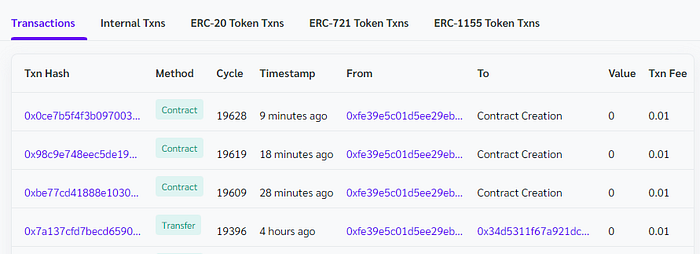
By following the steps above, you will have successfully deployed your token and created an NFT.
If you want more, check out my other airdrop guides. Thanks for reading. Please don´t forget to follow and clap!
Also follow me on Twitter.





