
So I've got some photos here to take you through my disaster of a night so far. So I had this Google Chromebook from 2012 (Samsung XE303C12 is the full title). Broken.
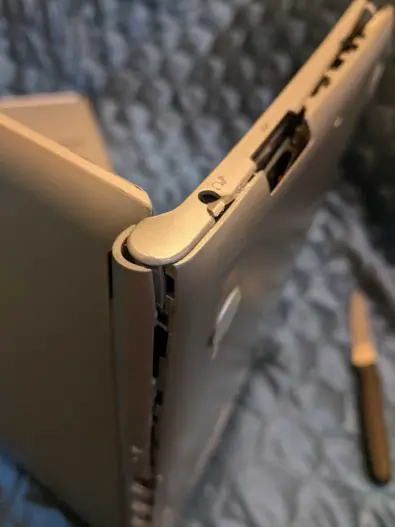
The battery is broken and the swelling of the battery caused the chassis to bend and possibly caused the touchscreen to stop functioning adequately. It was in a state where a repair was maybe possible with a simple battery replacement but you know, not easy. I only really want to dispose of the machine but I can't seem to just put it in the bin. It's not a good idea to put batteries like this in the bin anyway - some of the toxic metals inside (cobalt and nickel I think) are going to leach ultimately into the groundsoil and groundwater. I've no idea what some hypothetical end-of-the-line magical recycling company would do with a battery like this or how it is disposed of carefully. I'm no environmental hero - I own too many NFTs for that.
But I just get a project and I get obsessed especially with disposing of things from my place in a kind of virtuous manner of recycling. I should just give up and bin it now actually. It would do me good. Such obsessions need battling. I have a box of socks and t-shirts and plastic bags and all this stuff that theoretically could be recyled but...
Anyway, why was I trying to break into this broken Chromebook? Oh yes, so I could remove the battery and dispose of the battery sensibly. But I bodged it and went at it too fast. It required some force to get this wedged apart. Look what it did to my kitchen knife! In this picture you can also see the swollen battery.
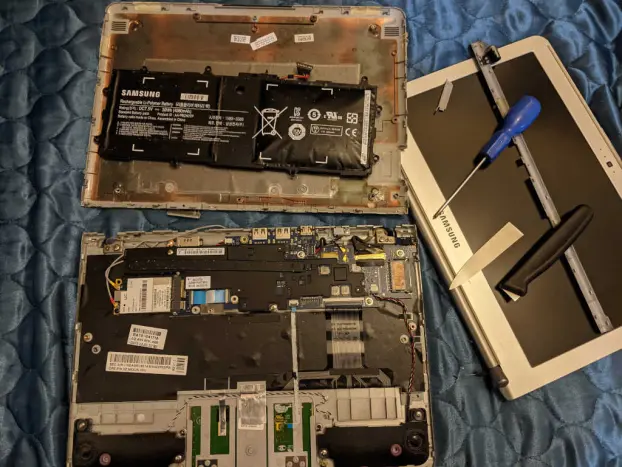
And the colour of the insides of that top panel doesn't look good. Then I watched a YouTube video by a friendly chap called Jamon from PC Monkey and took all the separate parts out of the machine according to his instructions. I am going to put these up on eBay and see if I get a buyer. Here's what I got:
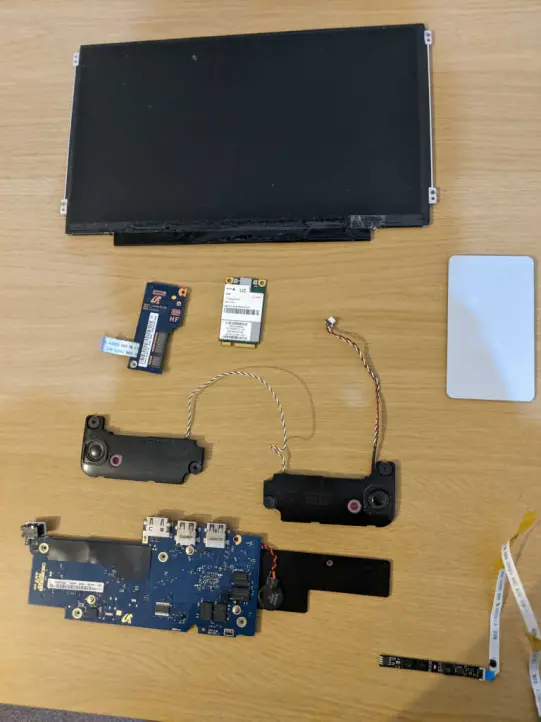
At the top is the LCD screen. Below that is... what are they?... that's a Novatel E396 3G + Mini PCI Express Card to provide 3G mobile internet access and next to it a port for a 3G SIM card. On the right is the touchpad. The two bits of black plastic connected by a wire below are the audio speakers from the Chromebook. Beneath that is the motherboard (possibly slightly broken on the far left) with CMOS battery and the weird papery thing in the bottom right corner of the photo is actually the webcam from the machine and its connected wire.
I did enjoy taking the Chromebook apart following the instructions in the video but really you know what I really should bin this. I can't be wasting my time on such mundane time-wastey affairs. Or (a) research proper recommended environmental disposal options in my local area, (b) package, retail list, and possibly sell or free-gift the working parts, and (c) nice job: set up Linux on another Chromebook I have that still works. And report back on all that to Publish0x readers. OK, that's the new plan. And (d) buy a new kitchen knife.
Brighton beat lowly Grimsby Town 5-0 in the FA Cup quarter-finals. It was an efficient and quietly impressive performance from my favourite football team. I reached the end of Yasunari Kawabata's 'Dandelion', a short and sad, mysterious novel that I really struggled to understand. Then I went Chromebook silly and that was it for the night.






